
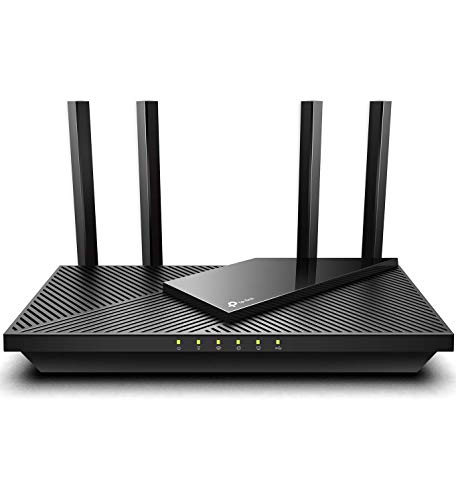
Description
TP-Link AX1800 WiFi 6 Router (Archer AX21) – Features & Prices in Saudi Arabia :
TP-Link AX1800 WiFi 6 Router (Archer AX21) – Dual Band Wireless Internet Router, Gigabit Router, USB port, Works with Alexa – A Certified for Humans Device
Wireless Type
802.11n, 802.11ax, 802.11b, 802.11ac, 802.11g
Number of USB 2.0 Ports
1
Item model number
Archer AX21
Operating System
Internet Explorer 11+, Firefox 12.0+, Chrome 20.0+, Safari 4.0+, or other JavaScript-enabled browserCable or DSL Modem (if needed)Subscription with an internet service provider (for internet access)
Item Weight
1.1 pounds
Product Dimensions
10.28 x 5.3 x 1.61 inches
Item Dimensions LxWxH
10.28 x 5.3 x 1.61 inches
Manufacturer
TP-Link
ASIN
B08H8ZLKKK
Country of Origin
Vietnam
Date First Available
August 28, 2020
Test video – TP-Link AX1800 WiFi 6 Router (Archer AX21) :
Product highlights :
Questions & Answers – TP-Link AX1800 WiFi 6 Router (Archer AX21) :
Technical specifications – TP-Link AX1800 WiFi 6 Router (Archer AX21) :
Brand
TP-Link
Series
Archer AX21
Frequency Band Class
Dual-Band
Wireless Type
802.11n, 802.11ax, 802.11b, 802.11ac, 802.11g
Compatible Devices
Laptop
Frequency
5 GHz
Included Components
Power Adapter, RJ45 Ethernet Cable, Quick Installation Guide
Connectivity Technology
Wi-Fi, USB, Ethernet
Antenna Type
Fixed
Item Weight
1.1 Pounds
Purchase advice :
-
Warranty :
Check the duration of the warranty and also the faults and defects it covers. Is it complete or limited? and What is included in the warranty (parts, repairs or both)?
-
Shipping :
Is delivery offered? And how long does it take to get delivered (Delivery time)
-
Proof of purchase :
Does the shop give you an invoice ?
-
After-sales service :
Do they have an after-sales service to have information about the installation or operation (instructions for use). Also in case of problem, it is the seller who takes charge or you must contact the manufacturer or supplier yourself.
_____________________________
F. S (verified owner) –
Great after a headache of a set up – I always worry about updating technology because as an older individual, technology isn’t my thing. However, after watching videos and looking at reviews I figured surely my husband and I can do this. Just to be safe, though, I asked a former co-worker who worked in my office’s IT department to be “on-call”. So setting the router up with our modem went well, and I downloaded the app on my phone (with my data on) and proceeded to follow the instructions. All went well until the step where I was to get an email to continue with the set up – the email never came. I began to get messages that my server wasn’t recognized. So frustrating! I could have called the company’s tech support but thought I’m not going to wait on-line and deal with the frustration of set up “from afar” – been there and done that. So I called my IT friend who came over and he couldn’t understand why my phone couldn’t receive an email as he could access the router on his phone. He then proceeded to set up the router without the use of the app. We don’t have a lot of technology to deal with but the set up of two phones, a TV, two Alexa devices and a Smart Plug was definitely something I doubt I’d have been able to do without assistance. In hindsight, maybe we just should have rented a router from our cable company – which I’m sure their staff would have installed. At any rate – won’t ever go through this again. As for how the router works – we’ve noticed an improvement in speed, less buffering on our TV, and I’m hoping a higher level of security in general than what our aged router was providing. As I said, like a lot of older people, I’m not a technology guru but can’t understand why these things don’t set up as easily as a computer or new phone that pretty much set up by themselves with minimal effort on your part.
E. A (verified owner) –
Archer A7/AX21 2.4G speed for iPhone 11 from 300M Verizon Fios – Archer A7/AX21 2.4G speed for iPhone 11 from 300M Verizon Fios
S. A (verified owner) –
AX21 is a worthy router to cover a house. – Now I have to say up front I was close to regretting getting the Archer AX21. I had the up and running in about 5-10 minutes but, tor the first 5 days the wifi devices using it were losing their internet connection multiple times a day and the only way to resolve it was to rebooting the modem. I started to think maybe some of the bad reviews here were true.
F. S (verified owner) –
Great after a headache of a set up – I always worry about updating technology because as an older individual, technology isn’t my thing. However, after watching videos and looking at reviews I figured surely my husband and I can do this. Just to be safe, though, I asked a former co-worker who worked in my office’s IT department to be “on-call”. So setting the router up with our modem went well, and I downloaded the app on my phone (with my data on) and proceeded to follow the instructions. All went well until the step where I was to get an email to continue with the set up – the email never came. I began to get messages that my server wasn’t recognized. So frustrating! I could have called the company’s tech support but thought I’m not going to wait on-line and deal with the frustration of set up “from afar” – been there and done that. So I called my IT friend who came over and he couldn’t understand why my phone couldn’t receive an email as he could access the router on his phone. He then proceeded to set up the router without the use of the app. We don’t have a lot of technology to deal with but the set up of two phones, a TV, two Alexa devices and a Smart Plug was definitely something I doubt I’d have been able to do without assistance. In hindsight, maybe we just should have rented a router from our cable company – which I’m sure their staff would have installed. At any rate – won’t ever go through this again. As for how the router works – we’ve noticed an improvement in speed, less buffering on our TV, and I’m hoping a higher level of security in general than what our aged router was providing. As I said, like a lot of older people, I’m not a technology guru but can’t understand why these things don’t set up as easily as a computer or new phone that pretty much set up by themselves with minimal effort on your part.
E. A (verified owner) –
Archer A7/AX21 2.4G speed for iPhone 11 from 300M Verizon Fios – Archer A7/AX21 2.4G speed for iPhone 11 from 300M Verizon Fios
S. A (verified owner) –
AX21 is a worthy router to cover a house. – Now I have to say up front I was close to regretting getting the Archer AX21. I had the up and running in about 5-10 minutes but, tor the first 5 days the wifi devices using it were losing their internet connection multiple times a day and the only way to resolve it was to rebooting the modem. I started to think maybe some of the bad reviews here were true.