
Description
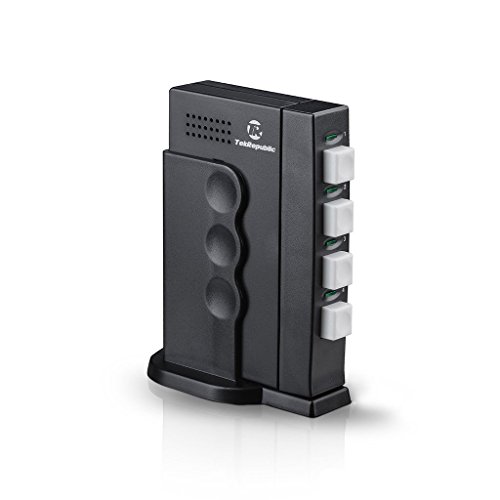
Tek Republic TUS-400 USB Sharing Switch – – Features & Prices in Saudi Arabia :
Tek Republic TUS-400 USB Sharing Switch – 4 Port Manual Switch One USB Device/Hub Between Four Computers
Product Dimensions
2.82 x 0.82 x 4.62 inches
Item Weight
7.1 ounces
Manufacturer
Tek Republic
ASIN
B00FEM69KE
Item model number
TUS-400
Is Discontinued By Manufacturer
No
Date First Available
September 24, 2013
Test video – Tek Republic TUS-400 USB Sharing Switch – :
Product highlights :
Questions & Answers – Tek Republic TUS-400 USB Sharing Switch – :
Technical specifications – Tek Republic TUS-400 USB Sharing Switch – :
Operation Mode
Manual
Connector Type
Usb 2.0
Brand
Tek Republic
Switch Type
Touch Switch
Item Dimensions LxWxH
2.82 x 0.82 x 4.62 inches
Mounting Type
Plug-In Mount
International Protection Rating
IP54
Unit Count
1 Count
Purchase advice :
-
Warranty :
Check the duration of the warranty and also the faults and defects it covers. Is it complete or limited? and What is included in the warranty (parts, repairs or both)?
-
Shipping :
Is delivery offered? And how long does it take to get delivered (Delivery time)
-
Proof of purchase :
Does the shop give you an invoice ?
-
After-sales service :
Do they have an after-sales service to have information about the installation or operation (instructions for use). Also in case of problem, it is the seller who takes charge or you must contact the manufacturer or supplier yourself.
_____________________________
L. H (verified owner) –
KVM without the monitor – This is like a KVM without a monitor. My monitor supports three input, so I don’t need a full KVM. I use this switch to connect between my main computer, server, and laptop. Between Windows 7, Server 2012, and OSX, they switch just fine. I do not need to do any shutting down. They are sharing a gaming mouse and a mechanical keyboard through a USB HUB that is attached to this switch. The USB HUB is powered. As far as the computers are concern, it is like plugging and unplugging the USB devices every time I make a switch. The switch itself is powerless. When you switch to a computer, the LED indicator on the switch will only turn on if your computer is on. The button on the switch also makes a nice click. Be aware that this is a switch, so only one computer can use the attached usb devices at a time. This switch is very good for occasional usage. You might not like switching around every minute.
G. S (verified owner) –
IMPORTANT — Only as good as the USB hub you attach to it!! – This is an updated review: After owning the switch for less than a month, I wrote a bad review. But then I discovered the real problem.
J. O (verified owner) –
GOOD PRODUCT – Easy to set-up. Helps in using two different computers in getting the print done with one printer. Glad I purchased the Tek Republic TUS-400 for the home.
O. T (verified owner) –
Works, but finicky – This item did exactly what I need it to do… for about 3 months. I used it to share a USB receiver for a cordless mouse between 2 PCs. It was a cheap alternative to add USB functionality to my ps/2 kvm switch. I would have given it 5 stars. But, in the middle of a hectic day, the buttons temporarily stopped functioning and would not stay depressed. After taking it apart (on a more calm day) and fiddling with the spring, it seems to work for the time being.
G. D (verified owner) –
Updated…started failing after a few months… – I wasn’t looking for a full blown KVM switch…just a way to share a keyboard and mouse through a usb port…and the Tek Republic switch fit that bill perfectly. I have had the switch now for a while and I am absolutely pleased with it. It is aesthetically pleasing and has been a perfect performer, everything I could hope for. If you need a usb switch…look n further.
P. T (verified owner) –
Works ok for current setup, 1 kb, 2 PCs (4 port version) – It seems to be working for me, after a bit of fiddling (which may not have been the fault of this switch).
T. G (verified owner) –
5 Star Performance, Reliability ?? – I would have given this a 5 star rating, but the first unit I received had a defective port. I returned the unit and ordered another one. So far the second one has worked without any problems. It has allowed me to hookup four computers to my one and only printer. It is easy to setup and is truly plug and play with windows 7. About the only slight negative (except for the bad first unit) is that the wires tend to pull on it making it a little unstable with the attached small base. As for long term reliability, it is impossible for me to say at this point. If I have trouble with it in the future I will update this review.
P. T (verified owner) –
Works ok for current setup, 1 kb, 2 PCs (4 port version) – It seems to be working for me, after a bit of fiddling (which may not have been the fault of this switch).
K. J (verified owner) –
Does not switch a USB Hub. – The device arrived in good condition as expected but does not function as advertised. I can switch a mouse OR a Keyboard but NOT a USB hub. I expected the device and I believe the product information implies that a USB hub could be switched between two PCs which is excaclty what I wanted to do. I planned to switch a keyboard and mouse, connected to a USB hub with this selector product between two PCs.
G. D (verified owner) –
Updated…started failing after a few months… – I wasn’t looking for a full blown KVM switch…just a way to share a keyboard and mouse through a usb port…and the Tek Republic switch fit that bill perfectly. I have had the switch now for a while and I am absolutely pleased with it. It is aesthetically pleasing and has been a perfect performer, everything I could hope for. If you need a usb switch…look n further.
O. T (verified owner) –
Works, but finicky – This item did exactly what I need it to do… for about 3 months. I used it to share a USB receiver for a cordless mouse between 2 PCs. It was a cheap alternative to add USB functionality to my ps/2 kvm switch. I would have given it 5 stars. But, in the middle of a hectic day, the buttons temporarily stopped functioning and would not stay depressed. After taking it apart (on a more calm day) and fiddling with the spring, it seems to work for the time being.
T. G (verified owner) –
5 Star Performance, Reliability ?? – I would have given this a 5 star rating, but the first unit I received had a defective port. I returned the unit and ordered another one. So far the second one has worked without any problems. It has allowed me to hookup four computers to my one and only printer. It is easy to setup and is truly plug and play with windows 7. About the only slight negative (except for the bad first unit) is that the wires tend to pull on it making it a little unstable with the attached small base. As for long term reliability, it is impossible for me to say at this point. If I have trouble with it in the future I will update this review.
L. H (verified owner) –
KVM without the monitor – This is like a KVM without a monitor. My monitor supports three input, so I don’t need a full KVM. I use this switch to connect between my main computer, server, and laptop. Between Windows 7, Server 2012, and OSX, they switch just fine. I do not need to do any shutting down. They are sharing a gaming mouse and a mechanical keyboard through a USB HUB that is attached to this switch. The USB HUB is powered. As far as the computers are concern, it is like plugging and unplugging the USB devices every time I make a switch. The switch itself is powerless. When you switch to a computer, the LED indicator on the switch will only turn on if your computer is on. The button on the switch also makes a nice click. Be aware that this is a switch, so only one computer can use the attached usb devices at a time. This switch is very good for occasional usage. You might not like switching around every minute.
G. S (verified owner) –
IMPORTANT — Only as good as the USB hub you attach to it!! – This is an updated review: After owning the switch for less than a month, I wrote a bad review. But then I discovered the real problem.
J. O (verified owner) –
GOOD PRODUCT – Easy to set-up. Helps in using two different computers in getting the print done with one printer. Glad I purchased the Tek Republic TUS-400 for the home.
K. J (verified owner) –
Does not switch a USB Hub. – The device arrived in good condition as expected but does not function as advertised. I can switch a mouse OR a Keyboard but NOT a USB hub. I expected the device and I believe the product information implies that a USB hub could be switched between two PCs which is excaclty what I wanted to do. I planned to switch a keyboard and mouse, connected to a USB hub with this selector product between two PCs.