
Description
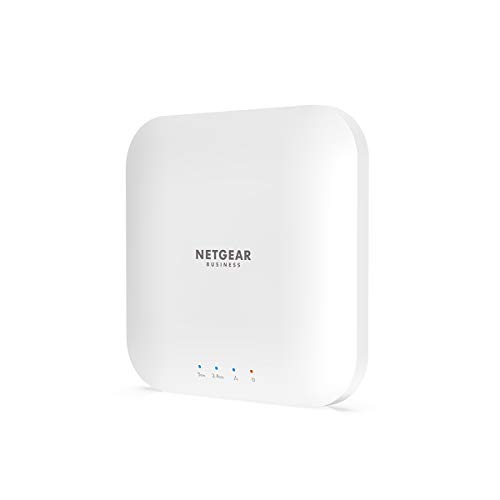
NETGEAR Wireless Access Point (WAX214PA) – WiFi – Features & Prices in Saudi Arabia :
NETGEAR Wireless Access Point (WAX214PA) – WiFi 6 Dual-Band AX1800 Speed | 1 x 1G Ethernet PoE Port | Up to 128 Devices | 802.11ax | WPA3 Security | MU-MIMO | with Power Adapter
Product Dimensions
8.5 x 8.2 x 3.4 inches
Item Weight
1.05 pounds
ASIN
B08PQ7HZ6D
Item model number
WAX214PA-100NAS
Date First Available
December 9, 2020
Manufacturer
Netgear
Country of Origin
Taiwan
Test video – NETGEAR Wireless Access Point (WAX214PA) – WiFi :
Product highlights :
Questions & Answers – NETGEAR Wireless Access Point (WAX214PA) – WiFi :
Technical specifications – NETGEAR Wireless Access Point (WAX214PA) – WiFi :
Brand
NETGEAR
Hardware Interface
Ethernet
Operating System
Mac
Color
white
Compatible Devices
Laptop, Desktop
Item Dimensions LxWxH
8.5 x 8.2 x 3.4 inches
Data Link Protocol
Ethernet
Item Weight
1.05 Pounds
Purchase advice :
-
Warranty :
Check the duration of the warranty and also the faults and defects it covers. Is it complete or limited? and What is included in the warranty (parts, repairs or both)?
-
Shipping :
Is delivery offered? And how long does it take to get delivered (Delivery time)
-
Proof of purchase :
Does the shop give you an invoice ?
-
After-sales service :
Do they have an after-sales service to have information about the installation or operation (instructions for use). Also in case of problem, it is the seller who takes charge or you must contact the manufacturer or supplier yourself.
_____________________________
I. H (verified owner) –
Simply superb – I bought this to replace a WiFi 5 router. It was super easy to set up, but I needed help to create a couple of VLANs for segmentation that would work with my Firewalla Gold firewall router. Netgear’s tech support got me through it by logging on to my system. The tech person explained what they were doing, so I also learned something. Everything is running like a dream. This is a great device and a great company. P.S. Unless you’re going to run a long line of CAT cable, just buy the AC adapter, not a POE injector.
F. H (verified owner) –
Very good product overall. Except new firmware issue. – After installing the latest firmware, the page that shows the client connections to the wireless no longer worked and would not display anything. I have multiples and they all did the same thing. I was able to downgrade the firmware and the connections page started working again. I alerted Netgear, but there was no resolution for the new firmware issue at the time I contacted them. So I just kept them downgraded for now. Hopefully more people will complain and ask them to fix the issue soon.
O. K (verified owner) –
Inexpensive WAP, with decent features (see details). Conditionally Recommended – I needed to install a couple wireless access points in my retail storefront. The purpose was pretty simple… the AT&T combo router/WAP was sitting at front door, but it didn’t have the reach to get to the back stockroom. The plan was to move the router to the back, where it would be local to the fiber-to-copper media converter, and re-use the CAT5 drop to the front for one of the NETGEAR WAX214 Wireless Access Points. Then, I’d put another near the stockroom, and then disable the wifi capability on the router. Easy, right?
G. N (verified owner) –
Great for a home – Great value for money, good range, good speed.
N. G (verified owner) –
get it if it’s on sale – This is not a bad AP. The wifi radio itself is pretty good. The software leaves a bit to be desired. It looks to be a modified version of OpenWRT/luci. initial setup can be somewhat painful. It’s supposed to launch the setup portal on first connection to the management SSID but depending on what web browser you use, this may or may not work out the box. If it doesn’t connect immediately to the setup portal, try a different OS/web browser for the initial connect. There is no central management for this – if you have multiple WAX14 APs you will have to manage them separately through their web interfaces. Security-wise, the web interface does support https and you can restrict the management interface to a specific VLAN if so desired. Note that that VLAN has to be untagged, otherwise it won’t work. Finally, you can’t change the admin username – it’s fixed to “admin”.
G. N (verified owner) –
Great for a home – Great value for money, good range, good speed.
T. E (verified owner) –
Works as Expected – Unit easy to install and set up. Has been working well (home use) for one week with no issues.
M. R (verified owner) –
By Far the Best Access Point for the Money – After trying multiple access points, I found the Netgear WAX214 the best bang for the buck and the easiest to set-up. Both its 2.4G and 5G speeds are as fast as any I tested, and it has many customizing options. I found the fastest way to initially set it up was to enter its internal IP address in a browser. I replaced all my AP, some costing three times as much, with the WAX214.
N. G (verified owner) –
get it if it’s on sale – This is not a bad AP. The wifi radio itself is pretty good. The software leaves a bit to be desired. It looks to be a modified version of OpenWRT/luci. initial setup can be somewhat painful. It’s supposed to launch the setup portal on first connection to the management SSID but depending on what web browser you use, this may or may not work out the box. If it doesn’t connect immediately to the setup portal, try a different OS/web browser for the initial connect. There is no central management for this – if you have multiple WAX14 APs you will have to manage them separately through their web interfaces. Security-wise, the web interface does support https and you can restrict the management interface to a specific VLAN if so desired. Note that that VLAN has to be untagged, otherwise it won’t work. Finally, you can’t change the admin username – it’s fixed to “admin”.
T. E (verified owner) –
Works as Expected – Unit easy to install and set up. Has been working well (home use) for one week with no issues.
M. R (verified owner) –
By Far the Best Access Point for the Money – After trying multiple access points, I found the Netgear WAX214 the best bang for the buck and the easiest to set-up. Both its 2.4G and 5G speeds are as fast as any I tested, and it has many customizing options. I found the fastest way to initially set it up was to enter its internal IP address in a browser. I replaced all my AP, some costing three times as much, with the WAX214.
R. F (verified owner) –
Great standalone WiFi access point – but it is not cloud manageable – Love Netgear access points. I install them professionally for small businesses and schools all the time. Was able to get these quickly and good price, but be aware that if you plan to get two or more of these to mesh and manage with a cloud license, this is not the product for you. That said, I installed 5 of these at a small business and manually configured each one in less than 30 minutes. While there is no cloud-centric means of management, they do perform exceptionally well in SMB environments and have automatic channel switching as well as automatic 5GHz routing if you configure the both SSIDs with the same password.
O. K (verified owner) –
Inexpensive WAP, with decent features (see details). Conditionally Recommended – I needed to install a couple wireless access points in my retail storefront. The purpose was pretty simple… the AT&T combo router/WAP was sitting at front door, but it didn’t have the reach to get to the back stockroom. The plan was to move the router to the back, where it would be local to the fiber-to-copper media converter, and re-use the CAT5 drop to the front for one of the NETGEAR WAX214 Wireless Access Points. Then, I’d put another near the stockroom, and then disable the wifi capability on the router. Easy, right?
F. H (verified owner) –
Very good product overall. Except new firmware issue. – After installing the latest firmware, the page that shows the client connections to the wireless no longer worked and would not display anything. I have multiples and they all did the same thing. I was able to downgrade the firmware and the connections page started working again. I alerted Netgear, but there was no resolution for the new firmware issue at the time I contacted them. So I just kept them downgraded for now. Hopefully more people will complain and ask them to fix the issue soon.
R. F (verified owner) –
Great standalone WiFi access point – but it is not cloud manageable – Love Netgear access points. I install them professionally for small businesses and schools all the time. Was able to get these quickly and good price, but be aware that if you plan to get two or more of these to mesh and manage with a cloud license, this is not the product for you. That said, I installed 5 of these at a small business and manually configured each one in less than 30 minutes. While there is no cloud-centric means of management, they do perform exceptionally well in SMB environments and have automatic channel switching as well as automatic 5GHz routing if you configure the both SSIDs with the same password.
I. H (verified owner) –
Simply superb – I bought this to replace a WiFi 5 router. It was super easy to set up, but I needed help to create a couple of VLANs for segmentation that would work with my Firewalla Gold firewall router. Netgear’s tech support got me through it by logging on to my system. The tech person explained what they were doing, so I also learned something. Everything is running like a dream. This is a great device and a great company. P.S. Unless you’re going to run a long line of CAT cable, just buy the AC adapter, not a POE injector.