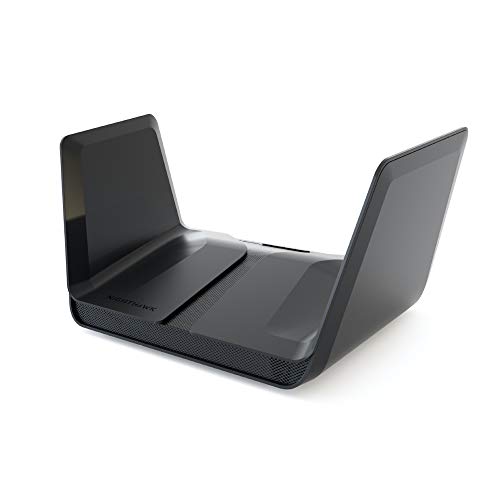
Test video – NETGEAR Nighthawk 8-Stream AX8 Wifi 6 Router :
https://www.youtube.com/watch?v=yhmIDaNMwvQ
Product highlights :
WIFI 6 – STREAM EVERYTHING AT EPIC SPEED: Simultaneously stream uninterrupted movies, games, video calls or download/transfer files at 6Gbps WiFi speed; Works with existing and new WiFi 6 devices like iPhone 11, Galaxy Note 10 and Galaxy S10.
WORKS WITH ALL INTERNET PROVIDERS: Replace your existing WiFi Router (separate modem or gateway required); Compatible with any Internet Service Provider up to 2Gbps including cable, satellite, fiber, DSL and more.
EASY TO SET-UP AND MANAGE: Connects to your existing cable modem and sets up and customizes in minutes with the Nighthawk app – easily manage your WiFi settings at the device and network level, test your Internet speed, view speed history and monitor data usage.
USB CONNECTIONS: Share a storage drive with any connected device and create a personal cloud storage to access from anywhere using the 2 x 3.0 USB ports.
NETGEAR ARMOR POWERED BY BITDEFENDER: The world’s leading cybersecurity protects all your home devices from virus, malware, and data theft with a 30-day free trial.
SMART PARENTAL CONTROLS: Pause or schedule device internet access, view site history usage, filter websites, set online time limits and more for $4.99/month with a 30-day free trial.
➕ What is the price of NETGEAR Nighthawk 8-Stream AX8 Wifi 6 Router in Saudi Arabia ?
The price of NETGEAR Nighthawk 8-Stream AX8 Wifi 6 Router in-store is 2020 SAR VAT.
➕ When NETGEAR Nighthawk 8-Stream AX8 Wifi 6 Router was released ?
The release date was November 6, 2018.
➕ What is the price of NETGEAR Nighthawk 8-Stream AX8 Wifi 6 Router cheap used ?
The price of NETGEAR Nighthawk 8-Stream AX8 Wifi 6 Router used is 1410 SAR VAT.
➕ What are the main characteristics of NETGEAR Nighthawk 8-Stream AX8 Wifi 6 Router ?
Special specifications :
WIFI 6 – STREAM EVERYTHING AT EPIC SPEED: Simultaneously stream uninterrupted movies, games, video calls or download/transfer files at 6Gbps WiFi speed; Works with existing and new WiFi 6 devices like iPhone 11, Galaxy Note 10 and Galaxy S10.
➕ Is it interesting to buy this product ?
The best people who can answer you are customers who have already bought and tested this product (See Customer Reviews). This product is rated 4 / 5 on Amazon.
➕ Where to buy NETGEAR Nighthawk 8-Stream AX8 Wifi 6 Router in Saudi Arabia ?
Check the duration of the warranty and also the faults and defects it covers. Is it complete or limited? and What is included in the warranty (parts, repairs or both)?
Shipping :
Is delivery offered? And how long does it take to get delivered (Delivery time)
Proof of purchase :
Does the shop give you an invoice ?
After-sales service :
Do they have an after-sales service to have information about the installation or operation (instructions for use). Also in case of problem, it is the seller who takes charge or you must contact the manufacturer or supplier yourself.
_____________________________
8 reviews for NETGEAR Nighthawk 8-Stream AX8 Wifi 6 Router
Rated 4 out of 5
C. N (verified owner)–
Performed as expected. – First impressions of the new NETGEAR Nighthawk AX8 8-Stream AX6000 Wi-Fi Router. Previous situation: AT&T DSL service over landline with an old Speedstream modem. My devices were hardwired (via CAT5 and a Linksys 10/100 switch model EZXS55W) and others Wi-Fi to a Linksys WRT1900 AC router. The AT&T service provided a max of 6 Mbps download and .8 Mbps upload. AT&T did not provide any better service to the area so I needed to go with another (Spectrum) provider. This new service was for 100 Mbps download and 5-10 Mbps upload. Considerably better than what I had. I decided that I would go all out and try to get the maximum benefit from the service and a little future proofing. I had purchased a Netgear CM600 modem instead of the supplied modem and router from Spectrum. I also ordered a new switch (Netgear 8 port 10/100/1000 model GS108) for my wired devices. I also pre-ordered the NETGEAR Nighthawk AX8 8-Stream AX6000 Wi-Fi Router. My house is around 1700 sq. ft. with a finished basement. Most of the equipment is in the basement. The previous modem/router was in the basement. It covered the whole house. However, it did not cover any area outside of the house such as the garage and outside the front door. I particularly wanted the range to go out the front door to potentially add security cameras without having to use Wi-Fi extenders. I was lucky enough to be able to get the Spectrum cable fished directly from the outside box to the same location as my previous modem/router. I hooked up the Netgear modem – all good. I connected a PC directly to the modem (CAT 5) and speed tested at 118 Mbps download and 11 Mbps upload. Since I did not have the new router yet, I just reconnected the Linksys WRT1900. The testing PC was then connected to the Linksys WRT1900. It still speed tested at the same. However, other PCs hardwired to a switch and then to the Linksys WRT1900 speed tested around the 60 Mbps download and 9 Mbps upload. Mobile units tested anywhere from 60-90 Mpbs and 11 Mbps upload. I figured the old switch had a lot to do with the hardwired slower speed. When the new switch came in, I installed it and that cleared up the speed problem (now 118 Mbps download and 11 Mbps upload) on the hardwired PCs. Once the Nighthawk AX8 came in, I replaced the Linksys router. Speed on the mobiles tested in at 117 Mbps download and 11.94 upload. The overall range of the Wi-Fi increased. It now covered the whole garage and only started to decrease in strength after moving about 15 ft. from the front door. As for specifics about the Nighthawk AX8, the unit is stylish. May remind you of something that would come out of a Star Wars or Star Trek show. If you are looking for an easy set up of a typical home network, it is very simple. Just follow the instructions in the provided Quick Start guide. If you need more advanced customization, you need to go to the Netgear support site and download the manual for this unit. The only instructions included in the box is the Startup guide and a note about upgrading the firmware. Unit comes with a power supply, network cable and startup guide. The “wings” (antenna units) were folder flat in the box. They simply lift up and then push the wings down to snap into place. Connect the network cable to the modem. Power up the device. I downloaded the app on my phone. The app connects automatically when it is started. Once connected the app prompted to upgrade the firmware. I walked through the rest of the setup on my phone app. Piece of cake. Having been able to max out the provided service from Spectrum on all my devices was icing on the cake. The extended coverage was even more so. I have seen several comments about the fan running on this unit. It did NOT start running when the unit was powered on. It has not yet turned on so I cannot comment if it has a noise issue or not. Firmware level is at 1.0.1.40_1.0.22. The unit seems to be well made and sturdy. There were two caveats to the good experience. Both are concerning the USB connections on the back of the unit. The first is that the USB connections on the back of the unit are too close to each other. I usually, put in two 128 GB sticks in the Linksys with no problems. The ones I used were about 13/16” wide. Way too wide for the Netgear. I would say if you have USBs to use that are wider than 5/8” (maybe 11/16”) two will not fit. My solution will be to see if I can find a couple of short USB extensions with a narrow end. Purely a poor design issue. The other caveat is that there is no information included concerning how to use and configure the USB connections. You must download the manual to get any initial setup and network mapping information. Otherwise, I would have given the unit a 5 star on “Easy to Use”. It is a little pricey at $399. However, I believe it will take me into future a good way and support any speed and protocol changes for a while. As long as there are no immediate performance issues that come up, I would readily recommend it.
K. F (verified owner)–
– Très bon routeur je recommande
Rated 4 out of 5
M. I (verified owner)–
High-tech and easy to use, decent signal, weird hardware – NOTE: Since Amazon lists the AX8 and AX12 as one product, this review covers both in one. This may help you for comparison.
K. F (verified owner)–
– Très bon routeur je recommande
Rated 4 out of 5
C. N (verified owner)–
Performed as expected. – First impressions of the new NETGEAR Nighthawk AX8 8-Stream AX6000 Wi-Fi Router. Previous situation: AT&T DSL service over landline with an old Speedstream modem. My devices were hardwired (via CAT5 and a Linksys 10/100 switch model EZXS55W) and others Wi-Fi to a Linksys WRT1900 AC router. The AT&T service provided a max of 6 Mbps download and .8 Mbps upload. AT&T did not provide any better service to the area so I needed to go with another (Spectrum) provider. This new service was for 100 Mbps download and 5-10 Mbps upload. Considerably better than what I had. I decided that I would go all out and try to get the maximum benefit from the service and a little future proofing. I had purchased a Netgear CM600 modem instead of the supplied modem and router from Spectrum. I also ordered a new switch (Netgear 8 port 10/100/1000 model GS108) for my wired devices. I also pre-ordered the NETGEAR Nighthawk AX8 8-Stream AX6000 Wi-Fi Router. My house is around 1700 sq. ft. with a finished basement. Most of the equipment is in the basement. The previous modem/router was in the basement. It covered the whole house. However, it did not cover any area outside of the house such as the garage and outside the front door. I particularly wanted the range to go out the front door to potentially add security cameras without having to use Wi-Fi extenders. I was lucky enough to be able to get the Spectrum cable fished directly from the outside box to the same location as my previous modem/router. I hooked up the Netgear modem – all good. I connected a PC directly to the modem (CAT 5) and speed tested at 118 Mbps download and 11 Mbps upload. Since I did not have the new router yet, I just reconnected the Linksys WRT1900. The testing PC was then connected to the Linksys WRT1900. It still speed tested at the same. However, other PCs hardwired to a switch and then to the Linksys WRT1900 speed tested around the 60 Mbps download and 9 Mbps upload. Mobile units tested anywhere from 60-90 Mpbs and 11 Mbps upload. I figured the old switch had a lot to do with the hardwired slower speed. When the new switch came in, I installed it and that cleared up the speed problem (now 118 Mbps download and 11 Mbps upload) on the hardwired PCs. Once the Nighthawk AX8 came in, I replaced the Linksys router. Speed on the mobiles tested in at 117 Mbps download and 11.94 upload. The overall range of the Wi-Fi increased. It now covered the whole garage and only started to decrease in strength after moving about 15 ft. from the front door. As for specifics about the Nighthawk AX8, the unit is stylish. May remind you of something that would come out of a Star Wars or Star Trek show. If you are looking for an easy set up of a typical home network, it is very simple. Just follow the instructions in the provided Quick Start guide. If you need more advanced customization, you need to go to the Netgear support site and download the manual for this unit. The only instructions included in the box is the Startup guide and a note about upgrading the firmware. Unit comes with a power supply, network cable and startup guide. The “wings” (antenna units) were folder flat in the box. They simply lift up and then push the wings down to snap into place. Connect the network cable to the modem. Power up the device. I downloaded the app on my phone. The app connects automatically when it is started. Once connected the app prompted to upgrade the firmware. I walked through the rest of the setup on my phone app. Piece of cake. Having been able to max out the provided service from Spectrum on all my devices was icing on the cake. The extended coverage was even more so. I have seen several comments about the fan running on this unit. It did NOT start running when the unit was powered on. It has not yet turned on so I cannot comment if it has a noise issue or not. Firmware level is at 1.0.1.40_1.0.22. The unit seems to be well made and sturdy. There were two caveats to the good experience. Both are concerning the USB connections on the back of the unit. The first is that the USB connections on the back of the unit are too close to each other. I usually, put in two 128 GB sticks in the Linksys with no problems. The ones I used were about 13/16” wide. Way too wide for the Netgear. I would say if you have USBs to use that are wider than 5/8” (maybe 11/16”) two will not fit. My solution will be to see if I can find a couple of short USB extensions with a narrow end. Purely a poor design issue. The other caveat is that there is no information included concerning how to use and configure the USB connections. You must download the manual to get any initial setup and network mapping information. Otherwise, I would have given the unit a 5 star on “Easy to Use”. It is a little pricey at $399. However, I believe it will take me into future a good way and support any speed and protocol changes for a while. As long as there are no immediate performance issues that come up, I would readily recommend it.
B. M (verified owner)–
– No me agrada que en repetidas ocasiones se cae las redes de 2.4 y 5Mhz aun cuando se cambio de canal y realizo troubleshooting y se auto actulizó el firmware.
Rated 4 out of 5
M. I (verified owner)–
High-tech and easy to use, decent signal, weird hardware – NOTE: Since Amazon lists the AX8 and AX12 as one product, this review covers both in one. This may help you for comparison.
B. M (verified owner)–
– No me agrada que en repetidas ocasiones se cae las redes de 2.4 y 5Mhz aun cuando se cambio de canal y realizo troubleshooting y se auto actulizó el firmware.


C. N (verified owner) –
Performed as expected. – First impressions of the new NETGEAR Nighthawk AX8 8-Stream AX6000 Wi-Fi Router. Previous situation: AT&T DSL service over landline with an old Speedstream modem. My devices were hardwired (via CAT5 and a Linksys 10/100 switch model EZXS55W) and others Wi-Fi to a Linksys WRT1900 AC router. The AT&T service provided a max of 6 Mbps download and .8 Mbps upload. AT&T did not provide any better service to the area so I needed to go with another (Spectrum) provider. This new service was for 100 Mbps download and 5-10 Mbps upload. Considerably better than what I had. I decided that I would go all out and try to get the maximum benefit from the service and a little future proofing. I had purchased a Netgear CM600 modem instead of the supplied modem and router from Spectrum. I also ordered a new switch (Netgear 8 port 10/100/1000 model GS108) for my wired devices. I also pre-ordered the NETGEAR Nighthawk AX8 8-Stream AX6000 Wi-Fi Router. My house is around 1700 sq. ft. with a finished basement. Most of the equipment is in the basement. The previous modem/router was in the basement. It covered the whole house. However, it did not cover any area outside of the house such as the garage and outside the front door. I particularly wanted the range to go out the front door to potentially add security cameras without having to use Wi-Fi extenders. I was lucky enough to be able to get the Spectrum cable fished directly from the outside box to the same location as my previous modem/router. I hooked up the Netgear modem – all good. I connected a PC directly to the modem (CAT 5) and speed tested at 118 Mbps download and 11 Mbps upload. Since I did not have the new router yet, I just reconnected the Linksys WRT1900. The testing PC was then connected to the Linksys WRT1900. It still speed tested at the same. However, other PCs hardwired to a switch and then to the Linksys WRT1900 speed tested around the 60 Mbps download and 9 Mbps upload. Mobile units tested anywhere from 60-90 Mpbs and 11 Mbps upload. I figured the old switch had a lot to do with the hardwired slower speed. When the new switch came in, I installed it and that cleared up the speed problem (now 118 Mbps download and 11 Mbps upload) on the hardwired PCs. Once the Nighthawk AX8 came in, I replaced the Linksys router. Speed on the mobiles tested in at 117 Mbps download and 11.94 upload. The overall range of the Wi-Fi increased. It now covered the whole garage and only started to decrease in strength after moving about 15 ft. from the front door. As for specifics about the Nighthawk AX8, the unit is stylish. May remind you of something that would come out of a Star Wars or Star Trek show. If you are looking for an easy set up of a typical home network, it is very simple. Just follow the instructions in the provided Quick Start guide. If you need more advanced customization, you need to go to the Netgear support site and download the manual for this unit. The only instructions included in the box is the Startup guide and a note about upgrading the firmware. Unit comes with a power supply, network cable and startup guide. The “wings” (antenna units) were folder flat in the box. They simply lift up and then push the wings down to snap into place. Connect the network cable to the modem. Power up the device. I downloaded the app on my phone. The app connects automatically when it is started. Once connected the app prompted to upgrade the firmware. I walked through the rest of the setup on my phone app. Piece of cake. Having been able to max out the provided service from Spectrum on all my devices was icing on the cake. The extended coverage was even more so. I have seen several comments about the fan running on this unit. It did NOT start running when the unit was powered on. It has not yet turned on so I cannot comment if it has a noise issue or not. Firmware level is at 1.0.1.40_1.0.22. The unit seems to be well made and sturdy. There were two caveats to the good experience. Both are concerning the USB connections on the back of the unit. The first is that the USB connections on the back of the unit are too close to each other. I usually, put in two 128 GB sticks in the Linksys with no problems. The ones I used were about 13/16” wide. Way too wide for the Netgear. I would say if you have USBs to use that are wider than 5/8” (maybe 11/16”) two will not fit. My solution will be to see if I can find a couple of short USB extensions with a narrow end. Purely a poor design issue. The other caveat is that there is no information included concerning how to use and configure the USB connections. You must download the manual to get any initial setup and network mapping information. Otherwise, I would have given the unit a 5 star on “Easy to Use”. It is a little pricey at $399. However, I believe it will take me into future a good way and support any speed and protocol changes for a while. As long as there are no immediate performance issues that come up, I would readily recommend it.
K. F (verified owner) –
– Très bon routeur je recommande
M. I (verified owner) –
High-tech and easy to use, decent signal, weird hardware – NOTE: Since Amazon lists the AX8 and AX12 as one product, this review covers both in one. This may help you for comparison.
K. F (verified owner) –
– Très bon routeur je recommande
C. N (verified owner) –
Performed as expected. – First impressions of the new NETGEAR Nighthawk AX8 8-Stream AX6000 Wi-Fi Router. Previous situation: AT&T DSL service over landline with an old Speedstream modem. My devices were hardwired (via CAT5 and a Linksys 10/100 switch model EZXS55W) and others Wi-Fi to a Linksys WRT1900 AC router. The AT&T service provided a max of 6 Mbps download and .8 Mbps upload. AT&T did not provide any better service to the area so I needed to go with another (Spectrum) provider. This new service was for 100 Mbps download and 5-10 Mbps upload. Considerably better than what I had. I decided that I would go all out and try to get the maximum benefit from the service and a little future proofing. I had purchased a Netgear CM600 modem instead of the supplied modem and router from Spectrum. I also ordered a new switch (Netgear 8 port 10/100/1000 model GS108) for my wired devices. I also pre-ordered the NETGEAR Nighthawk AX8 8-Stream AX6000 Wi-Fi Router. My house is around 1700 sq. ft. with a finished basement. Most of the equipment is in the basement. The previous modem/router was in the basement. It covered the whole house. However, it did not cover any area outside of the house such as the garage and outside the front door. I particularly wanted the range to go out the front door to potentially add security cameras without having to use Wi-Fi extenders. I was lucky enough to be able to get the Spectrum cable fished directly from the outside box to the same location as my previous modem/router. I hooked up the Netgear modem – all good. I connected a PC directly to the modem (CAT 5) and speed tested at 118 Mbps download and 11 Mbps upload. Since I did not have the new router yet, I just reconnected the Linksys WRT1900. The testing PC was then connected to the Linksys WRT1900. It still speed tested at the same. However, other PCs hardwired to a switch and then to the Linksys WRT1900 speed tested around the 60 Mbps download and 9 Mbps upload. Mobile units tested anywhere from 60-90 Mpbs and 11 Mbps upload. I figured the old switch had a lot to do with the hardwired slower speed. When the new switch came in, I installed it and that cleared up the speed problem (now 118 Mbps download and 11 Mbps upload) on the hardwired PCs. Once the Nighthawk AX8 came in, I replaced the Linksys router. Speed on the mobiles tested in at 117 Mbps download and 11.94 upload. The overall range of the Wi-Fi increased. It now covered the whole garage and only started to decrease in strength after moving about 15 ft. from the front door. As for specifics about the Nighthawk AX8, the unit is stylish. May remind you of something that would come out of a Star Wars or Star Trek show. If you are looking for an easy set up of a typical home network, it is very simple. Just follow the instructions in the provided Quick Start guide. If you need more advanced customization, you need to go to the Netgear support site and download the manual for this unit. The only instructions included in the box is the Startup guide and a note about upgrading the firmware. Unit comes with a power supply, network cable and startup guide. The “wings” (antenna units) were folder flat in the box. They simply lift up and then push the wings down to snap into place. Connect the network cable to the modem. Power up the device. I downloaded the app on my phone. The app connects automatically when it is started. Once connected the app prompted to upgrade the firmware. I walked through the rest of the setup on my phone app. Piece of cake. Having been able to max out the provided service from Spectrum on all my devices was icing on the cake. The extended coverage was even more so. I have seen several comments about the fan running on this unit. It did NOT start running when the unit was powered on. It has not yet turned on so I cannot comment if it has a noise issue or not. Firmware level is at 1.0.1.40_1.0.22. The unit seems to be well made and sturdy. There were two caveats to the good experience. Both are concerning the USB connections on the back of the unit. The first is that the USB connections on the back of the unit are too close to each other. I usually, put in two 128 GB sticks in the Linksys with no problems. The ones I used were about 13/16” wide. Way too wide for the Netgear. I would say if you have USBs to use that are wider than 5/8” (maybe 11/16”) two will not fit. My solution will be to see if I can find a couple of short USB extensions with a narrow end. Purely a poor design issue. The other caveat is that there is no information included concerning how to use and configure the USB connections. You must download the manual to get any initial setup and network mapping information. Otherwise, I would have given the unit a 5 star on “Easy to Use”. It is a little pricey at $399. However, I believe it will take me into future a good way and support any speed and protocol changes for a while. As long as there are no immediate performance issues that come up, I would readily recommend it.
B. M (verified owner) –
– No me agrada que en repetidas ocasiones se cae las redes de 2.4 y 5Mhz aun cuando se cambio de canal y realizo troubleshooting y se auto actulizó el firmware.
M. I (verified owner) –
High-tech and easy to use, decent signal, weird hardware – NOTE: Since Amazon lists the AX8 and AX12 as one product, this review covers both in one. This may help you for comparison.
B. M (verified owner) –
– No me agrada que en repetidas ocasiones se cae las redes de 2.4 y 5Mhz aun cuando se cambio de canal y realizo troubleshooting y se auto actulizó el firmware.