
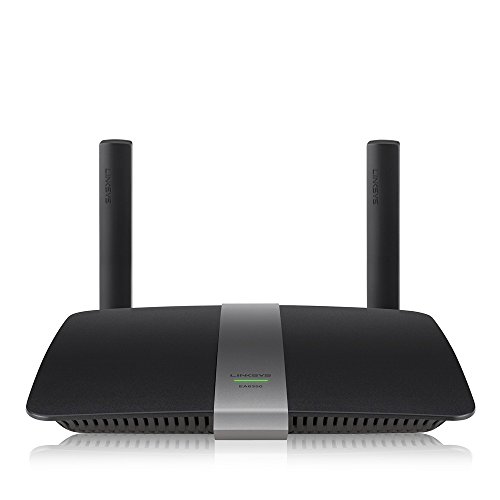
Description
Linksys EA6350 Wi-Fi Wireless Dual-Band+ Router with – Features & Prices in Saudi Arabia :
Linksys EA6350 Wi-Fi Wireless Dual-Band+ Router with Gigabit & USB Ports – (Renewed)
Wireless Type
2.4 GHz Radio Frequency
Series
Linksys EA6350
Item model number
Ea6350
Item Weight
1.1 pounds
Product Dimensions
12.9 x 10.4 x 2.7 inches
Item Dimensions LxWxH
12.9 x 10.4 x 2.7 inches
Color
black
Manufacturer
Linksys
ASIN
B00QR6UR2W
Is Discontinued By Manufacturer
No
Date First Available
December 9, 2014
Test video – Linksys EA6350 Wi-Fi Wireless Dual-Band+ Router with :
Product highlights :
Questions & Answers – Linksys EA6350 Wi-Fi Wireless Dual-Band+ Router with :
Technical specifications – Linksys EA6350 Wi-Fi Wireless Dual-Band+ Router with :
Brand
Linksys
Color
black
Hardware Interface
USB, Ethernet
Compatible Devices
Routers, Monitors
Item Dimensions LxWxH
12.9 x 10.4 x 2.7 inches
Purchase advice :
-
Warranty :
Check the duration of the warranty and also the faults and defects it covers. Is it complete or limited? and What is included in the warranty (parts, repairs or both)?
-
Shipping :
Is delivery offered? And how long does it take to get delivered (Delivery time)
-
Proof of purchase :
Does the shop give you an invoice ?
-
After-sales service :
Do they have an after-sales service to have information about the installation or operation (instructions for use). Also in case of problem, it is the seller who takes charge or you must contact the manufacturer or supplier yourself.
_____________________________
https://www.youtube.com/www.youtube.com/wat

K. N (verified owner) –
A terrific router for an unbeatable price! – Before I begin the review, here’s a little background on me and why my opinion on this device is worth listening to: I am a computer science guy who has set up networks for the US Department of Energy. I have a degree in networking, as well as various certifications. Suffice it to say, I am experienced with setting up networks – both on the enterprise and home level.
S. P (verified owner) –
Best basic home AC router. – I bought a refurbished version of this router and the only signs of it were the packaging (no clear plastic on anything, cables were tied to themselves and no instruction manual- not that I needed one) and the labels on the bottom which have the corners slightly frayed. Other then that, everything looks and feel good. The router has been functioning perfectly since I’ve gotten it. It’s a basic router with a 4 port gigabit switch (which operates at full speed) and just USB 3.0, not USB3.1. so it only supports 5Gbs not 10Gbs (you will never get those speeds obviously in the real world, but it means it is still twice as slow as USB 3.1). Regardless it doesn’t matter to me because I have a NAS server and don’t use the USB port. It has average speeds for the price as it uses an older, lower end revision of the 802.11ac standard limiting you to 300Mbits on the 2.4Ghz band and 867Mbits on the 5Ghz band. For average household use (let’s say, two adults and 2.5 kids) this is, realistically, more than enough for everyone to do their thing at the same time. Sadly it means I cannot download files over WiFi at gigabit speeds, but I did only pay $50 for it, so I cannot complain. Internally it has all the standard features as every other Linksys router since the early 2000s updated to match today’s security standards + “Smart WiFi” which is supposedly a cloud based remote control of your router? But you could always do that by opening a port and enabling access from a non local IP on older Linksys routers so this is really a Cisco gimmick which I do not use. Security wise it offers all the common modern day access security protocols as well as a basic firewall, port forwarding, and MAC filtering. It has a WPS button on it, but I disabled that since I don’t want people touching my networking equipment. It also has the ability to create a guest network, pretty standard these days, but handy none the less. One very nice and slightly less than standard feature that is has though is QoS (or as they call it “Media Prioritization”) which lets you set bandwidth priority to devices and even specific applications which are connected. It also has built in support for DDNS, which is nice, I suppose. Somewhere in there, there is also parental controls, however since I never used them I have nothing to say about them or how they work. It is kind of a shame that these are all the feature it supports as hardware wise this little baby could support much more, but Cisco had a nasty habit of crippling their “Home” products to force you to buy their “Business” line. This makes it all the more saddening that this router does not support DD-WRT at the moment. Last thing to note is that this router does support IPv6 (though if you are running a VPN at home you *NEED* and I can’t stress that enough, turn it off.)
S. P (verified owner) –
Best basic home AC router. – I bought a refurbished version of this router and the only signs of it were the packaging (no clear plastic on anything, cables were tied to themselves and no instruction manual- not that I needed one) and the labels on the bottom which have the corners slightly frayed. Other then that, everything looks and feel good. The router has been functioning perfectly since I’ve gotten it. It’s a basic router with a 4 port gigabit switch (which operates at full speed) and just USB 3.0, not USB3.1. so it only supports 5Gbs not 10Gbs (you will never get those speeds obviously in the real world, but it means it is still twice as slow as USB 3.1). Regardless it doesn’t matter to me because I have a NAS server and don’t use the USB port. It has average speeds for the price as it uses an older, lower end revision of the 802.11ac standard limiting you to 300Mbits on the 2.4Ghz band and 867Mbits on the 5Ghz band. For average household use (let’s say, two adults and 2.5 kids) this is, realistically, more than enough for everyone to do their thing at the same time. Sadly it means I cannot download files over WiFi at gigabit speeds, but I did only pay $50 for it, so I cannot complain. Internally it has all the standard features as every other Linksys router since the early 2000s updated to match today’s security standards + “Smart WiFi” which is supposedly a cloud based remote control of your router? But you could always do that by opening a port and enabling access from a non local IP on older Linksys routers so this is really a Cisco gimmick which I do not use. Security wise it offers all the common modern day access security protocols as well as a basic firewall, port forwarding, and MAC filtering. It has a WPS button on it, but I disabled that since I don’t want people touching my networking equipment. It also has the ability to create a guest network, pretty standard these days, but handy none the less. One very nice and slightly less than standard feature that is has though is QoS (or as they call it “Media Prioritization”) which lets you set bandwidth priority to devices and even specific applications which are connected. It also has built in support for DDNS, which is nice, I suppose. Somewhere in there, there is also parental controls, however since I never used them I have nothing to say about them or how they work. It is kind of a shame that these are all the feature it supports as hardware wise this little baby could support much more, but Cisco had a nasty habit of crippling their “Home” products to force you to buy their “Business” line. This makes it all the more saddening that this router does not support DD-WRT at the moment. Last thing to note is that this router does support IPv6 (though if you are running a VPN at home you *NEED* and I can’t stress that enough, turn it off.)
K. N (verified owner) –
A terrific router for an unbeatable price! – Before I begin the review, here’s a little background on me and why my opinion on this device is worth listening to: I am a computer science guy who has set up networks for the US Department of Energy. I have a degree in networking, as well as various certifications. Suffice it to say, I am experienced with setting up networks – both on the enterprise and home level.