ConnectSense Router Rebooter, Monitors Your Internet and is available in Saudi Arabia.
Find out all you need to know about ConnectSense Router Rebooter, Monitors Your Internet and before buying : Price, Test video, Datasheet, Similar products.
ConnectSense Router Rebooter, Monitors Your Internet and – Features & Prices in Saudi Arabia :
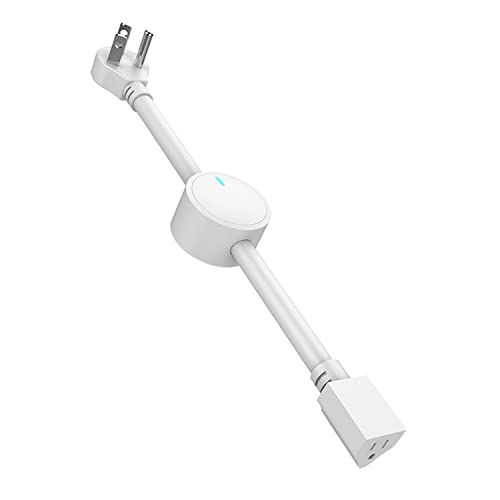
ConnectSense Router Rebooter, Monitors Your Internet and Automatically Reboots When A Connection Failure is Detected, Can Be Used as a Scheduled ON/Off Cycler or Remote ON/Off Controller
Package Dimensions
6.77 x 6.5 x 2.52 inches
Item Weight
10.8 ounces
ASIN
B08TN1QGJ3
Item model number
1201
Date First Available
February 18, 2021
Manufacturer
Grid Connect Inc
Test video – ConnectSense Router Rebooter, Monitors Your Internet and :
Product highlights :
24/7 AUTOMATIC MONITORING AND REBOOT: the rebooter has been proven to increase speed reliability with daily scheduled reboots, ensuring seamless connection at optimal speed 24/7.
“SMART SECURITY BECOMES MORE SECURE: having internet connection issues detected and fixed asap by the ConnectSense router rebooter means that your smart devices at home or in the office, such as wireless security cameras, doorbell cams and fire alarms, will experience almost no downtime, so security and safety lapses are minimized. “
UNINTERRUPTED SMART HOMES AND OFFICES: this router rebooter ensures that your digital devices such as lights, plugs, remote-controlled cookers, locks and thermostats run like clockwork by automatically rebooting the router/modem as soon as the internet connection fails or slows down.
MULTI-FUNCTIONAL DEVICE: you may switch off the automatic rebooter function and use the device as a scheduled ON/OFF cycler or remote ON/OFF controller.
WORKS WITH A RANGE OF APPS AND SMART DEVICES: ConnectSense router rebooter is very versatile and works with iOS & Android apps for remote reboot, or voice commands from Amazon Alexa and Google Home. So you get the ultimate in convenience and usability with just one nifty device.
Questions & Answers – ConnectSense Router Rebooter, Monitors Your Internet and :
➕ What is the price of ConnectSense Router Rebooter, Monitors Your Internet and in Saudi Arabia ?
The price of ConnectSense Router Rebooter, Monitors Your Internet and in-store is 210 SAR VAT.
➕ When ConnectSense Router Rebooter, Monitors Your Internet and was released ?
The release date was February 18, 2021.
➕ What is the price of ConnectSense Router Rebooter, Monitors Your Internet and cheap used ?
The price of ConnectSense Router Rebooter, Monitors Your Internet and used is 150 SAR VAT.
➕ What are the main characteristics of ConnectSense Router Rebooter, Monitors Your Internet and ?
Special specifications :
24/7 AUTOMATIC MONITORING AND REBOOT: the rebooter has been proven to increase speed reliability with daily scheduled reboots, ensuring seamless connection at optimal speed 24/7.
➕ Is it interesting to buy this product ?
The best people who can answer you are customers who have already bought and tested this product (See Customer Reviews). This product is rated 3.7 / 5 on Amazon.
➕ Where to buy ConnectSense Router Rebooter, Monitors Your Internet and in Saudi Arabia ?
Technical specifications – ConnectSense Router Rebooter, Monitors Your Internet and :
Brand
ConnectSense
Connectivity Technology
USB
Control Method
App
Controller Type
Switch
Purchase advice :
Warranty :
Check the duration of the warranty and also the faults and defects it covers. Is it complete or limited? and What is included in the warranty (parts, repairs or both)?
Shipping :
Is delivery offered? And how long does it take to get delivered (Delivery time)
Proof of purchase :
Does the shop give you an invoice ?
After-sales service :
Do they have an after-sales service to have information about the installation or operation (instructions for use). Also in case of problem, it is the seller who takes charge or you must contact the manufacturer or supplier yourself.
_____________________________
6 reviews for ConnectSense Router Rebooter, Monitors Your Internet and
Rated 4 out of 5
E. M (verified owner)–
Convenient way to automate WiFi reboot – I’ve been experiencing dropped signals and sporadic performance on my WiFi and had Xfinity come in once to make a few changes that helped a bit, but the problem is ongoing. (I am in an older, multi-unit apartment building so I’m sure the cabling dates back to the earliest days of the internet) I also learned that rebooting can be a security measure against malware. So, I started rebooting the router regularly by unplugging it, which was simple but not easy because of stuff in the way. When I accidentally caused the TV to fall over, I knew I needed a better fix. A friend told me about a smart cable you can put between the router and the outlet to schedule automatic rebooting via an app. I bought one, and it’s working like a charm.
Rated 2 out of 5
O. S (verified owner)–
Complex product setup/operating design given simple product function – Product function: Power-cycle plugged-in device (router or modem) if internet connection fails.
Rated 3 out of 5
A. I (verified owner)–
Not so easy peasy. – I have a lot of wifi devices (cameras, switches, temp sensors, t-stats, etc) that occasionally scramble my router requiring a reboot for internet connectivity to resume. I needed a device to allow the reboot to happen when I’m away for weeks at a time. This device sounded it like it would fit the bill. Upon receipt I opened the box and there were no directions. I go to the Play Store to download the connectsense app. Nowhere in the description for the app does it mention this device. It’s all about smart power management via wall switches. I download the app anyway and eventually get to the “rebooter”. Not the greatest app, not the worst but still limited information on using the device is provided. Everything about using this device you have to figure out on your own.
Rated 2 out of 5
O. S (verified owner)–
Complex product setup/operating design given simple product function – Product function: Power-cycle plugged-in device (router or modem) if internet connection fails.
Rated 4 out of 5
E. M (verified owner)–
Convenient way to automate WiFi reboot – I’ve been experiencing dropped signals and sporadic performance on my WiFi and had Xfinity come in once to make a few changes that helped a bit, but the problem is ongoing. (I am in an older, multi-unit apartment building so I’m sure the cabling dates back to the earliest days of the internet) I also learned that rebooting can be a security measure against malware. So, I started rebooting the router regularly by unplugging it, which was simple but not easy because of stuff in the way. When I accidentally caused the TV to fall over, I knew I needed a better fix. A friend told me about a smart cable you can put between the router and the outlet to schedule automatic rebooting via an app. I bought one, and it’s working like a charm.
Rated 3 out of 5
A. I (verified owner)–
Not so easy peasy. – I have a lot of wifi devices (cameras, switches, temp sensors, t-stats, etc) that occasionally scramble my router requiring a reboot for internet connectivity to resume. I needed a device to allow the reboot to happen when I’m away for weeks at a time. This device sounded it like it would fit the bill. Upon receipt I opened the box and there were no directions. I go to the Play Store to download the connectsense app. Nowhere in the description for the app does it mention this device. It’s all about smart power management via wall switches. I download the app anyway and eventually get to the “rebooter”. Not the greatest app, not the worst but still limited information on using the device is provided. Everything about using this device you have to figure out on your own.

E. M (verified owner) –
Convenient way to automate WiFi reboot – I’ve been experiencing dropped signals and sporadic performance on my WiFi and had Xfinity come in once to make a few changes that helped a bit, but the problem is ongoing. (I am in an older, multi-unit apartment building so I’m sure the cabling dates back to the earliest days of the internet) I also learned that rebooting can be a security measure against malware. So, I started rebooting the router regularly by unplugging it, which was simple but not easy because of stuff in the way. When I accidentally caused the TV to fall over, I knew I needed a better fix. A friend told me about a smart cable you can put between the router and the outlet to schedule automatic rebooting via an app. I bought one, and it’s working like a charm.
O. S (verified owner) –
Complex product setup/operating design given simple product function – Product function: Power-cycle plugged-in device (router or modem) if internet connection fails.
A. I (verified owner) –
Not so easy peasy. – I have a lot of wifi devices (cameras, switches, temp sensors, t-stats, etc) that occasionally scramble my router requiring a reboot for internet connectivity to resume. I needed a device to allow the reboot to happen when I’m away for weeks at a time. This device sounded it like it would fit the bill. Upon receipt I opened the box and there were no directions. I go to the Play Store to download the connectsense app. Nowhere in the description for the app does it mention this device. It’s all about smart power management via wall switches. I download the app anyway and eventually get to the “rebooter”. Not the greatest app, not the worst but still limited information on using the device is provided. Everything about using this device you have to figure out on your own.
O. S (verified owner) –
Complex product setup/operating design given simple product function – Product function: Power-cycle plugged-in device (router or modem) if internet connection fails.
E. M (verified owner) –
Convenient way to automate WiFi reboot – I’ve been experiencing dropped signals and sporadic performance on my WiFi and had Xfinity come in once to make a few changes that helped a bit, but the problem is ongoing. (I am in an older, multi-unit apartment building so I’m sure the cabling dates back to the earliest days of the internet) I also learned that rebooting can be a security measure against malware. So, I started rebooting the router regularly by unplugging it, which was simple but not easy because of stuff in the way. When I accidentally caused the TV to fall over, I knew I needed a better fix. A friend told me about a smart cable you can put between the router and the outlet to schedule automatic rebooting via an app. I bought one, and it’s working like a charm.
A. I (verified owner) –
Not so easy peasy. – I have a lot of wifi devices (cameras, switches, temp sensors, t-stats, etc) that occasionally scramble my router requiring a reboot for internet connectivity to resume. I needed a device to allow the reboot to happen when I’m away for weeks at a time. This device sounded it like it would fit the bill. Upon receipt I opened the box and there were no directions. I go to the Play Store to download the connectsense app. Nowhere in the description for the app does it mention this device. It’s all about smart power management via wall switches. I download the app anyway and eventually get to the “rebooter”. Not the greatest app, not the worst but still limited information on using the device is provided. Everything about using this device you have to figure out on your own.