Wireless Router, WAVLINK AC3200 Dual Band Gigabit – Features & Prices in Saudi Arabia :
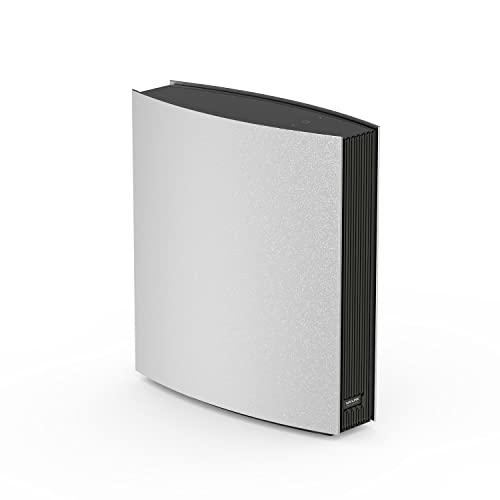
Wireless Router, WAVLINK AC3200 Dual Band Gigabit Router with LCD Display & Parent Control Function, Built in 8x5dBi Internal Antennas, Speed up to 3.2Gbps, Coverage Up to 2500 sq.ft, 100+ Devices.
Product Dimensions
7.09 x 7.87 x 2.36 inches
Item Weight
4.38 pounds
ASIN
B092ZBB6JX
Date First Available
May 21, 2021
Manufacturer
WAVLINK
Country of Origin
China
Test video – Wireless Router, WAVLINK AC3200 Dual Band Gigabit :
Product highlights :
【Faster and Smoother, Smart Gigabit Router】WAVLINK AC3200 router features dual band and speeds up to 3200 Mbps (1,000 Mbps in 2.4GHz + 2,167 Mbps in 5GHz) for a ridiculously fast home or office network. Enjoy 4K/8K HD streaming, gaming and more in high quality without buffering. Compatible with all Wi-Fi devices, 802.11ac and older.
【MU-MIMO Technology & Up to 100+ Devices】MU-MIMO technology helps you to provide extreme WIFI signal to multiple devices at the same time without slowing down the network speed, and can connect up to 100+ devices at the same time.
【Expand Coverage, Up to 2,500 sq. ft.】Built-in 8 high-performance antennas with beamforming technology ensure that the device has better wireless performance, that make the signal up to 2,500 sq. ft. whole home coverage and incredibly fast.
【Robust Parental Control & LCD Display】Support guest wifi. Limit online time and block inappropriate websites according to unique profiles created for each family member. Easy to keep your children safe while they’re online. The LCD screen on the top of the router shows the network status and local weather, WiFi connectivity and router status. With 3 touch keys allow easy and accurate operation.
【Gigabit Ports Meet All Your Needs】Total 5 ports, 1 x Ethernet WAN 1000Mbps, 3x Ethernet LAN 1000Mbps, 1xUSB3.0, the USB 3.0 for sharing files & media with networked devices. We provide 12 months warranty and our professional customer service support available for you 24/7. Any issues, please do not hesitate to contact us anytime.
➕ What is the price of Wireless Router, WAVLINK AC3200 Dual Band Gigabit in Saudi Arabia ?
The price of Wireless Router, WAVLINK AC3200 Dual Band Gigabit in-store is 210 SAR VAT.
➕ When Wireless Router, WAVLINK AC3200 Dual Band Gigabit was released ?
The release date was May 21, 2021.
➕ What is the price of Wireless Router, WAVLINK AC3200 Dual Band Gigabit cheap used ?
The price of Wireless Router, WAVLINK AC3200 Dual Band Gigabit used is 150 SAR VAT.
➕ What are the main characteristics of Wireless Router, WAVLINK AC3200 Dual Band Gigabit ?
Special specifications :
【Faster and Smoother, Smart Gigabit Router】WAVLINK AC3200 router features dual band and speeds up to 3200 Mbps (1,000 Mbps in 2.4GHz + 2,167 Mbps in 5GHz) for a ridiculously fast home or office network. Enjoy 4K/8K HD streaming, gaming and more in high quality without buffering. Compatible with all Wi-Fi devices, 802.11ac and older.
➕ Is it interesting to buy this product ?
The best people who can answer you are customers who have already bought and tested this product (See Customer Reviews). This product is rated 4.4 / 5 on Amazon.
➕ Where to buy Wireless Router, WAVLINK AC3200 Dual Band Gigabit in Saudi Arabia ?
5 GHz Radio Frequency, 802.11ac, 2.4 GHz Radio Frequency
Compatible Devices
Personal Computer
Frequency
5 GHz
Connectivity Technology
Wi-Fi
Color
538A8NEW
Antenna Type
Internal
Security Protocol
WPA-PSK, WPA2-PSK
Number of Ports
5
Purchase advice :
Warranty :
Check the duration of the warranty and also the faults and defects it covers. Is it complete or limited? and What is included in the warranty (parts, repairs or both)?
Shipping :
Is delivery offered? And how long does it take to get delivered (Delivery time)
Proof of purchase :
Does the shop give you an invoice ?
After-sales service :
Do they have an after-sales service to have information about the installation or operation (instructions for use). Also in case of problem, it is the seller who takes charge or you must contact the manufacturer or supplier yourself.
_____________________________
8 reviews for Wireless Router, WAVLINK AC3200 Dual Band Gigabit
Rated 4 out of 5
T. F (verified owner)–
Pretty good, just needs faster ethernet port capabilities. – Definitely set apart from the crowd, this is quite a unique router. The exterior screen is pretty cool because you can see everything that’s on your network at any given time. The program is nice for being able to customize what all is on your network. Also, whatever you name things on your network, is what they’ll also be called on the list of everything that’s on your network that’s on the exterior screen of the router itself. For example, if you had a smart bulb or something like that, and you changed it’s name to be, “Piece of Junk,” then that’s what it would show up as on the router itself too, lol. They don’t really say how to rename the stuff though. So here’s how you do so: When you log on to your Wavlink router, you know, using, “admin,” and the password, at the top of the page you should see: Home – Devices – Wireless – Advanced. Choose, “devices,” and you should see the list of everything that’s on your network. Keep in mind that I’m explaining how to do this on a personal computer. But anyway, you’re in the, “Devices,” section, right? It’s easy though, you just hover the mouse cursor over the name of the device, and the cursor should turn into a hand, prompting you to click on it so you can rename it. After you rename it, just hit, “Enter,” and that should be it. You can use emoji’s in the names, but they will come up on the router’s display as question marks. Also, on that page, it shows the upload and download speed of each device. The upload speed has a green arrow next to it, and the download speed has a blue arrow next to it. Just to the right of the, “Current Speed,” column, is the column labeled, “Limited.” And each device should say, “Unlimited,” next to its upload and download speeds for that section. Anyway, you should be able to click there and put whatever amount you wish for each of them, to restrict or allow certain amounts of data. Alternately, at the end there, you can simply just allow data or not on any given device.
Rated 4 out of 5
E. E (verified owner)–
Not bad signal, setup is fairly straight forward, big size router. – This is a pretty interesting router to have in terms of the information it is able to post on the top screen. The first thing is that it is bigger than your average router. I would say this is pretty much the size of a few cable modems. I am assume the bigger size is to accommodate the screen on the top. That is pretty much what makes this very unique is that you get additional information on the top. It gives you information like how much data transfer and such. The next thing I would say it works best home rather than office use for sure as this is not the top of the line router. It does well for home usage. Compared to my other routers, I do feel falls a little short. The setup was not too difficult. It did have a bit of a hard time reaching the dead zone of my house compared to my other router. From what I can tell, I can be sure I will have internet throughout most of my place. This does have a power button on the back to make it easier to reset the router as needed. I still have issues with signal reaching my smart television in my living room. As with any router, I will suggest it put this device in the upstairs part of the house to get a better signal. Wavlink has similar security features as most routers from what I can tell. The security feature is very easy to setup and user friendly so you do not have to be a tech wizard to set it up. I would say another thing about this device is that the user interface is pretty straight forward and easy to use compared to many other brands. The signal distance is pretty good. It can go through several rooms before having issues with connection. It does have Ethernet ports to plug directly into the router and does not require any additional setup to your device. The device is very big and because of the design cannot really be laid down. There are LED screen on top is not super bright but can be distracting at night. Again it does have several Ethernet ports on the back to make it easy for the router to provide direct lines to other devices. Overall I do like this device as you get a really powerful affordable router but it does not reach all the points in my house. It falls a little short. The top information screen is nice but not something I would say is needed. It is not very challenging to setup and works well once you are done it is really blazing fast. One small down side of this device is that it does run a bit hotter than normal so do not leave this in direct sun light or anything. The top does turn off so you do not get blinded by the LED light on top which is good.
Rated 4 out of 5
K. S (verified owner)–
Works great, not easy to install – I am not a technologically inclined person, and my husband is even less so. It was my job to set this up and it wasn’t fun. The instructions weren’t very detailed or especially easy to understand. It was frustrating but after walking away from it a couple times I eventually got it figured out by the end of the day. The wifi is strong and worked on our phones right away. We can get a good signal next door and all around our yard. I still haven’t worked up the will to get my computer connected to it, as it said I may have to download something to make it work. So overall I’d say if you aren’t great with tech, you can do it but be prepared.
Rated 4 out of 5
C. L (verified owner)–
Who doesn’t want a modem…? – Modems have become so integrated with routers that I didn’t realize that this wasn’t a modem as well. That said, it works well, and helped with my issue where I had a few too many devices for my older router. Can recommend it for that, but not really for those who don’t have a separate modem.
Rated 4 out of 5
E. E (verified owner)–
Not bad signal, setup is fairly straight forward, big size router. – This is a pretty interesting router to have in terms of the information it is able to post on the top screen. The first thing is that it is bigger than your average router. I would say this is pretty much the size of a few cable modems. I am assume the bigger size is to accommodate the screen on the top. That is pretty much what makes this very unique is that you get additional information on the top. It gives you information like how much data transfer and such. The next thing I would say it works best home rather than office use for sure as this is not the top of the line router. It does well for home usage. Compared to my other routers, I do feel falls a little short. The setup was not too difficult. It did have a bit of a hard time reaching the dead zone of my house compared to my other router. From what I can tell, I can be sure I will have internet throughout most of my place. This does have a power button on the back to make it easier to reset the router as needed. I still have issues with signal reaching my smart television in my living room. As with any router, I will suggest it put this device in the upstairs part of the house to get a better signal. Wavlink has similar security features as most routers from what I can tell. The security feature is very easy to setup and user friendly so you do not have to be a tech wizard to set it up. I would say another thing about this device is that the user interface is pretty straight forward and easy to use compared to many other brands. The signal distance is pretty good. It can go through several rooms before having issues with connection. It does have Ethernet ports to plug directly into the router and does not require any additional setup to your device. The device is very big and because of the design cannot really be laid down. There are LED screen on top is not super bright but can be distracting at night. Again it does have several Ethernet ports on the back to make it easy for the router to provide direct lines to other devices. Overall I do like this device as you get a really powerful affordable router but it does not reach all the points in my house. It falls a little short. The top information screen is nice but not something I would say is needed. It is not very challenging to setup and works well once you are done it is really blazing fast. One small down side of this device is that it does run a bit hotter than normal so do not leave this in direct sun light or anything. The top does turn off so you do not get blinded by the LED light on top which is good.
Rated 4 out of 5
T. F (verified owner)–
Pretty good, just needs faster ethernet port capabilities. – Definitely set apart from the crowd, this is quite a unique router. The exterior screen is pretty cool because you can see everything that’s on your network at any given time. The program is nice for being able to customize what all is on your network. Also, whatever you name things on your network, is what they’ll also be called on the list of everything that’s on your network that’s on the exterior screen of the router itself. For example, if you had a smart bulb or something like that, and you changed it’s name to be, “Piece of Junk,” then that’s what it would show up as on the router itself too, lol. They don’t really say how to rename the stuff though. So here’s how you do so: When you log on to your Wavlink router, you know, using, “admin,” and the password, at the top of the page you should see: Home – Devices – Wireless – Advanced. Choose, “devices,” and you should see the list of everything that’s on your network. Keep in mind that I’m explaining how to do this on a personal computer. But anyway, you’re in the, “Devices,” section, right? It’s easy though, you just hover the mouse cursor over the name of the device, and the cursor should turn into a hand, prompting you to click on it so you can rename it. After you rename it, just hit, “Enter,” and that should be it. You can use emoji’s in the names, but they will come up on the router’s display as question marks. Also, on that page, it shows the upload and download speed of each device. The upload speed has a green arrow next to it, and the download speed has a blue arrow next to it. Just to the right of the, “Current Speed,” column, is the column labeled, “Limited.” And each device should say, “Unlimited,” next to its upload and download speeds for that section. Anyway, you should be able to click there and put whatever amount you wish for each of them, to restrict or allow certain amounts of data. Alternately, at the end there, you can simply just allow data or not on any given device.
Rated 4 out of 5
C. L (verified owner)–
Who doesn’t want a modem…? – Modems have become so integrated with routers that I didn’t realize that this wasn’t a modem as well. That said, it works well, and helped with my issue where I had a few too many devices for my older router. Can recommend it for that, but not really for those who don’t have a separate modem.
Rated 4 out of 5
K. S (verified owner)–
Works great, not easy to install – I am not a technologically inclined person, and my husband is even less so. It was my job to set this up and it wasn’t fun. The instructions weren’t very detailed or especially easy to understand. It was frustrating but after walking away from it a couple times I eventually got it figured out by the end of the day. The wifi is strong and worked on our phones right away. We can get a good signal next door and all around our yard. I still haven’t worked up the will to get my computer connected to it, as it said I may have to download something to make it work. So overall I’d say if you aren’t great with tech, you can do it but be prepared.

T. F (verified owner) –
Pretty good, just needs faster ethernet port capabilities. – Definitely set apart from the crowd, this is quite a unique router. The exterior screen is pretty cool because you can see everything that’s on your network at any given time. The program is nice for being able to customize what all is on your network. Also, whatever you name things on your network, is what they’ll also be called on the list of everything that’s on your network that’s on the exterior screen of the router itself. For example, if you had a smart bulb or something like that, and you changed it’s name to be, “Piece of Junk,” then that’s what it would show up as on the router itself too, lol. They don’t really say how to rename the stuff though. So here’s how you do so: When you log on to your Wavlink router, you know, using, “admin,” and the password, at the top of the page you should see: Home – Devices – Wireless – Advanced. Choose, “devices,” and you should see the list of everything that’s on your network. Keep in mind that I’m explaining how to do this on a personal computer. But anyway, you’re in the, “Devices,” section, right? It’s easy though, you just hover the mouse cursor over the name of the device, and the cursor should turn into a hand, prompting you to click on it so you can rename it. After you rename it, just hit, “Enter,” and that should be it. You can use emoji’s in the names, but they will come up on the router’s display as question marks. Also, on that page, it shows the upload and download speed of each device. The upload speed has a green arrow next to it, and the download speed has a blue arrow next to it. Just to the right of the, “Current Speed,” column, is the column labeled, “Limited.” And each device should say, “Unlimited,” next to its upload and download speeds for that section. Anyway, you should be able to click there and put whatever amount you wish for each of them, to restrict or allow certain amounts of data. Alternately, at the end there, you can simply just allow data or not on any given device.
E. E (verified owner) –
Not bad signal, setup is fairly straight forward, big size router. – This is a pretty interesting router to have in terms of the information it is able to post on the top screen. The first thing is that it is bigger than your average router. I would say this is pretty much the size of a few cable modems. I am assume the bigger size is to accommodate the screen on the top. That is pretty much what makes this very unique is that you get additional information on the top. It gives you information like how much data transfer and such. The next thing I would say it works best home rather than office use for sure as this is not the top of the line router. It does well for home usage. Compared to my other routers, I do feel falls a little short. The setup was not too difficult. It did have a bit of a hard time reaching the dead zone of my house compared to my other router. From what I can tell, I can be sure I will have internet throughout most of my place. This does have a power button on the back to make it easier to reset the router as needed. I still have issues with signal reaching my smart television in my living room. As with any router, I will suggest it put this device in the upstairs part of the house to get a better signal. Wavlink has similar security features as most routers from what I can tell. The security feature is very easy to setup and user friendly so you do not have to be a tech wizard to set it up. I would say another thing about this device is that the user interface is pretty straight forward and easy to use compared to many other brands. The signal distance is pretty good. It can go through several rooms before having issues with connection. It does have Ethernet ports to plug directly into the router and does not require any additional setup to your device. The device is very big and because of the design cannot really be laid down. There are LED screen on top is not super bright but can be distracting at night. Again it does have several Ethernet ports on the back to make it easy for the router to provide direct lines to other devices. Overall I do like this device as you get a really powerful affordable router but it does not reach all the points in my house. It falls a little short. The top information screen is nice but not something I would say is needed. It is not very challenging to setup and works well once you are done it is really blazing fast. One small down side of this device is that it does run a bit hotter than normal so do not leave this in direct sun light or anything. The top does turn off so you do not get blinded by the LED light on top which is good.
K. S (verified owner) –
Works great, not easy to install – I am not a technologically inclined person, and my husband is even less so. It was my job to set this up and it wasn’t fun. The instructions weren’t very detailed or especially easy to understand. It was frustrating but after walking away from it a couple times I eventually got it figured out by the end of the day. The wifi is strong and worked on our phones right away. We can get a good signal next door and all around our yard. I still haven’t worked up the will to get my computer connected to it, as it said I may have to download something to make it work. So overall I’d say if you aren’t great with tech, you can do it but be prepared.
C. L (verified owner) –
Who doesn’t want a modem…? – Modems have become so integrated with routers that I didn’t realize that this wasn’t a modem as well. That said, it works well, and helped with my issue where I had a few too many devices for my older router. Can recommend it for that, but not really for those who don’t have a separate modem.
E. E (verified owner) –
Not bad signal, setup is fairly straight forward, big size router. – This is a pretty interesting router to have in terms of the information it is able to post on the top screen. The first thing is that it is bigger than your average router. I would say this is pretty much the size of a few cable modems. I am assume the bigger size is to accommodate the screen on the top. That is pretty much what makes this very unique is that you get additional information on the top. It gives you information like how much data transfer and such. The next thing I would say it works best home rather than office use for sure as this is not the top of the line router. It does well for home usage. Compared to my other routers, I do feel falls a little short. The setup was not too difficult. It did have a bit of a hard time reaching the dead zone of my house compared to my other router. From what I can tell, I can be sure I will have internet throughout most of my place. This does have a power button on the back to make it easier to reset the router as needed. I still have issues with signal reaching my smart television in my living room. As with any router, I will suggest it put this device in the upstairs part of the house to get a better signal. Wavlink has similar security features as most routers from what I can tell. The security feature is very easy to setup and user friendly so you do not have to be a tech wizard to set it up. I would say another thing about this device is that the user interface is pretty straight forward and easy to use compared to many other brands. The signal distance is pretty good. It can go through several rooms before having issues with connection. It does have Ethernet ports to plug directly into the router and does not require any additional setup to your device. The device is very big and because of the design cannot really be laid down. There are LED screen on top is not super bright but can be distracting at night. Again it does have several Ethernet ports on the back to make it easy for the router to provide direct lines to other devices. Overall I do like this device as you get a really powerful affordable router but it does not reach all the points in my house. It falls a little short. The top information screen is nice but not something I would say is needed. It is not very challenging to setup and works well once you are done it is really blazing fast. One small down side of this device is that it does run a bit hotter than normal so do not leave this in direct sun light or anything. The top does turn off so you do not get blinded by the LED light on top which is good.
T. F (verified owner) –
Pretty good, just needs faster ethernet port capabilities. – Definitely set apart from the crowd, this is quite a unique router. The exterior screen is pretty cool because you can see everything that’s on your network at any given time. The program is nice for being able to customize what all is on your network. Also, whatever you name things on your network, is what they’ll also be called on the list of everything that’s on your network that’s on the exterior screen of the router itself. For example, if you had a smart bulb or something like that, and you changed it’s name to be, “Piece of Junk,” then that’s what it would show up as on the router itself too, lol. They don’t really say how to rename the stuff though. So here’s how you do so: When you log on to your Wavlink router, you know, using, “admin,” and the password, at the top of the page you should see: Home – Devices – Wireless – Advanced. Choose, “devices,” and you should see the list of everything that’s on your network. Keep in mind that I’m explaining how to do this on a personal computer. But anyway, you’re in the, “Devices,” section, right? It’s easy though, you just hover the mouse cursor over the name of the device, and the cursor should turn into a hand, prompting you to click on it so you can rename it. After you rename it, just hit, “Enter,” and that should be it. You can use emoji’s in the names, but they will come up on the router’s display as question marks. Also, on that page, it shows the upload and download speed of each device. The upload speed has a green arrow next to it, and the download speed has a blue arrow next to it. Just to the right of the, “Current Speed,” column, is the column labeled, “Limited.” And each device should say, “Unlimited,” next to its upload and download speeds for that section. Anyway, you should be able to click there and put whatever amount you wish for each of them, to restrict or allow certain amounts of data. Alternately, at the end there, you can simply just allow data or not on any given device.
C. L (verified owner) –
Who doesn’t want a modem…? – Modems have become so integrated with routers that I didn’t realize that this wasn’t a modem as well. That said, it works well, and helped with my issue where I had a few too many devices for my older router. Can recommend it for that, but not really for those who don’t have a separate modem.
K. S (verified owner) –
Works great, not easy to install – I am not a technologically inclined person, and my husband is even less so. It was my job to set this up and it wasn’t fun. The instructions weren’t very detailed or especially easy to understand. It was frustrating but after walking away from it a couple times I eventually got it figured out by the end of the day. The wifi is strong and worked on our phones right away. We can get a good signal next door and all around our yard. I still haven’t worked up the will to get my computer connected to it, as it said I may have to download something to make it work. So overall I’d say if you aren’t great with tech, you can do it but be prepared.