
Description
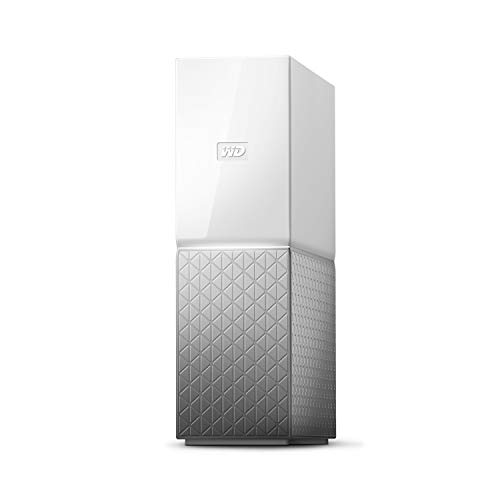
WD 3TB My Cloud Home Personal Cloud – Features & Prices in Saudi Arabia :
WD 3TB My Cloud Home Personal Cloud – WDBVXC0030HWT-NESN
Hard Drive
3 TB Mechanical Hard Disk
Series
My Cloud Home
Item model number
WDBVXC0030HWT-NESN
Hardware Platform
PC, Mac
Item Weight
2.28 pounds
Product Dimensions
5.51 x 2.09 x 6.91 inches
Item Dimensions LxWxH
5.51 x 2.09 x 6.91 inches
Color
White
Flash Memory Size
3
Hard Drive Interface
USB 1.1
Manufacturer
Western Digital Technologies, Inc.
ASIN
B076D1YV7T
Is Discontinued By Manufacturer
No
Date First Available
December 3, 2017
Test video – WD 3TB My Cloud Home Personal Cloud :
Product highlights :
Questions & Answers – WD 3TB My Cloud Home Personal Cloud :
Technical specifications – WD 3TB My Cloud Home Personal Cloud :
Digital Storage Capacity
3 TB
Hard Disk Interface
USB 1.1
Connectivity Technology
USB, Ethernet
Brand
Western Digital
Hard Disk Form Factor
3.5 Inches
Hard Disk Description
Mechanical Hard Disk
Compatible Devices
Desktop
Color
White
Hard Disk Size
3 TB
Specific Uses For Product
personal
Purchase advice :
-
Warranty :
Check the duration of the warranty and also the faults and defects it covers. Is it complete or limited? and What is included in the warranty (parts, repairs or both)?
-
Shipping :
Is delivery offered? And how long does it take to get delivered (Delivery time)
-
Proof of purchase :
Does the shop give you an invoice ?
-
After-sales service :
Do they have an after-sales service to have information about the installation or operation (instructions for use). Also in case of problem, it is the seller who takes charge or you must contact the manufacturer or supplier yourself.
_____________________________
L. B (verified owner) –
Personal Cloud Drive with limited features – Unlike the previous NAS drives this one was easy to install and works without glitches. Though it lacks certain techie features of a NAS unit, this is simpler to operate and works flawlessly. After couple of years of use I see some serious limitations with this unit and decided to move on to a NAS drive. The backup service, that runs natively to back up the contents of the drive, performs only mirroring with archaic restore capabilities.
P. K (verified owner) –
Not easy to setup – I was finally able to get it to work. The problem I have, is the way this device shares files. photos, etc.
K. R (verified owner) –
Very simple to set up but needs WD software to create a network drive – For the price this is a great product. I have been able to back up files and my wife’s craft items with out having to pull a usb hard drive in and out. You also have access to your files outside the home. However, you may need some help if you have no clue how networking works. I had to purchase a switch and extra patch cables to plug it directly to my router which is where it needs to go. Your computer/laptop will not see it directly like an external or internal hard drive. There are two ways to access it; internet or the WD My Discovery application which you download. The My Discovery application will set it to look like a regular drive so that you can create a folder structure or store your files.
C. I (verified owner) –
Why didn’t I go this route sooner?! – I am SO TIRED of having to delete stuff from my online storage sites just because they ran out of free space. Installing the WD network drive was easy. Love the increased storage capacity. 🙂 I dropped my first one, accidentally bricking it … so, be careful with these … they are unbelievably fragile 🙁
P. K (verified owner) –
Not easy to setup – I was finally able to get it to work. The problem I have, is the way this device shares files. photos, etc.
S. M (verified owner) –
Drive failed within 2 weeks and Western Digital technical support kept giving me a runaround – I purchased the My Cloud Home drive on Amazon. After receiving and installing it, I performed multiple backups of my MacBook using Time Machine. This worked fine.
C. I (verified owner) –
Why didn’t I go this route sooner?! – I am SO TIRED of having to delete stuff from my online storage sites just because they ran out of free space. Installing the WD network drive was easy. Love the increased storage capacity. 🙂 I dropped my first one, accidentally bricking it … so, be careful with these … they are unbelievably fragile 🙁
N. K (verified owner) –
Perfect for our thousands of photos – This is a great solution for our huge multi-thousands photo collection. When we get back from one of our many adventures, we can upload our photos from our phones using MyCloud software, then manage them from my laptop using Windows Explorer. I was a database expert and this system is perfect for simple, unfettered photo management. You will need a way to back your photos up onto something else. I keep a copy of what is on the My Cloud on my PC which has a terabyte hard drive. Not sure what I will do when I exceed that, but that’s weeks away. 🙂
Z. G (verified owner) –
No usb cable? – It needs a usb standard to usb standard to setup and did not include it , never needed this before . Bad first impression. I hope its user friendly
O. B (verified owner) –
Replaced my Apple Airport Time Capsule – When Apple discontinued the Time Capsule, I needed a solution that would allow my wife to use Time Machine to back up her MacBook Pro wireless when connected to my home network. I went with the WD 3TB My Cloud Home Personal Cloud Storage and I am very happy. There are added benefits to running my own cloud server for media, phtos and backup with remote access through the MyCloud App. I would buy this product again.
S. M (verified owner) –
Drive failed within 2 weeks and Western Digital technical support kept giving me a runaround – I purchased the My Cloud Home drive on Amazon. After receiving and installing it, I performed multiple backups of my MacBook using Time Machine. This worked fine.
K. R (verified owner) –
Very simple to set up but needs WD software to create a network drive – For the price this is a great product. I have been able to back up files and my wife’s craft items with out having to pull a usb hard drive in and out. You also have access to your files outside the home. However, you may need some help if you have no clue how networking works. I had to purchase a switch and extra patch cables to plug it directly to my router which is where it needs to go. Your computer/laptop will not see it directly like an external or internal hard drive. There are two ways to access it; internet or the WD My Discovery application which you download. The My Discovery application will set it to look like a regular drive so that you can create a folder structure or store your files.
L. B (verified owner) –
Personal Cloud Drive with limited features – Unlike the previous NAS drives this one was easy to install and works without glitches. Though it lacks certain techie features of a NAS unit, this is simpler to operate and works flawlessly. After couple of years of use I see some serious limitations with this unit and decided to move on to a NAS drive. The backup service, that runs natively to back up the contents of the drive, performs only mirroring with archaic restore capabilities.
Z. G (verified owner) –
No usb cable? – It needs a usb standard to usb standard to setup and did not include it , never needed this before . Bad first impression. I hope its user friendly
O. B (verified owner) –
Replaced my Apple Airport Time Capsule – When Apple discontinued the Time Capsule, I needed a solution that would allow my wife to use Time Machine to back up her MacBook Pro wireless when connected to my home network. I went with the WD 3TB My Cloud Home Personal Cloud Storage and I am very happy. There are added benefits to running my own cloud server for media, phtos and backup with remote access through the MyCloud App. I would buy this product again.
N. K (verified owner) –
Perfect for our thousands of photos – This is a great solution for our huge multi-thousands photo collection. When we get back from one of our many adventures, we can upload our photos from our phones using MyCloud software, then manage them from my laptop using Windows Explorer. I was a database expert and this system is perfect for simple, unfettered photo management. You will need a way to back your photos up onto something else. I keep a copy of what is on the My Cloud on my PC which has a terabyte hard drive. Not sure what I will do when I exceed that, but that’s weeks away. 🙂