
Description
TP-Link Deco AX3000 WiFi 6 Mesh System(Deco – Features & Prices in Saudi Arabia :
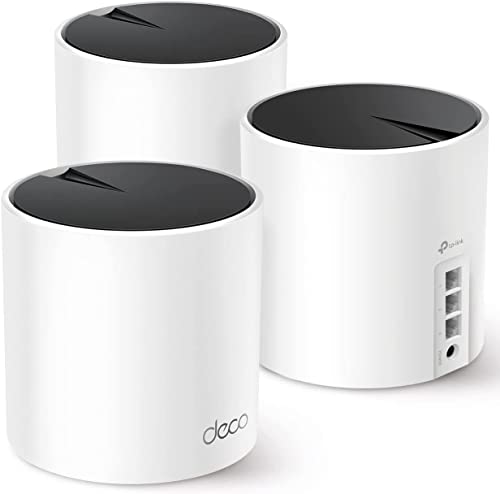
TP-Link Deco AX3000 WiFi 6 Mesh System(Deco X55) – Covers up to 6500 Sq.Ft. , Replaces Wireless Router and Extender, 3 Gigabit ports per unit, supports Ethernet Backhaul (3-pack)
Product Dimensions
4.33 x 4.33 x 4.49 inches
Item Weight
3.3 pounds
ASIN
B09PRB1MZM
Item model number
Deco X55
Date First Available
January 31, 2022
Manufacturer
TP-Link
Country of Origin
Vietnam
Test video – TP-Link Deco AX3000 WiFi 6 Mesh System(Deco :
Product highlights :
Questions & Answers – TP-Link Deco AX3000 WiFi 6 Mesh System(Deco :
Technical specifications – TP-Link Deco AX3000 WiFi 6 Mesh System(Deco :
Brand
TP-Link
Model Name
Deco X55(3-Pack)
Frequency Band Class
Dual-Band
Wireless Communication Standard
802.11n, 802.11b, 802.11ax, 802.11g, 802.11ac
Compatible Devices
Personal Computer
Included Components
1 x RJ45 Ethernet cable, 3 x Power adapters, 3 x Deco X55 units, 1 x Quick Installation Guide
Connectivity Technology
Wi-Fi, Ethernet
Color
White and Black
Antenna Type
Internal
Item Weight
3.3 Pounds
Purchase advice :
-
Warranty :
Check the duration of the warranty and also the faults and defects it covers. Is it complete or limited? and What is included in the warranty (parts, repairs or both)?
-
Shipping :
Is delivery offered? And how long does it take to get delivered (Delivery time)
-
Proof of purchase :
Does the shop give you an invoice ?
-
After-sales service :
Do they have an after-sales service to have information about the installation or operation (instructions for use). Also in case of problem, it is the seller who takes charge or you must contact the manufacturer or supplier yourself.
_____________________________
S. A (verified owner) –
Simple & effective. Overall good value. – I’m an experienced technologist with a background in networking and systems administration. I was looking for a mesh Wi-Fi 6 solution with an ethernet backhaul, that was cost effective, simple to manage and easily deployable. The TP Link X55 is all those things and more. I considered several other options, but they were more expensive than the X55 as like for like comparisons.
B. F (verified owner) –
– Me encanto el mesh es una chulada de producto, desactive el wifi del modem telmex y puse el de este, ahora si alcanza en todo mi hogar hasta con las puertas cerradas de los cuartos. Cabe destacar que para sacar todo su potencial usenlo como “punto de acceso” y no como “modem wifi”. Puse las 2 bsndas la 2.4 y la 5 juntas y en mi celular solo es 2.4ghz. logra llegar hasta 100mb cuando por esta banda solo me llegaba 60mb con el modem telmex. Comprenlo si quieren tener una conexion estable
T. B (verified owner) –
So easy to setup, even your grandparents can do it. Amazing experience so far! – I was blown away by the cost of 3 hubs, having 3 ethernets ports in each hub, and being able to setup a mesh network (with wired backhaul) in less than 10 minutes using the amazing app. Honestly, if you are a novice or an advanced user, this makes the experience and setup enjoyable. I couldn’t believe the amount of cool features available. Do not hesitate to buy.
B. F (verified owner) –
– Me encanto el mesh es una chulada de producto, desactive el wifi del modem telmex y puse el de este, ahora si alcanza en todo mi hogar hasta con las puertas cerradas de los cuartos. Cabe destacar que para sacar todo su potencial usenlo como “punto de acceso” y no como “modem wifi”. Puse las 2 bsndas la 2.4 y la 5 juntas y en mi celular solo es 2.4ghz. logra llegar hasta 100mb cuando por esta banda solo me llegaba 60mb con el modem telmex. Comprenlo si quieren tener una conexion estable
T. B (verified owner) –
So easy to setup, even your grandparents can do it. Amazing experience so far! – I was blown away by the cost of 3 hubs, having 3 ethernets ports in each hub, and being able to setup a mesh network (with wired backhaul) in less than 10 minutes using the amazing app. Honestly, if you are a novice or an advanced user, this makes the experience and setup enjoyable. I couldn’t believe the amount of cool features available. Do not hesitate to buy.
S. A (verified owner) –
Simple & effective. Overall good value. – I’m an experienced technologist with a background in networking and systems administration. I was looking for a mesh Wi-Fi 6 solution with an ethernet backhaul, that was cost effective, simple to manage and easily deployable. The TP Link X55 is all those things and more. I considered several other options, but they were more expensive than the X55 as like for like comparisons.
E. A (verified owner) –
– Fácil de instalar. La app para instalar y controlar funciona muy bien, aunque le faltan instrucciones de como usarla para obtener provecho total de todas las características del producto. Son muy nuevas aún. Espero que funcionen bien durante mucho tiempo, pero eso está por ver.
E. A (verified owner) –
– Fácil de instalar. La app para instalar y controlar funciona muy bien, aunque le faltan instrucciones de como usarla para obtener provecho total de todas las características del producto. Son muy nuevas aún. Espero que funcionen bien durante mucho tiempo, pero eso está por ver.
B. H (verified owner) –
Excellent and easy-to-install home WiFi – We have CenturyLink gigabit internet. We had their router at the basement panel powering 3 ethernet ports in the house. The upstairs ethernet port powered a second NetGear router, thus giving the house an upstairs and downstairs WiFi. Both worked fine but we never got great WiFi coverage nor speed.
B. H (verified owner) –
Excellent and easy-to-install home WiFi – We have CenturyLink gigabit internet. We had their router at the basement panel powering 3 ethernet ports in the house. The upstairs ethernet port powered a second NetGear router, thus giving the house an upstairs and downstairs WiFi. Both worked fine but we never got great WiFi coverage nor speed.