
Description
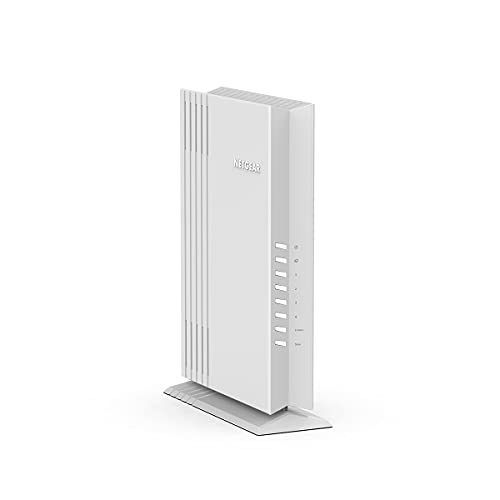
NETGEAR Wireless Desktop Access Point (WAX206)- WiFi – Features & Prices in Saudi Arabia :
NETGEAR Wireless Desktop Access Point (WAX206)- WiFi 6 Dual-Band AX3200 Speed, 4x1G Ethernet Ports, 1×2.5G WAN, Up to 128 Devices, WPA3 Security, Up to 3 Separate WiFi Networks, MU-MIMO, 802.11ax
Test video – NETGEAR Wireless Desktop Access Point (WAX206)- WiFi :
Product highlights :
Questions & Answers – NETGEAR Wireless Desktop Access Point (WAX206)- WiFi :
Technical specifications – NETGEAR Wireless Desktop Access Point (WAX206)- WiFi :
Purchase advice :
-
Warranty :
Check the duration of the warranty and also the faults and defects it covers. Is it complete or limited? and What is included in the warranty (parts, repairs or both)?
-
Shipping :
Is delivery offered? And how long does it take to get delivered (Delivery time)
-
Proof of purchase :
Does the shop give you an invoice ?
-
After-sales service :
Do they have an after-sales service to have information about the installation or operation (instructions for use). Also in case of problem, it is the seller who takes charge or you must contact the manufacturer or supplier yourself.
_____________________________
Z. G (verified owner) –
Works like it should—-but – I needed this as a bridge to some older non wireless devices. It works great and is is generally unobtrusive. My only complaint is the provided “documentation” is a multi folded sheet of paper in 4 languages that is confusing and poorly written. The website is no better. What you need to do is search the website for the REAL documentation, once I found that I had it in bridge mode in about 10 min and working fine. Also the provided information sheet must have been written for an earlier version of the website as it refers to options on the webpage that do not exist. So good device-poor documentation.
K. T (verified owner) –
NetGear is GREAT Gear and this device is working out great in our network. – In addition to the WAS206, I have two NetGear switches (both 1Gbs). I’m using this device as an Access Point (AP) for a split network (2.4 Ghz and 5 Ghz). It is working great allowing everyone to move from areas where the Comcast Gateway supports the WIFI network to areas not reachable by the Comcast modem/router/access point.
P. A (verified owner) –
Do this instead of a WiFi extender! – If you have an ethernet cable to the other end of your house for a computer, and you are wondering how to get a better WiFi signal from that location for your phone or tablet, then this is it. It sets up a satellite router – in this case known as an access point – and then provides 4 ethernet outlets. One will go to the aforementioned computer. It then also has a WiFi signal for plenty of more gadgets. One oddity: the satellite WiFi that is set up is known by a different name. So you may have to switch your phone from one WiFi network to another as you go through your house. But chances are the new WiFi is stronger and will work all around. It comes with a short ethernet cable to stretch from the access center to the computer. Had trouble with passwords. It insisted on the password taped to the bottom of the device. Oh, and it also needs a table top or shelf to rest on, and it needs an nearby electrical outlet for power. Its speed is probably limited by your original router. It uses the latest standards (as of Aug. 2022).
M. O (verified owner) –
Easy set up – Great product. Great price. Easy set up.
Z. G (verified owner) –
Works like it should—-but – I needed this as a bridge to some older non wireless devices. It works great and is is generally unobtrusive. My only complaint is the provided “documentation” is a multi folded sheet of paper in 4 languages that is confusing and poorly written. The website is no better. What you need to do is search the website for the REAL documentation, once I found that I had it in bridge mode in about 10 min and working fine. Also the provided information sheet must have been written for an earlier version of the website as it refers to options on the webpage that do not exist. So good device-poor documentation.
M. O (verified owner) –
Easy set up – Great product. Great price. Easy set up.
T. L (verified owner) –
Good when it’s half price. Also may need to update firmware if you only want to use it in AP mode. – I bought 5 of these when they were less than half price. These are very basic APs/router. If you live in a congested area, it’s probably not great as it doesn’t let you select all the channels that may be useable in your area.
J. R (verified owner) –
Perfect to extend wi-fi in unusual situations – I purchased this as part of an overall upgrade of my home network where I wanted more overall wi-fi and wired coverage; my house has an unusually long footprint, so the router is on one side of the house, leaving a smaller signal at the end. I tried a plug-in wi-fi repeater, but it can only do so much.
J. R (verified owner) –
Perfect to extend wi-fi in unusual situations – I purchased this as part of an overall upgrade of my home network where I wanted more overall wi-fi and wired coverage; my house has an unusually long footprint, so the router is on one side of the house, leaving a smaller signal at the end. I tried a plug-in wi-fi repeater, but it can only do so much.
D. H (verified owner) –
berry good – me approve
K. T (verified owner) –
NetGear is GREAT Gear and this device is working out great in our network. – In addition to the WAS206, I have two NetGear switches (both 1Gbs). I’m using this device as an Access Point (AP) for a split network (2.4 Ghz and 5 Ghz). It is working great allowing everyone to move from areas where the Comcast Gateway supports the WIFI network to areas not reachable by the Comcast modem/router/access point.
T. L (verified owner) –
Good when it’s half price. Also may need to update firmware if you only want to use it in AP mode. – I bought 5 of these when they were less than half price. These are very basic APs/router. If you live in a congested area, it’s probably not great as it doesn’t let you select all the channels that may be useable in your area.
D. H (verified owner) –
berry good – me approve
R. T (verified owner) –
Didn’t really boost wifi. – Bought this to use as a wifi access point, set it up as one and it did not increase wifi connectivity. At times it actually seems to be throttling my bandwidth and causing wifi issues.
R. T (verified owner) –
Didn’t really boost wifi. – Bought this to use as a wifi access point, set it up as one and it did not increase wifi connectivity. At times it actually seems to be throttling my bandwidth and causing wifi issues.
P. A (verified owner) –
Do this instead of a WiFi extender! – If you have an ethernet cable to the other end of your house for a computer, and you are wondering how to get a better WiFi signal from that location for your phone or tablet, then this is it. It sets up a satellite router – in this case known as an access point – and then provides 4 ethernet outlets. One will go to the aforementioned computer. It then also has a WiFi signal for plenty of more gadgets. One oddity: the satellite WiFi that is set up is known by a different name. So you may have to switch your phone from one WiFi network to another as you go through your house. But chances are the new WiFi is stronger and will work all around. It comes with a short ethernet cable to stretch from the access center to the computer. Had trouble with passwords. It insisted on the password taped to the bottom of the device. Oh, and it also needs a table top or shelf to rest on, and it needs an nearby electrical outlet for power. Its speed is probably limited by your original router. It uses the latest standards (as of Aug. 2022).