
Description
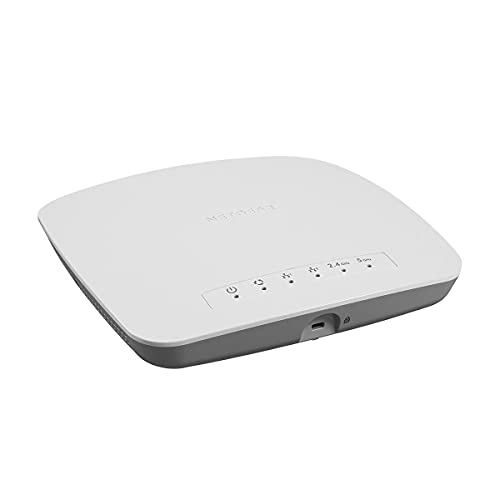
NETGEAR Wireless Access Point (WAC510) – Dual-Band – Features & Prices in Saudi Arabia :
NETGEAR Wireless Access Point (WAC510) – Dual-Band AC1300 WiFi Speed | Up to 200 Client Devices | 1 x 1G Ethernet LAN Port | MU-MIMO | Insight Remote Management | PoE or Optional Power Adapter
Wireless Type
802.11a/b/g/n/ac
Series
Long Range AP
Item model number
WAC510-100NAS
Item Weight
1.22 pounds
Product Dimensions
7.75 x 1.45 x 7.75 inches
Item Dimensions LxWxH
7.75 x 1.45 x 7.75 inches
Manufacturer
Netgear Inc
ASIN
B01NCJGL9H
Is Discontinued By Manufacturer
No
Date First Available
January 4, 2017
Test video – NETGEAR Wireless Access Point (WAC510) – Dual-Band :
Product highlights :
Questions & Answers – NETGEAR Wireless Access Point (WAC510) – Dual-Band :
Technical specifications – NETGEAR Wireless Access Point (WAC510) – Dual-Band :
Brand
NETGEAR
Series
Long Range AP
Frequency Band Class
Dual-Band
Wireless Type
802.11a/b/g/n/ac
Compatible Devices
iPhone, Printer, laptop
Included Components
,
Connectivity Technology
Ethernet
Item Weight
1.22 Pounds
Security Protocol
WPA-PSK, WPA2-PSK
Number of Ports
2
Purchase advice :
-
Warranty :
Check the duration of the warranty and also the faults and defects it covers. Is it complete or limited? and What is included in the warranty (parts, repairs or both)?
-
Shipping :
Is delivery offered? And how long does it take to get delivered (Delivery time)
-
Proof of purchase :
Does the shop give you an invoice ?
-
After-sales service :
Do they have an after-sales service to have information about the installation or operation (instructions for use). Also in case of problem, it is the seller who takes charge or you must contact the manufacturer or supplier yourself.
_____________________________

Z. G (verified owner) –
Multiple SSID with VLAN – It work flawless with multiple SSID with VLAN, I setup in AP mode, you must plug the cable to WAN port instead LAN port.
C. T (verified owner) –
excellent product – In my opinion this is an excellent product. If I was going to do it over, I would probably choose the WAC505, because the specs as an AP look similar, and it is less expensive, apparently mostly because there is no router capability. However, I am happy with the WAC510 operated as an AP. One additional comment – I’ve seen complaints about this product not including an external power supply. But if your other equipment supports PoE, it is a wonderful thing. One less cable to get tangled, one less wall wart to find an outlet for. Even if you don’t have PoE power sources, an injector doesn’t really cost more than a DC power supply, and you have freedom as to where you put it. For example, I have the PoE injector for a WAC510 at the router end of the ethernet cable, where it is out of the way.
R. S (verified owner) –
If you are installing a home WAP – I moved my internet connection and router to the front of the house and needed something for the other side. I had no idea how to install. Internet search gave me part of what I needed but I decided to press forward. When I built the house I had a Wireless Access Point Connection put in the Pantry. When the tech moved my Internet connection I had him connect the connection in the Pantry so I could install the WAP in there. I purchased the Aumox 5 Port Gigabit POE switch to provide the power and the NETGEAR WAC510 to connect to the other end. POE stands for Power Over Internet and it is how you will get power to the WAP. I plugged my router into the slot marked Uplink. You will need to have a Cat 5/6 connection in the same room that is connected to the WAP connection in the other room (in this case my pantry). I connected the wall to the port marked 1 and it immediately starting providing power to the Netgear. I then tested the WAC510 with a long cable to make sure everything worked. Setup was easy for the Netgear WAC510. Then I installed the WAP into the ceiling using the mounting bracket. I also ordered a 6 inch CAT 6 cable to use in to connect the NETGEAR to the plug in the pantry. Success. My router is 4 years old and was only providing about 80 MBPS wireless in my house. The WAC510 is providing almost 300 MBPS. You will have to create a second network but once everything is connected you won’t have to do anything else.
C. T (verified owner) –
excellent product – In my opinion this is an excellent product. If I was going to do it over, I would probably choose the WAC505, because the specs as an AP look similar, and it is less expensive, apparently mostly because there is no router capability. However, I am happy with the WAC510 operated as an AP. One additional comment – I’ve seen complaints about this product not including an external power supply. But if your other equipment supports PoE, it is a wonderful thing. One less cable to get tangled, one less wall wart to find an outlet for. Even if you don’t have PoE power sources, an injector doesn’t really cost more than a DC power supply, and you have freedom as to where you put it. For example, I have the PoE injector for a WAC510 at the router end of the ethernet cable, where it is out of the way.
R. S (verified owner) –
If you are installing a home WAP – I moved my internet connection and router to the front of the house and needed something for the other side. I had no idea how to install. Internet search gave me part of what I needed but I decided to press forward. When I built the house I had a Wireless Access Point Connection put in the Pantry. When the tech moved my Internet connection I had him connect the connection in the Pantry so I could install the WAP in there. I purchased the Aumox 5 Port Gigabit POE switch to provide the power and the NETGEAR WAC510 to connect to the other end. POE stands for Power Over Internet and it is how you will get power to the WAP. I plugged my router into the slot marked Uplink. You will need to have a Cat 5/6 connection in the same room that is connected to the WAP connection in the other room (in this case my pantry). I connected the wall to the port marked 1 and it immediately starting providing power to the Netgear. I then tested the WAC510 with a long cable to make sure everything worked. Setup was easy for the Netgear WAC510. Then I installed the WAP into the ceiling using the mounting bracket. I also ordered a 6 inch CAT 6 cable to use in to connect the NETGEAR to the plug in the pantry. Success. My router is 4 years old and was only providing about 80 MBPS wireless in my house. The WAC510 is providing almost 300 MBPS. You will have to create a second network but once everything is connected you won’t have to do anything else.
M. P (verified owner) –
– bought 2, The coverage for the house between the 2 is great. NO dead spots. I have one on one floor the one on the other.
P. Z (verified owner) –
First one died on me – I’ve been using Netgear switches for over a dozen years. They’ve always been rock solid and utterly dependable, even if the web interface has always been a bit clunky. This is the first Netgear WAP I’ve tried. I’ve typically used the U brand WAPs. In my experience those things are superior to anything else I’d tried, as long as you have a little bit of network management knowledge. But I needed another WAP for a secondary subnet so I decided to save a little money and get this one.
Z. G (verified owner) –
Multiple SSID with VLAN – It work flawless with multiple SSID with VLAN, I setup in AP mode, you must plug the cable to WAN port instead LAN port.
P. Z (verified owner) –
First one died on me – I’ve been using Netgear switches for over a dozen years. They’ve always been rock solid and utterly dependable, even if the web interface has always been a bit clunky. This is the first Netgear WAP I’ve tried. I’ve typically used the U brand WAPs. In my experience those things are superior to anything else I’d tried, as long as you have a little bit of network management knowledge. But I needed another WAP for a secondary subnet so I decided to save a little money and get this one.
M. P (verified owner) –
– bought 2, The coverage for the house between the 2 is great. NO dead spots. I have one on one floor the one on the other.