
Description
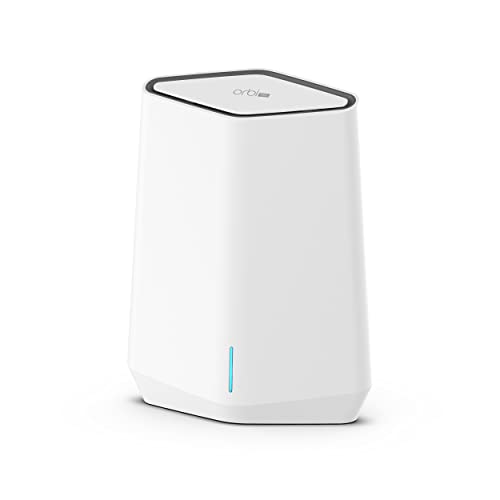
NETGEAR Orbi Pro WiFi 6 Tri-Band Mesh – Features & Prices in Saudi Arabia :
NETGEAR Orbi Pro WiFi 6 Tri-Band Mesh Add-on Satellite (SXS50) for Business or Home, Coverage up to 2,500 sq. ft, 75 Devices, AX5400 802.11AX (up to 5.4Gbps), Requires Orbi Pro WiFi 6 Router
Product Dimensions
8.3 x 9.8 x 6 inches
Item Weight
3.14 pounds
ASIN
B09PX728P8
Item model number
SXS50-100NAS
Date First Available
February 25, 2022
Manufacturer
Netgear
Test video – NETGEAR Orbi Pro WiFi 6 Tri-Band Mesh :
Product highlights :
Questions & Answers – NETGEAR Orbi Pro WiFi 6 Tri-Band Mesh :
Technical specifications – NETGEAR Orbi Pro WiFi 6 Tri-Band Mesh :
Brand
NETGEAR
Model Name
SXS50-100NAS
Frequency Band Class
Tri-Band
Wireless Communication Standard
802.11ax
Compatible Devices
iPhone, Laptop, Gaming Console
Included Components
One (1) 12V/2.5A power adapter, One (1) Orbi Pro WiFi 6 AX5400 Satellite (SXS50), Installation guide
Connectivity Technology
Wi-Fi, Ethernet
Control Method
App
Data Transfer Rate
5400 Megabits Per Second
Item Dimensions LxWxH
8.3 x 9.8 x 6 inches
Purchase advice :
-
Warranty :
Check the duration of the warranty and also the faults and defects it covers. Is it complete or limited? and What is included in the warranty (parts, repairs or both)?
-
Shipping :
Is delivery offered? And how long does it take to get delivered (Delivery time)
-
Proof of purchase :
Does the shop give you an invoice ?
-
After-sales service :
Do they have an after-sales service to have information about the installation or operation (instructions for use). Also in case of problem, it is the seller who takes charge or you must contact the manufacturer or supplier yourself.
_____________________________
G. N (verified owner) –
Tricky – Couple of tips here that can prove valuable to higher bandwidth packages.
T. P (verified owner) –
Everything I wanted it to be – I bought this for home – 3700 sqft on 3 levels including basement. Normal sized residential lot. I have security cameras around the house and property and outdoor patio spaces that were weakly served by my Nighthawk gaming router which was not wifi 6. This is a very solid platform that was pretty easy to setup with just a few bumps.
T. P (verified owner) –
Everything I wanted it to be – I bought this for home – 3700 sqft on 3 levels including basement. Normal sized residential lot. I have security cameras around the house and property and outdoor patio spaces that were weakly served by my Nighthawk gaming router which was not wifi 6. This is a very solid platform that was pretty easy to setup with just a few bumps.
B. N (verified owner) –
Overpriced but worth the hype I guess – I have always steered clear of NETGEAR and friends because the “normie” networking gear brands are way overpriced for what they are and usually dumbed down for mass market (Install the “Networks for Babies” app to configure your router – enter credit card number to enable Hacker Stopper(TM) and “supercharge your Streamie-weamies”, etc..). However I can’t argue with success here. These replaced a Quotom industrial PC that I turned into a router/AP and a MikroTik Cloud Switch. Both had issues with stability, and in the case of the MikroTik was slow and needed reboots. Those two have been relegated to the lab.
S. R (verified owner) –
Decent home wireless or small business APs. – I’m using these in access point mode only so not using the firewall / router functionality. There are 4 SSIDs you can setup on 4 different VLANs. If you don’t want to use an SSID on your default VLAN then you are limited to 3 SSIDs. The guest SSID is also setup for a guest type access only. Most situations this will provide the functionality you need. Just be aware of the VLAN to wireless associations. I have 4 VLANs on my home network for home, work, IOT and guest. Since I don’t use guest at all I’ve slimed it down to Home and IOT as my default VLAN is for management purposes only.
G. N (verified owner) –
Tricky – Couple of tips here that can prove valuable to higher bandwidth packages.
B. N (verified owner) –
Overpriced but worth the hype I guess – I have always steered clear of NETGEAR and friends because the “normie” networking gear brands are way overpriced for what they are and usually dumbed down for mass market (Install the “Networks for Babies” app to configure your router – enter credit card number to enable Hacker Stopper(TM) and “supercharge your Streamie-weamies”, etc..). However I can’t argue with success here. These replaced a Quotom industrial PC that I turned into a router/AP and a MikroTik Cloud Switch. Both had issues with stability, and in the case of the MikroTik was slow and needed reboots. Those two have been relegated to the lab.
S. R (verified owner) –
Decent home wireless or small business APs. – I’m using these in access point mode only so not using the firewall / router functionality. There are 4 SSIDs you can setup on 4 different VLANs. If you don’t want to use an SSID on your default VLAN then you are limited to 3 SSIDs. The guest SSID is also setup for a guest type access only. Most situations this will provide the functionality you need. Just be aware of the VLAN to wireless associations. I have 4 VLANs on my home network for home, work, IOT and guest. Since I don’t use guest at all I’ve slimed it down to Home and IOT as my default VLAN is for management purposes only.