
Description
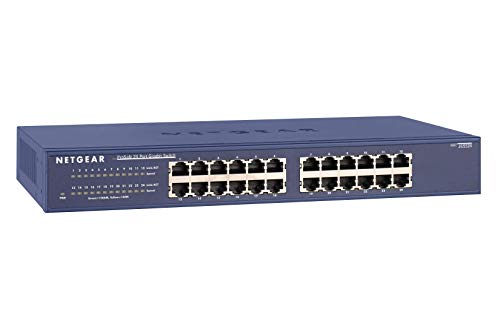
NETGEAR 24-Port Gigabit Ethernet Unmanaged Switch (JGS524) – Features & Prices in Saudi Arabia :
NETGEAR 24-Port Gigabit Ethernet Unmanaged Switch (JGS524) – Desktop or Rackmount, and Limited Lifetime Protection
Product Dimensions
18.11 x 9.13 x 3.23 inches
Item Weight
4.97 pounds
ASIN
B0002CWPW2
Item model number
JGS524NA
National Stock Number
5895-01-605-6139
Is Discontinued By Manufacturer
No
Date First Available
September 14, 2004
Manufacturer
Netgear
Language
English
Country of Origin
China
Test video – NETGEAR 24-Port Gigabit Ethernet Unmanaged Switch (JGS524) :
https://www.youtube.com/www.youtube.com/wat
Product highlights :
Questions & Answers – NETGEAR 24-Port Gigabit Ethernet Unmanaged Switch (JGS524) :
Technical specifications – NETGEAR 24-Port Gigabit Ethernet Unmanaged Switch (JGS524) :
Color
Black
Connector Type
RJ45
Brand
NETGEAR
Compatible Devices
PC
Cable Type
Ethernet
Purchase advice :
-
Warranty :
Check the duration of the warranty and also the faults and defects it covers. Is it complete or limited? and What is included in the warranty (parts, repairs or both)?
-
Shipping :
Is delivery offered? And how long does it take to get delivered (Delivery time)
-
Proof of purchase :
Does the shop give you an invoice ?
-
After-sales service :
Do they have an after-sales service to have information about the installation or operation (instructions for use). Also in case of problem, it is the seller who takes charge or you must contact the manufacturer or supplier yourself.
_____________________________
D. E (verified owner) –
Plug and play – I got this for a splitter for my dual gaming setup for me and my son. We have our desks side by side and it was an easy plug and play.
S. F (verified owner) –
Easy to use – Plug and play is always welcomed, settings aren’t complex, adorable box with basic security and efficiency. You had me at “life time warranty”. Would i recommend a friend? Yes. To who? To those who use at least two or more computers via ethernet cable.
T. L (verified owner) –
Nice BCM53128 switch with flawed management interface (can disable via hardware hack) – PROS:
I. R (verified owner) –
Gets the job done unattractively – The power cord is on the front. It’s designed I suppose primarily for wall mounting. Ugly and awkward if you don’t do that. I just need it to sit below the bedroom TV. Goofy looking with the power cord front and center.
M. C (verified owner) –
Real fast! – Went from 45 mb to 200! Just like that. I was getting 175+ on my phone, but not on my computer, until I hooked up the netgear. Easy is the keyword!!
I. F (verified owner) –
A stout little unit that works just the way it claims to ! – What I liked was the easy install and the ability to address the unit using mxlinux. Just install arp-scan (command line apt get-install arp-scan) and do a scan to find the unit ip address and sign on to set password, etc. I am using to feed two computers in my office off the one ethernet feed. Both computers run at the max speed of 250 Mbps. This compared to 50 Mbps with the second computer running wireless.
E. K (verified owner) –
A solid switch. JGS524 – I hate when Amazon groups similar products reviews together. Your not sure if the reviews you are reading are really for the specific product you intend to buy…Anyway my review is for the JGS524 24 port unmanaged rack mount switch.
M. C (verified owner) –
Real fast! – Went from 45 mb to 200! Just like that. I was getting 175+ on my phone, but not on my computer, until I hooked up the netgear. Easy is the keyword!!
I. F (verified owner) –
A stout little unit that works just the way it claims to ! – What I liked was the easy install and the ability to address the unit using mxlinux. Just install arp-scan (command line apt get-install arp-scan) and do a scan to find the unit ip address and sign on to set password, etc. I am using to feed two computers in my office off the one ethernet feed. Both computers run at the max speed of 250 Mbps. This compared to 50 Mbps with the second computer running wireless.
T. L (verified owner) –
Nice BCM53128 switch with flawed management interface (can disable via hardware hack) – PROS:
S. F (verified owner) –
Easy to use – Plug and play is always welcomed, settings aren’t complex, adorable box with basic security and efficiency. You had me at “life time warranty”. Would i recommend a friend? Yes. To who? To those who use at least two or more computers via ethernet cable.
I. S (verified owner) –
Also works with USB C to Ethernet Adapters – I have a switch box from another company, but it didn’t support the highest bandwidth for my USB C to Ethernet adapter. The Netgear switchbox supports the highest bandwidth for my USB C to Ethernet adapter, no drivers necessary, works straight out of the box.
E. K (verified owner) –
A solid switch. JGS524 – I hate when Amazon groups similar products reviews together. Your not sure if the reviews you are reading are really for the specific product you intend to buy…Anyway my review is for the JGS524 24 port unmanaged rack mount switch.
D. E (verified owner) –
Plug and play – I got this for a splitter for my dual gaming setup for me and my son. We have our desks side by side and it was an easy plug and play.
I. R (verified owner) –
Gets the job done unattractively – The power cord is on the front. It’s designed I suppose primarily for wall mounting. Ugly and awkward if you don’t do that. I just need it to sit below the bedroom TV. Goofy looking with the power cord front and center.
I. S (verified owner) –
Also works with USB C to Ethernet Adapters – I have a switch box from another company, but it didn’t support the highest bandwidth for my USB C to Ethernet adapter. The Netgear switchbox supports the highest bandwidth for my USB C to Ethernet adapter, no drivers necessary, works straight out of the box.