INTPW USB C Hub Adapter, USB C – Features & Prices in Saudi Arabia :
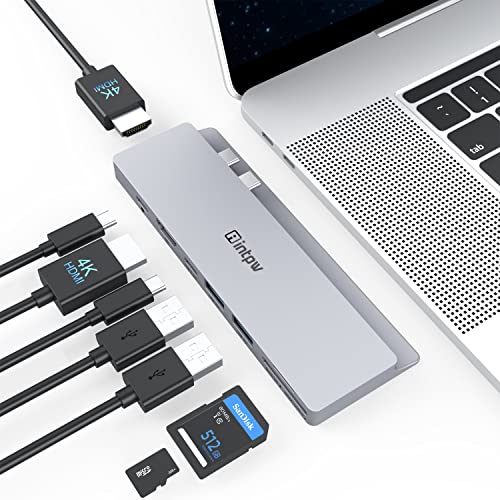
INTPW USB C Hub Adapter, USB C Multiport Adapter Hub Dongle for MacBook Pro/Air with Dual 4K HDMI, 312MB/s Data Transfer, 87W PD for 13/15 inch MacBook Pro 2020-2016, MacBook Air 2020-2018
Product Dimensions
5.3 x 2 x 0.4 inches
Item Weight
1.9 ounces
Manufacturer
intpw
ASIN
B09375P9C6
Item model number
IT-IF504
Date First Available
April 22, 2021
Test video – INTPW USB C Hub Adapter, USB C :
Product highlights :
【8 IN 2 USB C HUB】 The MacBook adapter expands your MacBook’s 2 USB-C ports into 2*4K@30Hz HDMI ports, 1*USB-C 3.0 port, 2*USB-A 3.0 ports, 87W USB-C Power Delivery fast charging port and Micro SD/USH-II SD Card slots. All from one MacBook USB C dock and fulfill your daily usage.
【4K TRIPLE DISPLAY】 Our USB C to HDMI adapter allows you to mirror or expand the display of your Macbook Pro/Macbook Air simultaneously to 2 TVs, monitors or projectors with resolution up to 4K@30Hz, our USB-C hub support display 3 screens in the same screen or split screen mode.
【5Gbps Data Transfer & PD 87W CHARGE】 Our USB C docking station equipped with SD 4.0 UHS-II Card slot support card up to 512G and allows super fast data reading and writing speed up to 312MB/s. The laptop docking station with USB-C 3.0 ports offers a fast transfer rate of up to 5Gbps, 20 times faster than USB 2.0, perfectly compatible with your USB devices. The USB-C PD Port will provide up to 87W to charge your MacBook.
【COMPACT DESIGN FOR MACBOOK】 This MacBook USB adapter ONLY fits on MacBook Pro 2019/2018/2017/2016, MacBook Air 2019/2018 13″ and 15″.NOT compatible with MacBook 16″ and Macbook with protective case/cover. Note: do not recommend that use this MacBook Pro 13 15 inch accessories in MacBook with M1 chip(dual monitors cannot be connected simultaneously). The USB C dongle with soft rubber bottom that ensures tight connection with the MacBook,provides additional stability of the Mac accessories.
【WORRY-FREE SERVICE】The set comes with a MacBook Pro USB adapter, 1 User Manual.18 Months warranty & Life-long time product support & Friendly Customer Service. Our company always try our best to satisfy our customer. If you have any questions with our Mac USB adapter, Please do not hesitate to contact us at any time freely.
Questions & Answers – INTPW USB C Hub Adapter, USB C :
➕ What is the price of INTPW USB C Hub Adapter, USB C in Saudi Arabia ?
The price of INTPW USB C Hub Adapter, USB C in-store is 190 SAR VAT.
➕ When INTPW USB C Hub Adapter, USB C was released ?
The release date was April 22, 2021.
➕ What is the price of INTPW USB C Hub Adapter, USB C cheap used ?
The price of INTPW USB C Hub Adapter, USB C used is 130 SAR VAT.
➕ What are the main characteristics of INTPW USB C Hub Adapter, USB C ?
Special specifications :
【8 IN 2 USB C HUB】 The MacBook adapter expands your MacBook’s 2 USB-C ports into 2*4K@30Hz HDMI ports, 1*USB-C 3.0 port, 2*USB-A 3.0 ports, 87W USB-C Power Delivery fast charging port and Micro SD/USH-II SD Card slots. All from one MacBook USB C dock and fulfill your daily usage.
➕ Is it interesting to buy this product ?
The best people who can answer you are customers who have already bought and tested this product (See Customer Reviews). This product is rated 4.1 / 5 on Amazon.
➕ Where to buy INTPW USB C Hub Adapter, USB C in Saudi Arabia ?
Technical specifications – INTPW USB C Hub Adapter, USB C :
Brand
intpw
Color
sliver
Hardware Interface
USB 3.0 Type A, USB 3.0 Type C, HDMI
Compatible Devices
MacBook Pro/Macbook Air
Total USB Ports
2
Purchase advice :
Warranty :
Check the duration of the warranty and also the faults and defects it covers. Is it complete or limited? and What is included in the warranty (parts, repairs or both)?
Shipping :
Is delivery offered? And how long does it take to get delivered (Delivery time)
Proof of purchase :
Does the shop give you an invoice ?
After-sales service :
Do they have an after-sales service to have information about the installation or operation (instructions for use). Also in case of problem, it is the seller who takes charge or you must contact the manufacturer or supplier yourself.
_____________________________
16 reviews for INTPW USB C Hub Adapter, USB C
Rated 2 out of 5
R. D (verified owner)–
Was almost great, but then… – Unfortunately, this dock worked well only for about 3 months. Yesterday I unplugged one of the HDMI cables, and once I plugged it back in, that HDMI port stopped working. The monitor registers that it’s being plugged in, but no data transfers. I also checked that cable with the other HDMI port, and it still works. The problem is definitely the dock. Considering it’s the first time I’ve unplugged and plugged the HDMI cable back in, it just points to this being low quality. And I can’t find access to INTWP’s customer support.
Rated 5 out of 5
A. R (verified owner)–
Turns your mac into an actual work laptop. – This makes a your mac work with your workflow. With the work from home trend this month, this has really allowed me to connect my MacBook Pro just like my other windows computers. It is at a decent price, and really adds a lot of functionality, with a sleek form. For the same price as the stupid HDMI, USB, and USB-C adapter sold by Apple, you get a ton more usb ports, an extra HDMI extra USB-C and SD card readers. Comes with a cute case to carry it, but you will likely keep this connected to your computer or at your desk.
Rated 4 out of 5
I. M (verified owner)–
Good adapter but blocks fan – This is a nice adapter and have solved my problems for the lack of ports on my MacBook Pro. A drawback I have is that it blocks some of the cooling with the fan when it is plugged in, but I usually don’t notice any interruptions or negative effects from that.
Rated 4 out of 5
F. D (verified owner)–
Did NOT fit on 16-in MBP 2019 – Did NOT fit my 2019 16-in MacBook Pro. Luckily, my wife has a 2019 15-in and it fits fine. I decided to keep it for her and look for something else for the newer MBPs.
Rated 5 out of 5
A. R (verified owner)–
Turns your mac into an actual work laptop. – This makes a your mac work with your workflow. With the work from home trend this month, this has really allowed me to connect my MacBook Pro just like my other windows computers. It is at a decent price, and really adds a lot of functionality, with a sleek form. For the same price as the stupid HDMI, USB, and USB-C adapter sold by Apple, you get a ton more usb ports, an extra HDMI extra USB-C and SD card readers. Comes with a cute case to carry it, but you will likely keep this connected to your computer or at your desk.
Rated 4 out of 5
K. G (verified owner)–
Plug and play – Like: Plug and play (somewhat). Allows to add up to 2 external monitors. Lots of interfaces to play with.
Rated 4 out of 5
I. M (verified owner)–
Good adapter but blocks fan – This is a nice adapter and have solved my problems for the lack of ports on my MacBook Pro. A drawback I have is that it blocks some of the cooling with the fan when it is plugged in, but I usually don’t notice any interruptions or negative effects from that.
Rated 5 out of 5
F. T (verified owner)–
Exactly what I needed!! – This is exactly what I needed, especially working from home, I can hook up both my screens to it, my wireless mouse and keyboard adapter, charger cable, and external hard drive. No lag or heating issues. I like the colour also, matches my space grey 16″ MacBook Pro. I trimmed my case using a dremel so I can have the hub plugged in the same time as my case. Wasn’t that big of a deal, I love the design and how it hugs the laptop. Pictures attached.
Rated 4 out of 5
K. G (verified owner)–
Plug and play – Like: Plug and play (somewhat). Allows to add up to 2 external monitors. Lots of interfaces to play with.
Rated 5 out of 5
C. P (verified owner)–
Works great to have dual monitors, PD Charging. – Using this with my Macbook Pro 16″, it has worked well for dual monitors (only 1080p, so can’t comment on 4k screen support) as well as power delivery and a few USBs. Works well and so far has kept the computer charging despite only charging at 87W (instead of the 96W that the computer will take). For my situation, I’m also using a separate USB-c dock that I had to connect to ethernet and a third monitor, so this works pretty well for a 3 monitor setup on the Macbook (which Apple has really made unnecessarily difficult). I thought about getting a Thunderbolt 3 dock, but just couldn’t justify the cost. Happy with my purchase!
Rated 2 out of 5
L. T (verified owner)–
Good for two monitors but thats it… – I have been using this product since May 2020 (I had to pay for it ..did not get it free like some other reviews).
Rated 4 out of 5
F. D (verified owner)–
Did NOT fit on 16-in MBP 2019 – Did NOT fit my 2019 16-in MacBook Pro. Luckily, my wife has a 2019 15-in and it fits fine. I decided to keep it for her and look for something else for the newer MBPs.
Rated 2 out of 5
R. D (verified owner)–
Was almost great, but then… – Unfortunately, this dock worked well only for about 3 months. Yesterday I unplugged one of the HDMI cables, and once I plugged it back in, that HDMI port stopped working. The monitor registers that it’s being plugged in, but no data transfers. I also checked that cable with the other HDMI port, and it still works. The problem is definitely the dock. Considering it’s the first time I’ve unplugged and plugged the HDMI cable back in, it just points to this being low quality. And I can’t find access to INTWP’s customer support.
Rated 5 out of 5
C. P (verified owner)–
Works great to have dual monitors, PD Charging. – Using this with my Macbook Pro 16″, it has worked well for dual monitors (only 1080p, so can’t comment on 4k screen support) as well as power delivery and a few USBs. Works well and so far has kept the computer charging despite only charging at 87W (instead of the 96W that the computer will take). For my situation, I’m also using a separate USB-c dock that I had to connect to ethernet and a third monitor, so this works pretty well for a 3 monitor setup on the Macbook (which Apple has really made unnecessarily difficult). I thought about getting a Thunderbolt 3 dock, but just couldn’t justify the cost. Happy with my purchase!
Rated 2 out of 5
L. T (verified owner)–
Good for two monitors but thats it… – I have been using this product since May 2020 (I had to pay for it ..did not get it free like some other reviews).
Rated 5 out of 5
F. T (verified owner)–
Exactly what I needed!! – This is exactly what I needed, especially working from home, I can hook up both my screens to it, my wireless mouse and keyboard adapter, charger cable, and external hard drive. No lag or heating issues. I like the colour also, matches my space grey 16″ MacBook Pro. I trimmed my case using a dremel so I can have the hub plugged in the same time as my case. Wasn’t that big of a deal, I love the design and how it hugs the laptop. Pictures attached.

R. D (verified owner) –
Was almost great, but then… – Unfortunately, this dock worked well only for about 3 months. Yesterday I unplugged one of the HDMI cables, and once I plugged it back in, that HDMI port stopped working. The monitor registers that it’s being plugged in, but no data transfers. I also checked that cable with the other HDMI port, and it still works. The problem is definitely the dock. Considering it’s the first time I’ve unplugged and plugged the HDMI cable back in, it just points to this being low quality. And I can’t find access to INTWP’s customer support.
A. R (verified owner) –
Turns your mac into an actual work laptop. – This makes a your mac work with your workflow. With the work from home trend this month, this has really allowed me to connect my MacBook Pro just like my other windows computers. It is at a decent price, and really adds a lot of functionality, with a sleek form. For the same price as the stupid HDMI, USB, and USB-C adapter sold by Apple, you get a ton more usb ports, an extra HDMI extra USB-C and SD card readers. Comes with a cute case to carry it, but you will likely keep this connected to your computer or at your desk.
I. M (verified owner) –
Good adapter but blocks fan – This is a nice adapter and have solved my problems for the lack of ports on my MacBook Pro. A drawback I have is that it blocks some of the cooling with the fan when it is plugged in, but I usually don’t notice any interruptions or negative effects from that.
F. D (verified owner) –
Did NOT fit on 16-in MBP 2019 – Did NOT fit my 2019 16-in MacBook Pro. Luckily, my wife has a 2019 15-in and it fits fine. I decided to keep it for her and look for something else for the newer MBPs.
A. R (verified owner) –
Turns your mac into an actual work laptop. – This makes a your mac work with your workflow. With the work from home trend this month, this has really allowed me to connect my MacBook Pro just like my other windows computers. It is at a decent price, and really adds a lot of functionality, with a sleek form. For the same price as the stupid HDMI, USB, and USB-C adapter sold by Apple, you get a ton more usb ports, an extra HDMI extra USB-C and SD card readers. Comes with a cute case to carry it, but you will likely keep this connected to your computer or at your desk.
K. G (verified owner) –
Plug and play – Like: Plug and play (somewhat). Allows to add up to 2 external monitors. Lots of interfaces to play with.
I. M (verified owner) –
Good adapter but blocks fan – This is a nice adapter and have solved my problems for the lack of ports on my MacBook Pro. A drawback I have is that it blocks some of the cooling with the fan when it is plugged in, but I usually don’t notice any interruptions or negative effects from that.
F. T (verified owner) –
Exactly what I needed!! – This is exactly what I needed, especially working from home, I can hook up both my screens to it, my wireless mouse and keyboard adapter, charger cable, and external hard drive. No lag or heating issues. I like the colour also, matches my space grey 16″ MacBook Pro. I trimmed my case using a dremel so I can have the hub plugged in the same time as my case. Wasn’t that big of a deal, I love the design and how it hugs the laptop. Pictures attached.
K. G (verified owner) –
Plug and play – Like: Plug and play (somewhat). Allows to add up to 2 external monitors. Lots of interfaces to play with.
C. P (verified owner) –
Works great to have dual monitors, PD Charging. – Using this with my Macbook Pro 16″, it has worked well for dual monitors (only 1080p, so can’t comment on 4k screen support) as well as power delivery and a few USBs. Works well and so far has kept the computer charging despite only charging at 87W (instead of the 96W that the computer will take). For my situation, I’m also using a separate USB-c dock that I had to connect to ethernet and a third monitor, so this works pretty well for a 3 monitor setup on the Macbook (which Apple has really made unnecessarily difficult). I thought about getting a Thunderbolt 3 dock, but just couldn’t justify the cost. Happy with my purchase!
L. T (verified owner) –
Good for two monitors but thats it… – I have been using this product since May 2020 (I had to pay for it ..did not get it free like some other reviews).
F. D (verified owner) –
Did NOT fit on 16-in MBP 2019 – Did NOT fit my 2019 16-in MacBook Pro. Luckily, my wife has a 2019 15-in and it fits fine. I decided to keep it for her and look for something else for the newer MBPs.
R. D (verified owner) –
Was almost great, but then… – Unfortunately, this dock worked well only for about 3 months. Yesterday I unplugged one of the HDMI cables, and once I plugged it back in, that HDMI port stopped working. The monitor registers that it’s being plugged in, but no data transfers. I also checked that cable with the other HDMI port, and it still works. The problem is definitely the dock. Considering it’s the first time I’ve unplugged and plugged the HDMI cable back in, it just points to this being low quality. And I can’t find access to INTWP’s customer support.
C. P (verified owner) –
Works great to have dual monitors, PD Charging. – Using this with my Macbook Pro 16″, it has worked well for dual monitors (only 1080p, so can’t comment on 4k screen support) as well as power delivery and a few USBs. Works well and so far has kept the computer charging despite only charging at 87W (instead of the 96W that the computer will take). For my situation, I’m also using a separate USB-c dock that I had to connect to ethernet and a third monitor, so this works pretty well for a 3 monitor setup on the Macbook (which Apple has really made unnecessarily difficult). I thought about getting a Thunderbolt 3 dock, but just couldn’t justify the cost. Happy with my purchase!
L. T (verified owner) –
Good for two monitors but thats it… – I have been using this product since May 2020 (I had to pay for it ..did not get it free like some other reviews).
F. T (verified owner) –
Exactly what I needed!! – This is exactly what I needed, especially working from home, I can hook up both my screens to it, my wireless mouse and keyboard adapter, charger cable, and external hard drive. No lag or heating issues. I like the colour also, matches my space grey 16″ MacBook Pro. I trimmed my case using a dremel so I can have the hub plugged in the same time as my case. Wasn’t that big of a deal, I love the design and how it hugs the laptop. Pictures attached.