ASUS USB-BT500 Bluetooth 5.0 USB Adapter with – Features & Prices in Saudi Arabia :
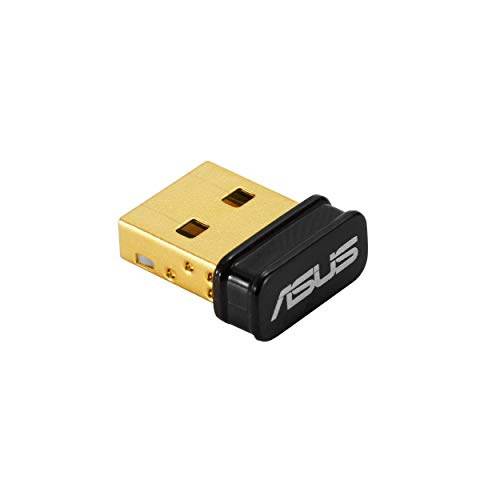
ASUS USB-BT500 Bluetooth 5.0 USB Adapter with Ultra Small Design, Backward Compatible with Bluetooth 2.1/3.x/4.x
Brand
ASUS
Item model number
USB-BT500
Operating System
Linux,Windows 8
Item Weight
0.16 ounces
Product Dimensions
0.28 x 0.59 x 0.69 inches
Item Dimensions LxWxH
0.28 x 0.59 x 0.69 inches
Color
Black
Manufacturer
Asus
ASIN
B08DFBNG7F
Country of Origin
China
Date First Available
July 21, 2020
Test video – ASUS USB-BT500 Bluetooth 5.0 USB Adapter with :
https://www.youtube.com/watch?v=v2U4cy6HmzU
Product highlights :
Bluetooth 5.0 for Faster, Further Coverage- Transfer data up to twice as fast as before, and with 4X the range in BLE
Wireless Connection, free of limitation – Enables wireless communication with Bluetooth-enabled devices
Full Compatibility – Backward compatible with Bluetooth2.1/3.x/4.x
Power Saving for Devices – Bluetooth Low Energy technology for energy-saving wireless connectivity
Ultra-small Design – Highly portable and easy to use.
Questions & Answers – ASUS USB-BT500 Bluetooth 5.0 USB Adapter with :
➕ What is the price of ASUS USB-BT500 Bluetooth 5.0 USB Adapter with in Saudi Arabia ?
The price of ASUS USB-BT500 Bluetooth 5.0 USB Adapter with in-store is 60 SAR VAT.
➕ When ASUS USB-BT500 Bluetooth 5.0 USB Adapter with was released ?
The release date was July 21, 2020.
➕ What is the price of ASUS USB-BT500 Bluetooth 5.0 USB Adapter with cheap used ?
The price of ASUS USB-BT500 Bluetooth 5.0 USB Adapter with used is 40 SAR VAT.
➕ What are the main characteristics of ASUS USB-BT500 Bluetooth 5.0 USB Adapter with ?
Special specifications :
Bluetooth 5.0 for Faster, Further Coverage- Transfer data up to twice as fast as before, and with 4X the range in BLE
➕ Is it interesting to buy this product ?
The best people who can answer you are customers who have already bought and tested this product (See Customer Reviews). This product is rated 4.6 / 5 on Amazon.
➕ Where to buy ASUS USB-BT500 Bluetooth 5.0 USB Adapter with in Saudi Arabia ?
Technical specifications – ASUS USB-BT500 Bluetooth 5.0 USB Adapter with :
Brand
ASUS
Hardware Interface
Bluetooth, USB
Operating System
Linux,Windows 8
Color
Black
Item Dimensions LxWxH
0.28 x 0.59 x 0.69 inches
Data Link Protocol
Bluetooth
Item Weight
0.01 Pounds
Purchase advice :
Warranty :
Check the duration of the warranty and also the faults and defects it covers. Is it complete or limited? and What is included in the warranty (parts, repairs or both)?
Shipping :
Is delivery offered? And how long does it take to get delivered (Delivery time)
Proof of purchase :
Does the shop give you an invoice ?
After-sales service :
Do they have an after-sales service to have information about the installation or operation (instructions for use). Also in case of problem, it is the seller who takes charge or you must contact the manufacturer or supplier yourself.
_____________________________
16 reviews for ASUS USB-BT500 Bluetooth 5.0 USB Adapter with
Rated 5 out of 5
P. K (verified owner)–
Good purchase. READ WHY – There maybe other products that do the job but this is from a well known company… it’s well made… and comes with warranty/tech support. I bought it cuz my x570 wouldn’t connect to my PS5 controller. This is an overkill product, it will detect my controller and other connected devices from 10 houses away.. WHY buy if it’s overkill??? Cuz if you need to use Bluetooth for anything else like large data file transfers ect… it’s 5.0, so it will carry and manage anything you throw at it
Rated 5 out of 5
S. R (verified owner)–
Solid Bluetooth adapter, but screwy driver installation – Like any ASUS products, this Bluetooth is solidly built so it can withstand frequent insertions into the USB port. The only issue with this Bluetooth adapter is the ASUS driver install. If you want the latest drivers for this Bluetooth adapter, you have to download it at the ASUS website. There is no readme.txt file to explain how this installation works. I found out after much troubleshooting of the Bluetooth connection failures at first that the install folder must on the C: drive, because their installation program is DOS based and cannot handle Windows OS drive mappings. Nice of ASUS not to warn us about this problem with their install program. Anyway, after uninstalling the corrupted drivers, then moving the install folder to the C: drive, and rerunning the install program, the drivers then fully installed for the Windows OS; and the Bluetooth successfully connected to my Bluetooth devices. Yes, it is a lot of work to get this Bluetooth adapter to work successfully.
Rated 5 out of 5
N. D (verified owner)–
Plug and Play for Legacy Desktops! – Highly recommended. I have a legacy desktop and this device is literally plug and play without downloading any software for Windows 10. I paid a few extra dollars for Asus instead of TP-link (Chinese owned compaany). Asus is a reputable company so I’d rather pay more money for a quality product.
Rated 5 out of 5
J. I (verified owner)–
I just Plug’n Played! – [Day One Review]
Rated 5 out of 5
F. Z (verified owner)–
Bought for Home Assistant (on HA Blue hardware) – So one day you see HA now supports BLE tokens, and you think to yourself. What new fun (pointless to the wife) nerdy thing can I do with tokens… I know! I can slap one on the bottom of my wheelie bin and create a notification that knows the bin has not been taken out of taken in.
Rated 5 out of 5
P. K (verified owner)–
Good purchase. READ WHY – There maybe other products that do the job but this is from a well known company… it’s well made… and comes with warranty/tech support. I bought it cuz my x570 wouldn’t connect to my PS5 controller. This is an overkill product, it will detect my controller and other connected devices from 10 houses away.. WHY buy if it’s overkill??? Cuz if you need to use Bluetooth for anything else like large data file transfers ect… it’s 5.0, so it will carry and manage anything you throw at it
Rated 5 out of 5
F. Z (verified owner)–
Bought for Home Assistant (on HA Blue hardware) – So one day you see HA now supports BLE tokens, and you think to yourself. What new fun (pointless to the wife) nerdy thing can I do with tokens… I know! I can slap one on the bottom of my wheelie bin and create a notification that knows the bin has not been taken out of taken in.
Rated 5 out of 5
A. B (verified owner)–
Kind of plug and play on Windows 10 – My PC is on Windows 10. If you’re using this for a headset then you need to make your headset the default speaker.
Rated 5 out of 5
M. K (verified owner)–
Works great with Windows 11 – The ASUS USB-BT500 is really easy to install. Just plug into a USB 2.0 port (don’t use USB 3.0, you won’t get any speed increase and USB 3.0 is known to cause electrical interference problems with USB Bluetooth devices of all brands), then install the latest drivers downloaded from the ASUS website, then after a system reboot you’re good to go.
Rated 5 out of 5
A. B (verified owner)–
Kind of plug and play on Windows 10 – My PC is on Windows 10. If you’re using this for a headset then you need to make your headset the default speaker.
Rated 4 out of 5
F. E (verified owner)–
It does what it suppose to do. – I paid extra for the name brand. Intuitive, easy to use. Let’s hope it last for a long time also.
Rated 5 out of 5
M. K (verified owner)–
Works great with Windows 11 – The ASUS USB-BT500 is really easy to install. Just plug into a USB 2.0 port (don’t use USB 3.0, you won’t get any speed increase and USB 3.0 is known to cause electrical interference problems with USB Bluetooth devices of all brands), then install the latest drivers downloaded from the ASUS website, then after a system reboot you’re good to go.
Rated 5 out of 5
J. I (verified owner)–
I just Plug’n Played! – [Day One Review]
Rated 5 out of 5
N. D (verified owner)–
Plug and Play for Legacy Desktops! – Highly recommended. I have a legacy desktop and this device is literally plug and play without downloading any software for Windows 10. I paid a few extra dollars for Asus instead of TP-link (Chinese owned compaany). Asus is a reputable company so I’d rather pay more money for a quality product.
Rated 4 out of 5
F. E (verified owner)–
It does what it suppose to do. – I paid extra for the name brand. Intuitive, easy to use. Let’s hope it last for a long time also.
Rated 5 out of 5
S. R (verified owner)–
Solid Bluetooth adapter, but screwy driver installation – Like any ASUS products, this Bluetooth is solidly built so it can withstand frequent insertions into the USB port. The only issue with this Bluetooth adapter is the ASUS driver install. If you want the latest drivers for this Bluetooth adapter, you have to download it at the ASUS website. There is no readme.txt file to explain how this installation works. I found out after much troubleshooting of the Bluetooth connection failures at first that the install folder must on the C: drive, because their installation program is DOS based and cannot handle Windows OS drive mappings. Nice of ASUS not to warn us about this problem with their install program. Anyway, after uninstalling the corrupted drivers, then moving the install folder to the C: drive, and rerunning the install program, the drivers then fully installed for the Windows OS; and the Bluetooth successfully connected to my Bluetooth devices. Yes, it is a lot of work to get this Bluetooth adapter to work successfully.
P. K (verified owner) –
Good purchase. READ WHY – There maybe other products that do the job but this is from a well known company… it’s well made… and comes with warranty/tech support. I bought it cuz my x570 wouldn’t connect to my PS5 controller. This is an overkill product, it will detect my controller and other connected devices from 10 houses away.. WHY buy if it’s overkill??? Cuz if you need to use Bluetooth for anything else like large data file transfers ect… it’s 5.0, so it will carry and manage anything you throw at it
S. R (verified owner) –
Solid Bluetooth adapter, but screwy driver installation – Like any ASUS products, this Bluetooth is solidly built so it can withstand frequent insertions into the USB port. The only issue with this Bluetooth adapter is the ASUS driver install. If you want the latest drivers for this Bluetooth adapter, you have to download it at the ASUS website. There is no readme.txt file to explain how this installation works. I found out after much troubleshooting of the Bluetooth connection failures at first that the install folder must on the C: drive, because their installation program is DOS based and cannot handle Windows OS drive mappings. Nice of ASUS not to warn us about this problem with their install program. Anyway, after uninstalling the corrupted drivers, then moving the install folder to the C: drive, and rerunning the install program, the drivers then fully installed for the Windows OS; and the Bluetooth successfully connected to my Bluetooth devices. Yes, it is a lot of work to get this Bluetooth adapter to work successfully.
N. D (verified owner) –
Plug and Play for Legacy Desktops! – Highly recommended. I have a legacy desktop and this device is literally plug and play without downloading any software for Windows 10. I paid a few extra dollars for Asus instead of TP-link (Chinese owned compaany). Asus is a reputable company so I’d rather pay more money for a quality product.
J. I (verified owner) –
I just Plug’n Played! – [Day One Review]
F. Z (verified owner) –
Bought for Home Assistant (on HA Blue hardware) – So one day you see HA now supports BLE tokens, and you think to yourself. What new fun (pointless to the wife) nerdy thing can I do with tokens… I know! I can slap one on the bottom of my wheelie bin and create a notification that knows the bin has not been taken out of taken in.
P. K (verified owner) –
Good purchase. READ WHY – There maybe other products that do the job but this is from a well known company… it’s well made… and comes with warranty/tech support. I bought it cuz my x570 wouldn’t connect to my PS5 controller. This is an overkill product, it will detect my controller and other connected devices from 10 houses away.. WHY buy if it’s overkill??? Cuz if you need to use Bluetooth for anything else like large data file transfers ect… it’s 5.0, so it will carry and manage anything you throw at it
F. Z (verified owner) –
Bought for Home Assistant (on HA Blue hardware) – So one day you see HA now supports BLE tokens, and you think to yourself. What new fun (pointless to the wife) nerdy thing can I do with tokens… I know! I can slap one on the bottom of my wheelie bin and create a notification that knows the bin has not been taken out of taken in.
A. B (verified owner) –
Kind of plug and play on Windows 10 – My PC is on Windows 10. If you’re using this for a headset then you need to make your headset the default speaker.
M. K (verified owner) –
Works great with Windows 11 – The ASUS USB-BT500 is really easy to install. Just plug into a USB 2.0 port (don’t use USB 3.0, you won’t get any speed increase and USB 3.0 is known to cause electrical interference problems with USB Bluetooth devices of all brands), then install the latest drivers downloaded from the ASUS website, then after a system reboot you’re good to go.
A. B (verified owner) –
Kind of plug and play on Windows 10 – My PC is on Windows 10. If you’re using this for a headset then you need to make your headset the default speaker.
F. E (verified owner) –
It does what it suppose to do. – I paid extra for the name brand. Intuitive, easy to use. Let’s hope it last for a long time also.
M. K (verified owner) –
Works great with Windows 11 – The ASUS USB-BT500 is really easy to install. Just plug into a USB 2.0 port (don’t use USB 3.0, you won’t get any speed increase and USB 3.0 is known to cause electrical interference problems with USB Bluetooth devices of all brands), then install the latest drivers downloaded from the ASUS website, then after a system reboot you’re good to go.
J. I (verified owner) –
I just Plug’n Played! – [Day One Review]
N. D (verified owner) –
Plug and Play for Legacy Desktops! – Highly recommended. I have a legacy desktop and this device is literally plug and play without downloading any software for Windows 10. I paid a few extra dollars for Asus instead of TP-link (Chinese owned compaany). Asus is a reputable company so I’d rather pay more money for a quality product.
F. E (verified owner) –
It does what it suppose to do. – I paid extra for the name brand. Intuitive, easy to use. Let’s hope it last for a long time also.
S. R (verified owner) –
Solid Bluetooth adapter, but screwy driver installation – Like any ASUS products, this Bluetooth is solidly built so it can withstand frequent insertions into the USB port. The only issue with this Bluetooth adapter is the ASUS driver install. If you want the latest drivers for this Bluetooth adapter, you have to download it at the ASUS website. There is no readme.txt file to explain how this installation works. I found out after much troubleshooting of the Bluetooth connection failures at first that the install folder must on the C: drive, because their installation program is DOS based and cannot handle Windows OS drive mappings. Nice of ASUS not to warn us about this problem with their install program. Anyway, after uninstalling the corrupted drivers, then moving the install folder to the C: drive, and rerunning the install program, the drivers then fully installed for the Windows OS; and the Bluetooth successfully connected to my Bluetooth devices. Yes, it is a lot of work to get this Bluetooth adapter to work successfully.