Test video – ARRIS Surfboard G34 DOCSIS 3.1 Gigabit Cable :
Product highlights :
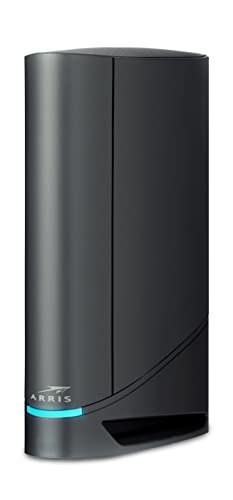
A Trusted Name in Home Connectivity: Get high speeds, low latency, and a two-in-one product! With the ARRIS SURFboard G34 Wi-Fi Cable Modem, you will increase your network capability and get ultra-fast streaming and downloading throughout your home. From a trusted brand with over 260 million modems sold and growing.
Save Money: Own your modem and save. Reduce your cable bill up to $168 dollars per year in cable modem rental fees (Savings vary by cable service provider). Certified for use with most U.S. cable internet service providers. For a complete list see additional details below.
Modem Technology: DOCSIS 3.1 is the newest technology available from cable internet providers. Its 10x faster than DOCSIS 3.0, provides better security, reduces lag while gaming & enables multi-gig networking (ability to run fast speeds on your copper cable from your internet provider).
Simple and Secure Set-up: Just plug-in, download the SURFboard Central App, and follow the step-by-step intrstuctions to activate the modem, set-up and customize your Wi-Fi network, and add devices to your home network! Once setup is complete, the app provides real-time monitoring of the devices on your network, enhanced parental controls like setting time limits and pausing internet and much more.
Compatibility: The SURFboard G34 is compatible with major U.S. cable internet providers including Cox (Gigablast), Spectrum (Internet Gig), Xfinity (Gigabit/Gigabit x2) and others. It’s approved for cable internet speed plans up to 1 Gbps. Check your Internet Service Provider (ISP) website to confirm compatibility.
What’s in the Box: When you purchase you will get an ARRIS SURFboard G34 Cable Modem, Power Supply, Quick-Start guide, and 2-year warranty card.
➕ What is the price of ARRIS Surfboard G34 DOCSIS 3.1 Gigabit Cable in Saudi Arabia ?
The price of ARRIS Surfboard G34 DOCSIS 3.1 Gigabit Cable in-store is 800 SAR VAT.
➕ When ARRIS Surfboard G34 DOCSIS 3.1 Gigabit Cable was released ?
The release date was June 8, 2021.
➕ What is the price of ARRIS Surfboard G34 DOCSIS 3.1 Gigabit Cable cheap used ?
The price of ARRIS Surfboard G34 DOCSIS 3.1 Gigabit Cable used is 550 SAR VAT.
➕ What are the main characteristics of ARRIS Surfboard G34 DOCSIS 3.1 Gigabit Cable ?
Special specifications :
A Trusted Name in Home Connectivity: Get high speeds, low latency, and a two-in-one product! With the ARRIS SURFboard G34 Wi-Fi Cable Modem, you will increase your network capability and get ultra-fast streaming and downloading throughout your home. From a trusted brand with over 260 million modems sold and growing.
➕ Is it interesting to buy this product ?
The best people who can answer you are customers who have already bought and tested this product (See Customer Reviews). This product is rated 4.3 / 5 on Amazon.
➕ Where to buy ARRIS Surfboard G34 DOCSIS 3.1 Gigabit Cable in Saudi Arabia ?
Check the duration of the warranty and also the faults and defects it covers. Is it complete or limited? and What is included in the warranty (parts, repairs or both)?
Shipping :
Is delivery offered? And how long does it take to get delivered (Delivery time)
Proof of purchase :
Does the shop give you an invoice ?
After-sales service :
Do they have an after-sales service to have information about the installation or operation (instructions for use). Also in case of problem, it is the seller who takes charge or you must contact the manufacturer or supplier yourself.
_____________________________
16 reviews for ARRIS Surfboard G34 DOCSIS 3.1 Gigabit Cable
Rated 5 out of 5
Z. M (verified owner)–
Solid replacement for renting Xfinity modem – Decided to replace the rented Modem/Router with a ARRIS Surfboard G36 (on Black Friday sale). Activation was simple and quick. Small learning curve to make sure I applied all the settings similar to the previous one (IP Range Settings, Port Forwarding rules, etc.). Now it works like a charm. And faster than the rented one!! Plus I now can control my DNS server choice 🙂
Rated 4 out of 5
G. O (verified owner)–
Great wifi router at a really great price! – I was skeptical about buying a used product. But since it was sold by Amazon Warehouse, the discount was substantial enough and I could return it if it showed up in bad condition, I took a chance.
Rated 3 out of 5
A. G (verified owner)–
Wifi issues – Installation was easy. Administration was much easier on the web than tha surfboard app. For some reason app keeps saying the G34 is not linked and not setup. Tried multiple times to restart app and tried to link again but still same error. Sadly without the app you cannot remotely manage it like restart and stuff. Now the main problems: There is something wrong with the wifi in the G34 i got. It resets 2.4Ghz channel suddenly and assigns a different channel. Roku does not like that and it has to be restarted. I manually assigned the channel in admin so that G34 always keeps same channel. Second issue, because of this i have returned it, was the wifi stops working almost everyday. It shows connected but the it is hanged. Whether 5Ghz or 2.4Ghz it don’t matter. It just hangs and it has to be restarted. I never had this issue with my previous modem router combo. The time of the day when it decides to stop working was random and some days it used to stop during work hours. One you restart it started working again. Luckily amazon return policy is awesome so returned because it was not reliable and too much of a hassle. At this price point it should not have wifi issues everyday.
Rated 5 out of 5
S. N (verified owner)–
Need for Speed! – Bought this one to replace an older (AC1900) DOCSIS 3.0 unit. Activation/sync took a long time with multiple tries, but that was due to Spectrum and not the unit itself. I finally got some real help with online chat as phoning in was futile.
Rated 4 out of 5
I. M (verified owner)–
Works well – I’m in a 1 bed apartment so I haven’t really tested the wi-fi range but it works well so far. My only complaint is the lack of a power button. For the price of this thing you’d think it would have such a simple feature.
Rated 5 out of 5
I. R (verified owner)–
G36 Working well with the ISP RCN (Astound) cable internet (now Astound) – I replaced the rented SBG8300 with this G36 modem with a success. After connecting input cable to the G36 and following instructions inside the box to set up my new admin password for my own secure settings (the default password on the tiny paper is commonly known if your neighbor who may own any modem from the same brand might set it up for some reasons) , by using my laptop with Ethernet network cable. The next step is to call the RCN (now it is Astound) to provide the new MAC address of this G36 cable modem for the Bring Your Own Modem Service (Google it or go to the myRCN site for its local phone number). The RCN technician on the call will ask for the new modem’s MAC address (there are 2 MAC addresses on the modem label but only one is the right MAC for RCN to update. It will take about 10 minutes to take into effect after the technician switched to the new MAC , meaning the modem light indicator is turning to solid blue light from flashing green and the worldwide web internet access via WIFI 6 and Ethernet port both becomes available. The price at 229 on the Cyber Monday is the same I paid in a recent Amazon event.
Rated 4 out of 5
G. O (verified owner)–
Great wifi router at a really great price! – I was skeptical about buying a used product. But since it was sold by Amazon Warehouse, the discount was substantial enough and I could return it if it showed up in bad condition, I took a chance.
Rated 5 out of 5
Z. M (verified owner)–
Solid replacement for renting Xfinity modem – Decided to replace the rented Modem/Router with a ARRIS Surfboard G36 (on Black Friday sale). Activation was simple and quick. Small learning curve to make sure I applied all the settings similar to the previous one (IP Range Settings, Port Forwarding rules, etc.). Now it works like a charm. And faster than the rented one!! Plus I now can control my DNS server choice 🙂
Rated 5 out of 5
I. R (verified owner)–
G36 Working well with the ISP RCN (Astound) cable internet (now Astound) – I replaced the rented SBG8300 with this G36 modem with a success. After connecting input cable to the G36 and following instructions inside the box to set up my new admin password for my own secure settings (the default password on the tiny paper is commonly known if your neighbor who may own any modem from the same brand might set it up for some reasons) , by using my laptop with Ethernet network cable. The next step is to call the RCN (now it is Astound) to provide the new MAC address of this G36 cable modem for the Bring Your Own Modem Service (Google it or go to the myRCN site for its local phone number). The RCN technician on the call will ask for the new modem’s MAC address (there are 2 MAC addresses on the modem label but only one is the right MAC for RCN to update. It will take about 10 minutes to take into effect after the technician switched to the new MAC , meaning the modem light indicator is turning to solid blue light from flashing green and the worldwide web internet access via WIFI 6 and Ethernet port both becomes available. The price at 229 on the Cyber Monday is the same I paid in a recent Amazon event.
Rated 4 out of 5
G. S (verified owner)–
Arris G34. Great Router Modem Combo at an Affordable Price – I’ll cut to the chase. Plug it in then call your ISP provider to activate and provision the Arris G34. The PIN number on the bottom of the modem is not the password for the modem. You’ll find the password for the modem on a small square piece of paper in the box it came in. Once everything is up and running, you’ll hopefully be amazed. My Wi-Fi speed went from 400mbps all the way up to 700mbps where it should have been but my old modem couldn’t handle the speed. The Arris G34 has Wi-Fi 6 and docsis 3.1 which are the latest Wi-Fi standards. One thing you’ll have to get used to is the one and only light on the front of the modem. It changes color according to connection status. Blue means you’re online. Contrary to other reviews here on Amazon, my particular Arris G34 does not randomly disconnect. So far it’s been solid. The range seems to be pretty strong unless you have multiple devices connected. I typically have two iPhones, one iPad and an Apple Watch connected at the same time. If I go in the bedroom, the speed will typically drop about 50mbps which is par for the course in my apartment. So do I recommend it? Absolutely. The Arris G34 Router/Modem Combo is one of the best I’ve had. It’s a great modem/router combo for an affordable price.
Rated 4 out of 5
A. C (verified owner)–
Medium Level Experience Required – The Arris G36 modem router is awesome. It was a great upgrade from my previous Arris modem router. Fairly easy to connect and interface with Xfinity. The more complex issues are with activating the Iv6 / 6G capabilities and getting the Arris website Controls Center to permit login for adjustments and settings. Would recommend this new modem router.
Rated 4 out of 5
A. C (verified owner)–
Medium Level Experience Required – The Arris G36 modem router is awesome. It was a great upgrade from my previous Arris modem router. Fairly easy to connect and interface with Xfinity. The more complex issues are with activating the Iv6 / 6G capabilities and getting the Arris website Controls Center to permit login for adjustments and settings. Would recommend this new modem router.
Rated 4 out of 5
G. S (verified owner)–
Arris G34. Great Router Modem Combo at an Affordable Price – I’ll cut to the chase. Plug it in then call your ISP provider to activate and provision the Arris G34. The PIN number on the bottom of the modem is not the password for the modem. You’ll find the password for the modem on a small square piece of paper in the box it came in. Once everything is up and running, you’ll hopefully be amazed. My Wi-Fi speed went from 400mbps all the way up to 700mbps where it should have been but my old modem couldn’t handle the speed. The Arris G34 has Wi-Fi 6 and docsis 3.1 which are the latest Wi-Fi standards. One thing you’ll have to get used to is the one and only light on the front of the modem. It changes color according to connection status. Blue means you’re online. Contrary to other reviews here on Amazon, my particular Arris G34 does not randomly disconnect. So far it’s been solid. The range seems to be pretty strong unless you have multiple devices connected. I typically have two iPhones, one iPad and an Apple Watch connected at the same time. If I go in the bedroom, the speed will typically drop about 50mbps which is par for the course in my apartment. So do I recommend it? Absolutely. The Arris G34 Router/Modem Combo is one of the best I’ve had. It’s a great modem/router combo for an affordable price.
Rated 3 out of 5
A. G (verified owner)–
Wifi issues – Installation was easy. Administration was much easier on the web than tha surfboard app. For some reason app keeps saying the G34 is not linked and not setup. Tried multiple times to restart app and tried to link again but still same error. Sadly without the app you cannot remotely manage it like restart and stuff. Now the main problems: There is something wrong with the wifi in the G34 i got. It resets 2.4Ghz channel suddenly and assigns a different channel. Roku does not like that and it has to be restarted. I manually assigned the channel in admin so that G34 always keeps same channel. Second issue, because of this i have returned it, was the wifi stops working almost everyday. It shows connected but the it is hanged. Whether 5Ghz or 2.4Ghz it don’t matter. It just hangs and it has to be restarted. I never had this issue with my previous modem router combo. The time of the day when it decides to stop working was random and some days it used to stop during work hours. One you restart it started working again. Luckily amazon return policy is awesome so returned because it was not reliable and too much of a hassle. At this price point it should not have wifi issues everyday.
Rated 4 out of 5
I. M (verified owner)–
Works well – I’m in a 1 bed apartment so I haven’t really tested the wi-fi range but it works well so far. My only complaint is the lack of a power button. For the price of this thing you’d think it would have such a simple feature.
Rated 5 out of 5
S. N (verified owner)–
Need for Speed! – Bought this one to replace an older (AC1900) DOCSIS 3.0 unit. Activation/sync took a long time with multiple tries, but that was due to Spectrum and not the unit itself. I finally got some real help with online chat as phoning in was futile.

Z. M (verified owner) –
Solid replacement for renting Xfinity modem – Decided to replace the rented Modem/Router with a ARRIS Surfboard G36 (on Black Friday sale). Activation was simple and quick. Small learning curve to make sure I applied all the settings similar to the previous one (IP Range Settings, Port Forwarding rules, etc.). Now it works like a charm. And faster than the rented one!! Plus I now can control my DNS server choice 🙂
G. O (verified owner) –
Great wifi router at a really great price! – I was skeptical about buying a used product. But since it was sold by Amazon Warehouse, the discount was substantial enough and I could return it if it showed up in bad condition, I took a chance.
A. G (verified owner) –
Wifi issues – Installation was easy. Administration was much easier on the web than tha surfboard app. For some reason app keeps saying the G34 is not linked and not setup. Tried multiple times to restart app and tried to link again but still same error. Sadly without the app you cannot remotely manage it like restart and stuff. Now the main problems: There is something wrong with the wifi in the G34 i got. It resets 2.4Ghz channel suddenly and assigns a different channel. Roku does not like that and it has to be restarted. I manually assigned the channel in admin so that G34 always keeps same channel. Second issue, because of this i have returned it, was the wifi stops working almost everyday. It shows connected but the it is hanged. Whether 5Ghz or 2.4Ghz it don’t matter. It just hangs and it has to be restarted. I never had this issue with my previous modem router combo. The time of the day when it decides to stop working was random and some days it used to stop during work hours. One you restart it started working again. Luckily amazon return policy is awesome so returned because it was not reliable and too much of a hassle. At this price point it should not have wifi issues everyday.
S. N (verified owner) –
Need for Speed! – Bought this one to replace an older (AC1900) DOCSIS 3.0 unit. Activation/sync took a long time with multiple tries, but that was due to Spectrum and not the unit itself. I finally got some real help with online chat as phoning in was futile.
I. M (verified owner) –
Works well – I’m in a 1 bed apartment so I haven’t really tested the wi-fi range but it works well so far. My only complaint is the lack of a power button. For the price of this thing you’d think it would have such a simple feature.
I. R (verified owner) –
G36 Working well with the ISP RCN (Astound) cable internet (now Astound) – I replaced the rented SBG8300 with this G36 modem with a success. After connecting input cable to the G36 and following instructions inside the box to set up my new admin password for my own secure settings (the default password on the tiny paper is commonly known if your neighbor who may own any modem from the same brand might set it up for some reasons) , by using my laptop with Ethernet network cable. The next step is to call the RCN (now it is Astound) to provide the new MAC address of this G36 cable modem for the Bring Your Own Modem Service (Google it or go to the myRCN site for its local phone number). The RCN technician on the call will ask for the new modem’s MAC address (there are 2 MAC addresses on the modem label but only one is the right MAC for RCN to update. It will take about 10 minutes to take into effect after the technician switched to the new MAC , meaning the modem light indicator is turning to solid blue light from flashing green and the worldwide web internet access via WIFI 6 and Ethernet port both becomes available. The price at 229 on the Cyber Monday is the same I paid in a recent Amazon event.
G. O (verified owner) –
Great wifi router at a really great price! – I was skeptical about buying a used product. But since it was sold by Amazon Warehouse, the discount was substantial enough and I could return it if it showed up in bad condition, I took a chance.
Z. M (verified owner) –
Solid replacement for renting Xfinity modem – Decided to replace the rented Modem/Router with a ARRIS Surfboard G36 (on Black Friday sale). Activation was simple and quick. Small learning curve to make sure I applied all the settings similar to the previous one (IP Range Settings, Port Forwarding rules, etc.). Now it works like a charm. And faster than the rented one!! Plus I now can control my DNS server choice 🙂
I. R (verified owner) –
G36 Working well with the ISP RCN (Astound) cable internet (now Astound) – I replaced the rented SBG8300 with this G36 modem with a success. After connecting input cable to the G36 and following instructions inside the box to set up my new admin password for my own secure settings (the default password on the tiny paper is commonly known if your neighbor who may own any modem from the same brand might set it up for some reasons) , by using my laptop with Ethernet network cable. The next step is to call the RCN (now it is Astound) to provide the new MAC address of this G36 cable modem for the Bring Your Own Modem Service (Google it or go to the myRCN site for its local phone number). The RCN technician on the call will ask for the new modem’s MAC address (there are 2 MAC addresses on the modem label but only one is the right MAC for RCN to update. It will take about 10 minutes to take into effect after the technician switched to the new MAC , meaning the modem light indicator is turning to solid blue light from flashing green and the worldwide web internet access via WIFI 6 and Ethernet port both becomes available. The price at 229 on the Cyber Monday is the same I paid in a recent Amazon event.
G. S (verified owner) –
Arris G34. Great Router Modem Combo at an Affordable Price – I’ll cut to the chase. Plug it in then call your ISP provider to activate and provision the Arris G34. The PIN number on the bottom of the modem is not the password for the modem. You’ll find the password for the modem on a small square piece of paper in the box it came in. Once everything is up and running, you’ll hopefully be amazed. My Wi-Fi speed went from 400mbps all the way up to 700mbps where it should have been but my old modem couldn’t handle the speed. The Arris G34 has Wi-Fi 6 and docsis 3.1 which are the latest Wi-Fi standards. One thing you’ll have to get used to is the one and only light on the front of the modem. It changes color according to connection status. Blue means you’re online. Contrary to other reviews here on Amazon, my particular Arris G34 does not randomly disconnect. So far it’s been solid. The range seems to be pretty strong unless you have multiple devices connected. I typically have two iPhones, one iPad and an Apple Watch connected at the same time. If I go in the bedroom, the speed will typically drop about 50mbps which is par for the course in my apartment. So do I recommend it? Absolutely. The Arris G34 Router/Modem Combo is one of the best I’ve had. It’s a great modem/router combo for an affordable price.
A. C (verified owner) –
Medium Level Experience Required – The Arris G36 modem router is awesome. It was a great upgrade from my previous Arris modem router. Fairly easy to connect and interface with Xfinity. The more complex issues are with activating the Iv6 / 6G capabilities and getting the Arris website Controls Center to permit login for adjustments and settings. Would recommend this new modem router.
A. C (verified owner) –
Medium Level Experience Required – The Arris G36 modem router is awesome. It was a great upgrade from my previous Arris modem router. Fairly easy to connect and interface with Xfinity. The more complex issues are with activating the Iv6 / 6G capabilities and getting the Arris website Controls Center to permit login for adjustments and settings. Would recommend this new modem router.
G. S (verified owner) –
Arris G34. Great Router Modem Combo at an Affordable Price – I’ll cut to the chase. Plug it in then call your ISP provider to activate and provision the Arris G34. The PIN number on the bottom of the modem is not the password for the modem. You’ll find the password for the modem on a small square piece of paper in the box it came in. Once everything is up and running, you’ll hopefully be amazed. My Wi-Fi speed went from 400mbps all the way up to 700mbps where it should have been but my old modem couldn’t handle the speed. The Arris G34 has Wi-Fi 6 and docsis 3.1 which are the latest Wi-Fi standards. One thing you’ll have to get used to is the one and only light on the front of the modem. It changes color according to connection status. Blue means you’re online. Contrary to other reviews here on Amazon, my particular Arris G34 does not randomly disconnect. So far it’s been solid. The range seems to be pretty strong unless you have multiple devices connected. I typically have two iPhones, one iPad and an Apple Watch connected at the same time. If I go in the bedroom, the speed will typically drop about 50mbps which is par for the course in my apartment. So do I recommend it? Absolutely. The Arris G34 Router/Modem Combo is one of the best I’ve had. It’s a great modem/router combo for an affordable price.
A. G (verified owner) –
Wifi issues – Installation was easy. Administration was much easier on the web than tha surfboard app. For some reason app keeps saying the G34 is not linked and not setup. Tried multiple times to restart app and tried to link again but still same error. Sadly without the app you cannot remotely manage it like restart and stuff. Now the main problems: There is something wrong with the wifi in the G34 i got. It resets 2.4Ghz channel suddenly and assigns a different channel. Roku does not like that and it has to be restarted. I manually assigned the channel in admin so that G34 always keeps same channel. Second issue, because of this i have returned it, was the wifi stops working almost everyday. It shows connected but the it is hanged. Whether 5Ghz or 2.4Ghz it don’t matter. It just hangs and it has to be restarted. I never had this issue with my previous modem router combo. The time of the day when it decides to stop working was random and some days it used to stop during work hours. One you restart it started working again. Luckily amazon return policy is awesome so returned because it was not reliable and too much of a hassle. At this price point it should not have wifi issues everyday.
I. M (verified owner) –
Works well – I’m in a 1 bed apartment so I haven’t really tested the wi-fi range but it works well so far. My only complaint is the lack of a power button. For the price of this thing you’d think it would have such a simple feature.
S. N (verified owner) –
Need for Speed! – Bought this one to replace an older (AC1900) DOCSIS 3.0 unit. Activation/sync took a long time with multiple tries, but that was due to Spectrum and not the unit itself. I finally got some real help with online chat as phoning in was futile.