
Description
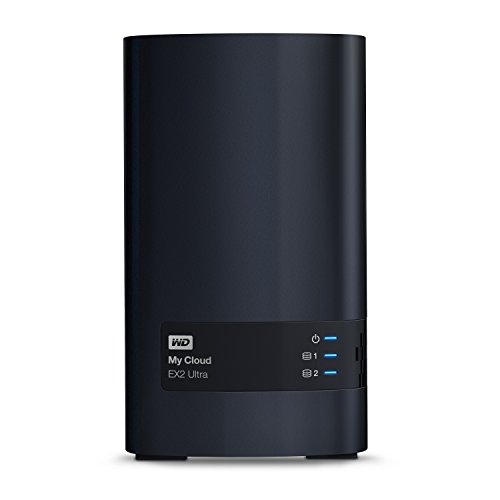
WD 8TB My Cloud EX2 Ultra Network – Features & Prices in Saudi Arabia :
WD 8TB My Cloud EX2 Ultra Network Attached Storage – NAS – WDBVBZ0080JCH-NESN
RAM
1 GB
Hard Drive
8 TB Desktop
Number of USB 2.0 Ports
1
Hardware Platform
PC, Mac
Item Weight
5 pounds
Product Dimensions
6.1 x 3.9 x 6.75 inches
Item Dimensions LxWxH
6.1 x 3.9 x 6.75 inches
Color
Gray / Silver
Flash Memory Size
8
Manufacturer
Western Digital
ASIN
B01AWH05GE
Country of Origin
Thailand
Is Discontinued By Manufacturer
No
Date First Available
February 17, 2016
Test video – WD 8TB My Cloud EX2 Ultra Network :
Product highlights :
Questions & Answers – WD 8TB My Cloud EX2 Ultra Network :
Technical specifications – WD 8TB My Cloud EX2 Ultra Network :
Purchase advice :
-
Warranty :
Check the duration of the warranty and also the faults and defects it covers. Is it complete or limited? and What is included in the warranty (parts, repairs or both)?
-
Shipping :
Is delivery offered? And how long does it take to get delivered (Delivery time)
-
Proof of purchase :
Does the shop give you an invoice ?
-
After-sales service :
Do they have an after-sales service to have information about the installation or operation (instructions for use). Also in case of problem, it is the seller who takes charge or you must contact the manufacturer or supplier yourself.
_____________________________
E. P (verified owner) –
Just works. Easy to set up, and RAID 0 backup for failure – nice! – I really don’t know about tech support, but I didn’t want to put no stars. I guess because I didn’t need any tech support, it gets 5 stars for tech support! 🙂
G. P (verified owner) –
Good home file storage, internet access to your files – Very good for home use. Set-up went quickly, file transfers from existing drives was basically drag and drop on my screen. Don’t try to run your medical clinic patient filing system on this unit – not what the operating system and software is designed for – get a big boy meant for business for that type of application. Not sure what other reviewers are referring to with ‘substitution of lower quality disc drives’ – mine arrived with the WD Red Pro drives – just as specified. Set-up was pretty straight forward – only instructions are on-line. If you’re not already familiar with which RAID mode you want to run in – there’s not really any tutorial to help you learn – BUT it starts up in RAID1 which is the most conservative and safest for data (it keeps a copy of every file on each drive – every time you save one – like an automatic back-up). That means one drive (of the two) could crash, you drop a new one in that slot, copy all the files from the other to it – and you’re back in business. The cooling fan is not silent (large data transfers spool the fan up) – I wouldn’t sit this next to my bed, but it’s OK in a home office setting. If you’re into energy and drive-wear conservation just be aware that it does not come set up to automatically ‘hibernate’ when inactive. You can manually instruct it to hibernate but you will have to unplug it and re-power it up to restart – no restart from your PC – this is a well-known belly-ache you’ll see on-line. There are very involved instructions from several you-tube geeks on how to alter your firmware and system boot files to create an automatic mode to come out of hibernation when the drive is queried by LAN activity – but not for the feint of heart. Not really a ‘problem’ for the average user – you buy WD Red Pro in the first place for reliability – they are rated at 1,000,000 operating hours between failures – I’m letting mine run 24×7 which is basically what it’s designed for. A little frustrated with Western Digital for obsoleting the original MyCloud – somewhat expected eventually – BUT the 20% discount offer e-mailed to those of us stuck buying a new unit only brought the replacement unit down from list to the same discount price you can get anywhere on-line for that unit – come on guys…I went Amazon instead, paid $3 less, free shipping and had the unit on my doorstep in 6 hours – not bad (must stock these in Minneapolis). Would buy again.
E. N (verified owner) –
Quality NAS drive, but not for everyone. – First the good stuff about this product: It was easy to follow the set up instructions on the WD “dashboard” and get it my two disc drives loaded properly and ready to accept files to store or stream. The unit seemed well built and was easy to load the hard drives into it. However, I use this device mostly to store hundreds of music CDs and Hi-Rez music files on, in order to stream them thru a high quality music streaming component in my stereo. This is where things got frustrating. Unlike my older WD “My Cloud” from several years ago, the company no longer includes Twonky or an equivalent program, built in, to make set up for music streaming easy. Consequently, the unit did not show up as a source AT ALL on my streamer’s app as a music source. I was told by their tech support to download Twonky on the WD app which I did and finally, it began to show up as a source, but wouldn’t stream. The files were “unavailable”. Undeterred, I kept calling their tech support and they kept inching me toward the correct solution. By the time I finished talking to the fourth tech guy, and after many hours of trying different settings on the Twonky app, I finally was able to stream music. With my older My Cloud, I was set up and streaming in a matter of minutes and knew much less about these items back then. I can only conclude that WD does NOT make this unit with music streaming in mind, but more for computer files back up and photo storage and the like. I like the unit, now that it’s working, but would not recommend it to a fellow music streamer. Much too difficult (with Twonky) to set up, unless you don’t mind calling WD tech support a few times! C’mon Western Digital! Make it easier for us music loving, non-computer geeks!
P. H (verified owner) –
Better way to go compared to the WD Cloud Home – I have a WD Cloud Home and I can’t change hard drives in it. This one I can put up to 2 drives and swap them in or out as upgrade is needed. Similarly priced in the range of the no name brands but WD brand stands for something. Good cloud app on the phone and easy to use. Just a pain moving data from the old WD Cloud Home to the new EX2 drive. Can’t connect the two together with USB. Have to use another USB drive to move data to from the old one and then connect that to the EX2 to move the data to it. Wish I can cut out the middle man usb drive. Other than that, it’s great. EX2 uses different app (My Cloud OS5) than the WD Cloud Home. FYI.
O. I (verified owner) –
A very reliable NAS – This is my second Western Digital NAS, and I’ve had it for about a month now. It was a breeze to set up. I currently have dual 16T WD Red HDD’s installed, and there has been no issue accessing them. Most of my equipment is on the Windows 10 platform. The NAS has had no difficulties seeing the computers, and vice-versa.
E. N (verified owner) –
Quality NAS drive, but not for everyone. – First the good stuff about this product: It was easy to follow the set up instructions on the WD “dashboard” and get it my two disc drives loaded properly and ready to accept files to store or stream. The unit seemed well built and was easy to load the hard drives into it. However, I use this device mostly to store hundreds of music CDs and Hi-Rez music files on, in order to stream them thru a high quality music streaming component in my stereo. This is where things got frustrating. Unlike my older WD “My Cloud” from several years ago, the company no longer includes Twonky or an equivalent program, built in, to make set up for music streaming easy. Consequently, the unit did not show up as a source AT ALL on my streamer’s app as a music source. I was told by their tech support to download Twonky on the WD app which I did and finally, it began to show up as a source, but wouldn’t stream. The files were “unavailable”. Undeterred, I kept calling their tech support and they kept inching me toward the correct solution. By the time I finished talking to the fourth tech guy, and after many hours of trying different settings on the Twonky app, I finally was able to stream music. With my older My Cloud, I was set up and streaming in a matter of minutes and knew much less about these items back then. I can only conclude that WD does NOT make this unit with music streaming in mind, but more for computer files back up and photo storage and the like. I like the unit, now that it’s working, but would not recommend it to a fellow music streamer. Much too difficult (with Twonky) to set up, unless you don’t mind calling WD tech support a few times! C’mon Western Digital! Make it easier for us music loving, non-computer geeks!
P. H (verified owner) –
Better way to go compared to the WD Cloud Home – I have a WD Cloud Home and I can’t change hard drives in it. This one I can put up to 2 drives and swap them in or out as upgrade is needed. Similarly priced in the range of the no name brands but WD brand stands for something. Good cloud app on the phone and easy to use. Just a pain moving data from the old WD Cloud Home to the new EX2 drive. Can’t connect the two together with USB. Have to use another USB drive to move data to from the old one and then connect that to the EX2 to move the data to it. Wish I can cut out the middle man usb drive. Other than that, it’s great. EX2 uses different app (My Cloud OS5) than the WD Cloud Home. FYI.
G. P (verified owner) –
Good home file storage, internet access to your files – Very good for home use. Set-up went quickly, file transfers from existing drives was basically drag and drop on my screen. Don’t try to run your medical clinic patient filing system on this unit – not what the operating system and software is designed for – get a big boy meant for business for that type of application. Not sure what other reviewers are referring to with ‘substitution of lower quality disc drives’ – mine arrived with the WD Red Pro drives – just as specified. Set-up was pretty straight forward – only instructions are on-line. If you’re not already familiar with which RAID mode you want to run in – there’s not really any tutorial to help you learn – BUT it starts up in RAID1 which is the most conservative and safest for data (it keeps a copy of every file on each drive – every time you save one – like an automatic back-up). That means one drive (of the two) could crash, you drop a new one in that slot, copy all the files from the other to it – and you’re back in business. The cooling fan is not silent (large data transfers spool the fan up) – I wouldn’t sit this next to my bed, but it’s OK in a home office setting. If you’re into energy and drive-wear conservation just be aware that it does not come set up to automatically ‘hibernate’ when inactive. You can manually instruct it to hibernate but you will have to unplug it and re-power it up to restart – no restart from your PC – this is a well-known belly-ache you’ll see on-line. There are very involved instructions from several you-tube geeks on how to alter your firmware and system boot files to create an automatic mode to come out of hibernation when the drive is queried by LAN activity – but not for the feint of heart. Not really a ‘problem’ for the average user – you buy WD Red Pro in the first place for reliability – they are rated at 1,000,000 operating hours between failures – I’m letting mine run 24×7 which is basically what it’s designed for. A little frustrated with Western Digital for obsoleting the original MyCloud – somewhat expected eventually – BUT the 20% discount offer e-mailed to those of us stuck buying a new unit only brought the replacement unit down from list to the same discount price you can get anywhere on-line for that unit – come on guys…I went Amazon instead, paid $3 less, free shipping and had the unit on my doorstep in 6 hours – not bad (must stock these in Minneapolis). Would buy again.
E. P (verified owner) –
Just works. Easy to set up, and RAID 0 backup for failure – nice! – I really don’t know about tech support, but I didn’t want to put no stars. I guess because I didn’t need any tech support, it gets 5 stars for tech support! 🙂
O. I (verified owner) –
A very reliable NAS – This is my second Western Digital NAS, and I’ve had it for about a month now. It was a breeze to set up. I currently have dual 16T WD Red HDD’s installed, and there has been no issue accessing them. Most of my equipment is on the Windows 10 platform. The NAS has had no difficulties seeing the computers, and vice-versa.