
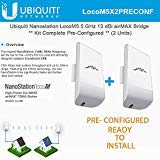
Description
Ubiquiti LocoM5 X 2 Units Bridge Kit – Features & Prices in Saudi Arabia :
Ubiquiti LocoM5 X 2 Units Bridge Kit Complete Pre-Configured Nanostation Loco M5
Wireless Type
5 GHz Radio Frequency
Item model number
8541550611
Item Weight
2.01 pounds
Package Dimensions
10.55 x 8.54 x 3.43 inches
Manufacturer
Ubiquiti Networks
ASIN
B06XKPCGH8
Is Discontinued By Manufacturer
No
Date First Available
March 14, 2017
Test video – Ubiquiti LocoM5 X 2 Units Bridge Kit :
Product highlights :
Questions & Answers – Ubiquiti LocoM5 X 2 Units Bridge Kit :
Technical specifications – Ubiquiti LocoM5 X 2 Units Bridge Kit :
Purchase advice :
-
Warranty :
Check the duration of the warranty and also the faults and defects it covers. Is it complete or limited? and What is included in the warranty (parts, repairs or both)?
-
Shipping :
Is delivery offered? And how long does it take to get delivered (Delivery time)
-
Proof of purchase :
Does the shop give you an invoice ?
-
After-sales service :
Do they have an after-sales service to have information about the installation or operation (instructions for use). Also in case of problem, it is the seller who takes charge or you must contact the manufacturer or supplier yourself.
_____________________________
L. I (verified owner) –
Very good – Antenna already configured making our work easier
P. R (verified owner) –
Worked great – There wasn’t much for instructions… But these worked great with no problems. I think if your network didn’t run off 192.168.1. These would need to be reconfigured as they are set for that type of network. Thanks
K. N (verified owner) –
keep up the good work… – so far, no comment…just keep up the good work…
E. G (verified owner) –
Bridge 900 ft – Was able to bridge starlink 900ft to my barn with very little loss of speed. It is across a hay field, no obstruction. I used the ethernet addition from starlink on gen2. Needed nothing extra except ethernet cable and a pole. Installation was so easy.
G. N (verified owner) –
Works great – Need more they work great for the job
Z. L (verified owner) –
Pain in the a$$ to get setup… – Instruction are horrible, cant understand the tech support people, so you gotta find a you tube video to setup. Finally got the 2 receivers talking from house to shop about 300’ away. But now can’t get anything to work through them. I’m told I gotta take them down, log back into them, and change the IP addresses.
C. T (verified owner) –
Incredibly difficult to set up, however they work great – These were very difficult to set up. Had to search internet for hours to find all the info I needed. IP addresses, subnet masks, IP4 setup just to connect to the units, etc. The instructions were totally incomplete. You tube helped some, but details (like what to set IP addresses to that would allow them to work with YOUR modem, etc). No excuse for having such poor instructions. I could actually write them now after all the digging I had to do. There are a couple of details that you need to know that unless you are a total nerd you will have a difficult time figuring out. Once I got them working they are great. Absolutely no loss in download speeds between my 2 buildings. Other downside is that after I finally got it working I felt like such a geek I wanted to binge on old episodes of star trek.
P. R (verified owner) –
Worked great – There wasn’t much for instructions… But these worked great with no problems. I think if your network didn’t run off 192.168.1. These would need to be reconfigured as they are set for that type of network. Thanks
G. N (verified owner) –
Works great – Need more they work great for the job
N. E (verified owner) –
Can’t get it to work – 3 hours in, still no joy. Woefully inadequate setup instructions in box. Need to watch YouTube videos and even they are incomplete. Almost no information on Support site. Not sure about the reviews that talk about how easy it is, it’s not. Will update review if I get an answer from community but probably shipping back and going Google.
Z. L (verified owner) –
Pain in the a$$ to get setup… – Instruction are horrible, cant understand the tech support people, so you gotta find a you tube video to setup. Finally got the 2 receivers talking from house to shop about 300’ away. But now can’t get anything to work through them. I’m told I gotta take them down, log back into them, and change the IP addresses.
K. N (verified owner) –
keep up the good work… – so far, no comment…just keep up the good work…
N. E (verified owner) –
Can’t get it to work – 3 hours in, still no joy. Woefully inadequate setup instructions in box. Need to watch YouTube videos and even they are incomplete. Almost no information on Support site. Not sure about the reviews that talk about how easy it is, it’s not. Will update review if I get an answer from community but probably shipping back and going Google.
C. T (verified owner) –
Incredibly difficult to set up, however they work great – These were very difficult to set up. Had to search internet for hours to find all the info I needed. IP addresses, subnet masks, IP4 setup just to connect to the units, etc. The instructions were totally incomplete. You tube helped some, but details (like what to set IP addresses to that would allow them to work with YOUR modem, etc). No excuse for having such poor instructions. I could actually write them now after all the digging I had to do. There are a couple of details that you need to know that unless you are a total nerd you will have a difficult time figuring out. Once I got them working they are great. Absolutely no loss in download speeds between my 2 buildings. Other downside is that after I finally got it working I felt like such a geek I wanted to binge on old episodes of star trek.
L. I (verified owner) –
Very good – Antenna already configured making our work easier
E. G (verified owner) –
Bridge 900 ft – Was able to bridge starlink 900ft to my barn with very little loss of speed. It is across a hay field, no obstruction. I used the ethernet addition from starlink on gen2. Needed nothing extra except ethernet cable and a pole. Installation was so easy.