Test video – TP-Link TL-SG2210MP | Jetstream 10 Port Gigabit :
Product highlights :
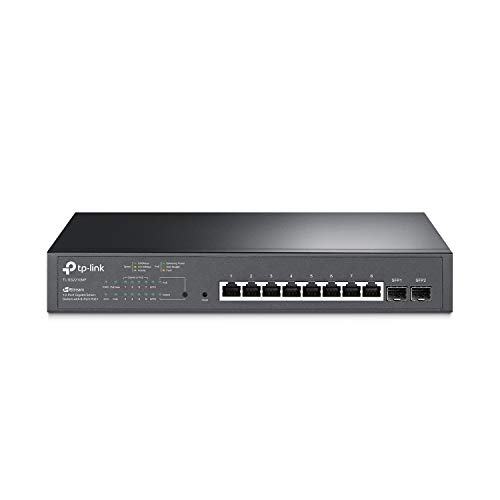
【Flexible Full Gigabit 10-Port PoE Configuration】8x PoE+ (802.3at/af) 10/100/1000 Mbps RJ45 ports providing up to 30W per port and total PoE power budget of 150W, together w/ 2x Gigabit SFP Slots for high-speed connections.
【Integrated into Omada SDN】Omada’s Software Defined Networking (SDN) platform integrates network devices including switches, access points & gateways with multiple control options offered – Omada Hardware controller, Omada Software Controller or Omada Cloud-based controller*(Contact TP-Link for Cloud-based controller plan details). Standalone mode also applies.
【Cloud Access】Remote cloud access and Omada app brings centralized cloud management of the whole network from different sites-all controlled from a single interface anywhere, anytime.
【SDN Compatibility】For SDN usage, make sure your devices/controllers are either equipped with or can be upgraded to SDN version. SDN controllers work only with SDN switches, access points & gateways. Non-SDN controllers work only with non-SDN access points. For devices that are compatible with SDN firmware, please visit TP-Link website.
【Enhance Network Security】Advanced security features include 802.1Q VLAN, IP-MAC-Port binding, ACL, Port Security, DoS defend, Storm control, DHCP Snooping, 802.1X radius authentication and more.
【Advanced Software Features】Prioritize your traffic and guarantee high quality of video or voice data transmission with L2/L3/L4 QoS, IGMP Snooping, Link Aggregation and Flow Control.
➕ What is the price of TP-Link TL-SG2210MP | Jetstream 10 Port Gigabit in Saudi Arabia ?
The price of TP-Link TL-SG2210MP | Jetstream 10 Port Gigabit in-store is 680 SAR VAT.
➕ When TP-Link TL-SG2210MP | Jetstream 10 Port Gigabit was released ?
The release date was November 6, 2020.
➕ What is the price of TP-Link TL-SG2210MP | Jetstream 10 Port Gigabit cheap used ?
The price of TP-Link TL-SG2210MP | Jetstream 10 Port Gigabit used is 470 SAR VAT.
➕ What are the main characteristics of TP-Link TL-SG2210MP | Jetstream 10 Port Gigabit ?
Special specifications :
【Flexible Full Gigabit 10-Port PoE Configuration】8x PoE+ (802.3at/af) 10/100/1000 Mbps RJ45 ports providing up to 30W per port and total PoE power budget of 150W, together w/ 2x Gigabit SFP Slots for high-speed connections.
➕ Is it interesting to buy this product ?
The best people who can answer you are customers who have already bought and tested this product (See Customer Reviews). This product is rated 4.6 / 5 on Amazon.
➕ Where to buy TP-Link TL-SG2210MP | Jetstream 10 Port Gigabit in Saudi Arabia ?
Check the duration of the warranty and also the faults and defects it covers. Is it complete or limited? and What is included in the warranty (parts, repairs or both)?
Shipping :
Is delivery offered? And how long does it take to get delivered (Delivery time)
Proof of purchase :
Does the shop give you an invoice ?
After-sales service :
Do they have an after-sales service to have information about the installation or operation (instructions for use). Also in case of problem, it is the seller who takes charge or you must contact the manufacturer or supplier yourself.
_____________________________
16 reviews for TP-Link TL-SG2210MP | Jetstream 10 Port Gigabit
Rated 5 out of 5
G. T (verified owner)–
Works well – My husband was a network engineer with advanced certifications. We were waiting for our Starlink gear to come in and he was in the process of switching our home networks to TP-Link products using the Omada controller to include several outdoor APs (for our barns, game cams, etc.) because we would finally have the internet speeds to support a full network. Sadly, he passed away before the Starlink kit showed up and wasn’t finished building out the network. When I got the satellite internet up and running, I tried to use the switches from the previous network build but wasn’t getting anywhere. After doing some online research, ordered this, plugged it in to the network and now all the APs are working. I have no idea how to do anything else in home networking, LOL, but am happy with the speed and reliability provided. We have two ceiling mount APs and three or four of the outdoor APs with multiple Apple TVs, Wi-Fi cameras, various personal devices, weather station, etc. and all receive good signal and fast speeds using this setup.
Rated 4 out of 5
E. L (verified owner)–
Good switch, sent old versions though – I’ve purchased many TP-Link products over the years from routers to switches to access points. They are well made and a good bargain. My only complaint over the years has been that the hardware versions change very frequently and the firmware versions don’t apply to much of the older hardware. This is especially an issue if you are trying to manage the devices by the TP-Link Omada app. If TP-Link would fix this issue, then they would climb even further up the value chain.
Rated 5 out of 5
H. A (verified owner)–
Solid Performance at Value Price – I have a large number of network jacks and 6 POE security cameras hooked up to this switch and it has performed flawlessly. I was primarily looking for a standard gigabit switch that also had a good amount of POE capacity to add more cameras in the future and this fit the bill at a very reasonable price point versus some of the name brand competitors.
Rated 5 out of 5
H. A (verified owner)–
Solid Performance at Value Price – I have a large number of network jacks and 6 POE security cameras hooked up to this switch and it has performed flawlessly. I was primarily looking for a standard gigabit switch that also had a good amount of POE capacity to add more cameras in the future and this fit the bill at a very reasonable price point versus some of the name brand competitors.
Rated 4 out of 5
O. C (verified owner)–
Good switch, fan whine – This switch works well, though my UAP-AC-LITE would not power on with the PoE. Works with Omada controller. The fan does have a very noticeable whine.
Rated 4 out of 5
H. I (verified owner)–
Very loud fan noise – The switch is great, performance wise. But the fan noise is a deal breaker. It won’t turn off even when the switch is idle. Make sure you plan on putting this switch away, far away, in a remote closet. The fan is so loud it makes it unbearable if used in an office environment.
Rated 5 out of 5
G. T (verified owner)–
Works well – My husband was a network engineer with advanced certifications. We were waiting for our Starlink gear to come in and he was in the process of switching our home networks to TP-Link products using the Omada controller to include several outdoor APs (for our barns, game cams, etc.) because we would finally have the internet speeds to support a full network. Sadly, he passed away before the Starlink kit showed up and wasn’t finished building out the network. When I got the satellite internet up and running, I tried to use the switches from the previous network build but wasn’t getting anywhere. After doing some online research, ordered this, plugged it in to the network and now all the APs are working. I have no idea how to do anything else in home networking, LOL, but am happy with the speed and reliability provided. We have two ceiling mount APs and three or four of the outdoor APs with multiple Apple TVs, Wi-Fi cameras, various personal devices, weather station, etc. and all receive good signal and fast speeds using this setup.
Rated 4 out of 5
O. C (verified owner)–
Good switch, fan whine – This switch works well, though my UAP-AC-LITE would not power on with the PoE. Works with Omada controller. The fan does have a very noticeable whine.
Rated 5 out of 5
K. G (verified owner)–
Simplifies my life – When I wanted to consolidate the 3 different WiFi systems on my rambling homestead, I looked at off-the-shelf systems such as Orbi. They didn’t offer all of the options that TP-Link does, such as outdoor APs. The ability to control things centrally AND locally was a big selling point too. This particular switch simplified my life by powering all of the doodads through the ethernet — even the stuff that’s at the end of a long run — which is a huge hunk of goodness. We’ve been running for about 6 months without missing a beat.
Rated 5 out of 5
K. G (verified owner)–
Simplifies my life – When I wanted to consolidate the 3 different WiFi systems on my rambling homestead, I looked at off-the-shelf systems such as Orbi. They didn’t offer all of the options that TP-Link does, such as outdoor APs. The ability to control things centrally AND locally was a big selling point too. This particular switch simplified my life by powering all of the doodads through the ethernet — even the stuff that’s at the end of a long run — which is a huge hunk of goodness. We’ve been running for about 6 months without missing a beat.
Rated 4 out of 5
K. M (verified owner)–
Very capable switch – This switch has tons of features, so many that navigating the setup menus can be confusing. But it functions perfectly well as a dumb switch without any configuration at all.
Rated 5 out of 5
F. K (verified owner)–
Great price/performance ratio for a managed PoE+ switch – The switch serves nicely as a substitute for the pricier enterprise manged switches in its class. The SDN looks promising, but the site is not at a scale where it would apply.
Rated 5 out of 5
F. K (verified owner)–
Great price/performance ratio for a managed PoE+ switch – The switch serves nicely as a substitute for the pricier enterprise manged switches in its class. The SDN looks promising, but the site is not at a scale where it would apply.
Rated 4 out of 5
K. M (verified owner)–
Very capable switch – This switch has tons of features, so many that navigating the setup menus can be confusing. But it functions perfectly well as a dumb switch without any configuration at all.
Rated 4 out of 5
E. L (verified owner)–
Good switch, sent old versions though – I’ve purchased many TP-Link products over the years from routers to switches to access points. They are well made and a good bargain. My only complaint over the years has been that the hardware versions change very frequently and the firmware versions don’t apply to much of the older hardware. This is especially an issue if you are trying to manage the devices by the TP-Link Omada app. If TP-Link would fix this issue, then they would climb even further up the value chain.
Rated 4 out of 5
H. I (verified owner)–
Very loud fan noise – The switch is great, performance wise. But the fan noise is a deal breaker. It won’t turn off even when the switch is idle. Make sure you plan on putting this switch away, far away, in a remote closet. The fan is so loud it makes it unbearable if used in an office environment.

G. T (verified owner) –
Works well – My husband was a network engineer with advanced certifications. We were waiting for our Starlink gear to come in and he was in the process of switching our home networks to TP-Link products using the Omada controller to include several outdoor APs (for our barns, game cams, etc.) because we would finally have the internet speeds to support a full network. Sadly, he passed away before the Starlink kit showed up and wasn’t finished building out the network. When I got the satellite internet up and running, I tried to use the switches from the previous network build but wasn’t getting anywhere. After doing some online research, ordered this, plugged it in to the network and now all the APs are working. I have no idea how to do anything else in home networking, LOL, but am happy with the speed and reliability provided. We have two ceiling mount APs and three or four of the outdoor APs with multiple Apple TVs, Wi-Fi cameras, various personal devices, weather station, etc. and all receive good signal and fast speeds using this setup.
E. L (verified owner) –
Good switch, sent old versions though – I’ve purchased many TP-Link products over the years from routers to switches to access points. They are well made and a good bargain. My only complaint over the years has been that the hardware versions change very frequently and the firmware versions don’t apply to much of the older hardware. This is especially an issue if you are trying to manage the devices by the TP-Link Omada app. If TP-Link would fix this issue, then they would climb even further up the value chain.
H. A (verified owner) –
Solid Performance at Value Price – I have a large number of network jacks and 6 POE security cameras hooked up to this switch and it has performed flawlessly. I was primarily looking for a standard gigabit switch that also had a good amount of POE capacity to add more cameras in the future and this fit the bill at a very reasonable price point versus some of the name brand competitors.
H. A (verified owner) –
Solid Performance at Value Price – I have a large number of network jacks and 6 POE security cameras hooked up to this switch and it has performed flawlessly. I was primarily looking for a standard gigabit switch that also had a good amount of POE capacity to add more cameras in the future and this fit the bill at a very reasonable price point versus some of the name brand competitors.
O. C (verified owner) –
Good switch, fan whine – This switch works well, though my UAP-AC-LITE would not power on with the PoE. Works with Omada controller. The fan does have a very noticeable whine.
H. I (verified owner) –
Very loud fan noise – The switch is great, performance wise. But the fan noise is a deal breaker. It won’t turn off even when the switch is idle. Make sure you plan on putting this switch away, far away, in a remote closet. The fan is so loud it makes it unbearable if used in an office environment.
G. T (verified owner) –
Works well – My husband was a network engineer with advanced certifications. We were waiting for our Starlink gear to come in and he was in the process of switching our home networks to TP-Link products using the Omada controller to include several outdoor APs (for our barns, game cams, etc.) because we would finally have the internet speeds to support a full network. Sadly, he passed away before the Starlink kit showed up and wasn’t finished building out the network. When I got the satellite internet up and running, I tried to use the switches from the previous network build but wasn’t getting anywhere. After doing some online research, ordered this, plugged it in to the network and now all the APs are working. I have no idea how to do anything else in home networking, LOL, but am happy with the speed and reliability provided. We have two ceiling mount APs and three or four of the outdoor APs with multiple Apple TVs, Wi-Fi cameras, various personal devices, weather station, etc. and all receive good signal and fast speeds using this setup.
O. C (verified owner) –
Good switch, fan whine – This switch works well, though my UAP-AC-LITE would not power on with the PoE. Works with Omada controller. The fan does have a very noticeable whine.
K. G (verified owner) –
Simplifies my life – When I wanted to consolidate the 3 different WiFi systems on my rambling homestead, I looked at off-the-shelf systems such as Orbi. They didn’t offer all of the options that TP-Link does, such as outdoor APs. The ability to control things centrally AND locally was a big selling point too. This particular switch simplified my life by powering all of the doodads through the ethernet — even the stuff that’s at the end of a long run — which is a huge hunk of goodness. We’ve been running for about 6 months without missing a beat.
K. G (verified owner) –
Simplifies my life – When I wanted to consolidate the 3 different WiFi systems on my rambling homestead, I looked at off-the-shelf systems such as Orbi. They didn’t offer all of the options that TP-Link does, such as outdoor APs. The ability to control things centrally AND locally was a big selling point too. This particular switch simplified my life by powering all of the doodads through the ethernet — even the stuff that’s at the end of a long run — which is a huge hunk of goodness. We’ve been running for about 6 months without missing a beat.
K. M (verified owner) –
Very capable switch – This switch has tons of features, so many that navigating the setup menus can be confusing. But it functions perfectly well as a dumb switch without any configuration at all.
F. K (verified owner) –
Great price/performance ratio for a managed PoE+ switch – The switch serves nicely as a substitute for the pricier enterprise manged switches in its class. The SDN looks promising, but the site is not at a scale where it would apply.
F. K (verified owner) –
Great price/performance ratio for a managed PoE+ switch – The switch serves nicely as a substitute for the pricier enterprise manged switches in its class. The SDN looks promising, but the site is not at a scale where it would apply.
K. M (verified owner) –
Very capable switch – This switch has tons of features, so many that navigating the setup menus can be confusing. But it functions perfectly well as a dumb switch without any configuration at all.
E. L (verified owner) –
Good switch, sent old versions though – I’ve purchased many TP-Link products over the years from routers to switches to access points. They are well made and a good bargain. My only complaint over the years has been that the hardware versions change very frequently and the firmware versions don’t apply to much of the older hardware. This is especially an issue if you are trying to manage the devices by the TP-Link Omada app. If TP-Link would fix this issue, then they would climb even further up the value chain.
H. I (verified owner) –
Very loud fan noise – The switch is great, performance wise. But the fan noise is a deal breaker. It won’t turn off even when the switch is idle. Make sure you plan on putting this switch away, far away, in a remote closet. The fan is so loud it makes it unbearable if used in an office environment.