
Description
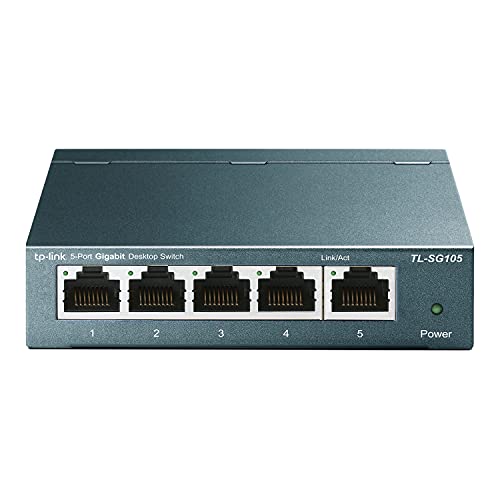
TP-Link TL-SG105 | 5 Port Gigabit Unmanaged – Features & Prices in Saudi Arabia :
TP-Link TL-SG105 | 5 Port Gigabit Unmanaged Ethernet Network Switch, Ethernet Splitter | Plug & Play | Fanless Metal Design | Shielded Ports | Traffic Optimization | Limited Lifetime Protection
Brand
TP-Link
Item model number
TL-SG105
Item Weight
7.7 ounces
Product Dimensions
3.9 x 3.9 x 1 inches
Item Dimensions LxWxH
3.9 x 3.9 x 1 inches
Color
Black
Processor Count
1
Computer Memory Type
DDR3 SDRAM
Voltage
220 Volts
Batteries
1 Unknown batteries required.
Manufacturer
TP-Link
Language
English
ASIN
B00A128S24
Country of Origin
Vietnam
Is Discontinued By Manufacturer
No
Date First Available
January 23, 2013
Test video – TP-Link TL-SG105 | 5 Port Gigabit Unmanaged :
Product highlights :
Questions & Answers – TP-Link TL-SG105 | 5 Port Gigabit Unmanaged :
Technical specifications – TP-Link TL-SG105 | 5 Port Gigabit Unmanaged :
Brand
TP-Link
Number of Ports
5
Included Components
5-Port 10/100/1000Mbps Desktop Switch Power Adapter Installation Guide
Color
Black
Compatible Devices
Desktop
Purchase advice :
-
Warranty :
Check the duration of the warranty and also the faults and defects it covers. Is it complete or limited? and What is included in the warranty (parts, repairs or both)?
-
Shipping :
Is delivery offered? And how long does it take to get delivered (Delivery time)
-
Proof of purchase :
Does the shop give you an invoice ?
-
After-sales service :
Do they have an after-sales service to have information about the installation or operation (instructions for use). Also in case of problem, it is the seller who takes charge or you must contact the manufacturer or supplier yourself.
_____________________________
A. B (verified owner) –
Simple Network Solution – I am all for Wi-Fi connection just like the next person but the very reason that drove me to purchase an Ethernet Network Switch was remote play. I wanted to be able to play my video game console from another room. The problem was that the video game console was located in an area where the Wi-Fi signal strength was not consistent. I thought about using a network extender to extend the network signal but I then I thought about attaching an ethernet wire cable from that video game console to router because that was the simplest option. The results were stable and reliable connection for that device. Then I thought that since I wanted to connect other nearby devices that is in the same area as the video game console then I thought about purchasing an Ethernet Network Switch.
C. B (verified owner) –
Great 8 port managed switch for network operations. – Purchased this for a network install, and it comes ready to manage from web interface which is a plus. Instructions and setup are a breeze and offer multiple options in configuration. The ability to turn off unused ports helps with localized security and the switch is 1000Mbps speed as well. This switch does not have PoE and we knew that before ordering and the location did not require. We received the v6.6 version which still has current firmware being issued for it (as of Oct 2022). I suggest if you order from a supplier and do not atleast get a v6 or 6.6, to return it as other past revisions do not seem as up to date from TP-Link. This switch does not do higher end functions (as the price should reflect), but having a managed switch in between your main router and devices is handy and usually preferred. It performed well and is still working great since install. Not sure why the review asked us to rate wireless as it does not have or come with this capability. Firmware updates and instructions were easy to find via the TP-Link website which has always been a support plus.
Z. M (verified owner) –
– Mon problème : ma télévision est loin de ma box internet (Freebox) et je dois alimenter en internet la télévision connectée, le décodeur Canal Sat, le boîtier Freebox player pour la TV, le lecteur de Blu-Ray, la chaine hifi, etc.
A. B (verified owner) –
Simple Network Solution – I am all for Wi-Fi connection just like the next person but the very reason that drove me to purchase an Ethernet Network Switch was remote play. I wanted to be able to play my video game console from another room. The problem was that the video game console was located in an area where the Wi-Fi signal strength was not consistent. I thought about using a network extender to extend the network signal but I then I thought about attaching an ethernet wire cable from that video game console to router because that was the simplest option. The results were stable and reliable connection for that device. Then I thought that since I wanted to connect other nearby devices that is in the same area as the video game console then I thought about purchasing an Ethernet Network Switch.
A. N (verified owner) –
Fast & Easy-To-Use! – First off I need to mention that Amazon asked me to rate 3 “features”: ‘WiFi signal’, ‘Tech Support’, and the ‘User Interface’. Let me be clear that this device does not use WiFi and it does not have it’s own local IP address to let you log into a “User Interface”. Just wanted to point this out in case you come across other reviews that have these two “features” rated that could be misleading you.
C. B (verified owner) –
Great 8 port managed switch for network operations. – Purchased this for a network install, and it comes ready to manage from web interface which is a plus. Instructions and setup are a breeze and offer multiple options in configuration. The ability to turn off unused ports helps with localized security and the switch is 1000Mbps speed as well. This switch does not have PoE and we knew that before ordering and the location did not require. We received the v6.6 version which still has current firmware being issued for it (as of Oct 2022). I suggest if you order from a supplier and do not atleast get a v6 or 6.6, to return it as other past revisions do not seem as up to date from TP-Link. This switch does not do higher end functions (as the price should reflect), but having a managed switch in between your main router and devices is handy and usually preferred. It performed well and is still working great since install. Not sure why the review asked us to rate wireless as it does not have or come with this capability. Firmware updates and instructions were easy to find via the TP-Link website which has always been a support plus.
A. N (verified owner) –
Fast & Easy-To-Use! – First off I need to mention that Amazon asked me to rate 3 “features”: ‘WiFi signal’, ‘Tech Support’, and the ‘User Interface’. Let me be clear that this device does not use WiFi and it does not have it’s own local IP address to let you log into a “User Interface”. Just wanted to point this out in case you come across other reviews that have these two “features” rated that could be misleading you.
Z. M (verified owner) –
– Mon problème : ma télévision est loin de ma box internet (Freebox) et je dois alimenter en internet la télévision connectée, le décodeur Canal Sat, le boîtier Freebox player pour la TV, le lecteur de Blu-Ray, la chaine hifi, etc.
B. S (verified owner) –
Got the job done – I had to move some network equipment around my house and decideded to hard wire a bunch of stuff. I didn’t need anything fancy and could have saved a few bucks with the non-managed version of this unit, but I went with the “E” version because the lights on the unit are able to distinguish 100 vs 1000 speeds on a glance. That alone made it worth the few extra dollars for me. I never used or really plan on using the management features, so I can’t comment there, but as a dumb switch, it gets the job done. I plugged it in, hooked up my gear, and it just works. The reason I ended up returning it is because I quickly decided I needed more ports, so I upgraded to the 8-port version. Otherwise, this was exactly what I needed. It’s frequently on sale, so it makes a good deal even better if you wait for one. It’s a solid, well built piece of equipment, at least for general home use.
B. S (verified owner) –
Got the job done – I had to move some network equipment around my house and decideded to hard wire a bunch of stuff. I didn’t need anything fancy and could have saved a few bucks with the non-managed version of this unit, but I went with the “E” version because the lights on the unit are able to distinguish 100 vs 1000 speeds on a glance. That alone made it worth the few extra dollars for me. I never used or really plan on using the management features, so I can’t comment there, but as a dumb switch, it gets the job done. I plugged it in, hooked up my gear, and it just works. The reason I ended up returning it is because I quickly decided I needed more ports, so I upgraded to the 8-port version. Otherwise, this was exactly what I needed. It’s frequently on sale, so it makes a good deal even better if you wait for one. It’s a solid, well built piece of equipment, at least for general home use.