
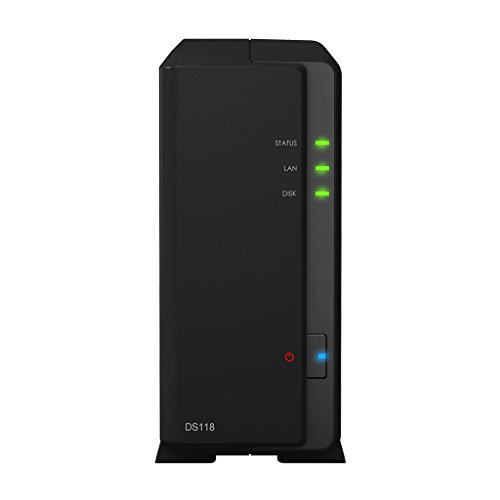
Description
Synology 1 bay NAS DiskStation DS118 (Diskless) – Features & Prices in Saudi Arabia :
Synology 1 bay NAS DiskStation DS118 (Diskless)
RAM
1 GB
Hard Drive
12 TB
Item model number
DS118
Item Weight
1.54 pounds
Product Dimensions
8.82 x 6.54 x 2.8 inches
Item Dimensions LxWxH
8.82 x 6.54 x 2.8 inches
Processor Count
1
Computer Memory Type
DDR2 SDRAM
Voltage
240 Volts
Batteries
1 Lithium Ion batteries required.
Manufacturer
Synology America Corp
Language
English, English, English, English, English
ASIN
B076FZ7VJ2
Country of Origin
Taiwan
Is Discontinued By Manufacturer
No
Date First Available
October 24, 2017
Test video – Synology 1 bay NAS DiskStation DS118 (Diskless) :
Product highlights :
Questions & Answers – Synology 1 bay NAS DiskStation DS118 (Diskless) :
Technical specifications – Synology 1 bay NAS DiskStation DS118 (Diskless) :
Digital Storage Capacity
2 TB
Brand
Synology
Compatible Devices
Desktop
Hard Disk Size
12 TB
Specific Uses For Product
personal, gaming, business
Included Components
RJ-45 LAN cable, Accessory pack, DS118 main unit, Quick Installation Guide, AC power adapter
Read Speed
113 Megabytes Per Second
Cache Size
1000
Series
DS118
Item Weight
1.54 Pounds
Purchase advice :
-
Warranty :
Check the duration of the warranty and also the faults and defects it covers. Is it complete or limited? and What is included in the warranty (parts, repairs or both)?
-
Shipping :
Is delivery offered? And how long does it take to get delivered (Delivery time)
-
Proof of purchase :
Does the shop give you an invoice ?
-
After-sales service :
Do they have an after-sales service to have information about the installation or operation (instructions for use). Also in case of problem, it is the seller who takes charge or you must contact the manufacturer or supplier yourself.
_____________________________
A. M (verified owner) –
OK NAS – This is my 3rd Synology NAS, but the first low cost version. I prefer the + versions, whether I use all the features or not. I am using this as more a backup target, and it is adequate for that. This was purchased to replace a Drobo, and while the Drobo was easier to use, this is soooooooo much faster!
L. G (verified owner) –
Great so far – Easy to setup, added 4 drives and it is humming away. Used the Synology default raid configuration.
D. F (verified owner) –
Clean replacement for my old DS – Well now, wouldn’t it be nice if I recalled exactly what my old model was…. I think it was a DS412+. The board died after some ridiculous amount of time (11-12 years?). This model works with the SATA disks I had in the old DS, and I was able to directly swap them in and recover all my data – super easy!
H. H (verified owner) –
Easier to use than expected – It’s been ten years since I bought a box like this. The management software is so much better now. Very easy to to setup jobs. I’m happy. I also auto back this up to a USB drive that starts the backup process when I plug it in. Also really easy to brows the backed up files from a phone. Very happy.
A. K (verified owner) –
Solid product. Couldn’t be happier. – I had tried a few different storage solutions for my Home and family’s small business, but no solution I tried seemed to work the way that it was advertised or meet my needs. In all honesty it was because of my choice to try to find a budget solution because $400 for a NAS and then another 4-500, at least, for drives to put in it is a lot of money. I can’t begin to describe how happy I am I did it though. This is a solid product. I can’t speak to the uses for a media server, because I haven’t gotten around to testing those features yet, but for a storage solution I can. This NAS makes back ups, data storage, and file sharing extremely easy and not just because I’m a computer science major. Even for people who may not be the best with computers, set up is super easy and the web interface is simple and very intuitive. Set up on a local network is extremely easy. Set up for remote access for multiple users though, while still much simpler than something like an Ubuntu server, still will probably require a little more than average technical and networking knowledge. Especially if running an antivirus and/or firewall as you will have to make exceptions for the remote IP address. For creating a remote network drive, you will also need either a static IP address or a domain name and a DDNS service.
H. H (verified owner) –
Easier to use than expected – It’s been ten years since I bought a box like this. The management software is so much better now. Very easy to to setup jobs. I’m happy. I also auto back this up to a USB drive that starts the backup process when I plug it in. Also really easy to brows the backed up files from a phone. Very happy.
K. D (verified owner) –
Solid unit – Paired with Seagate Ironwolf 6TB hard drive and windows 10 OS. Installed without issue, user interface and instructions were ok.
A. K (verified owner) –
Solid product. Couldn’t be happier. – I had tried a few different storage solutions for my Home and family’s small business, but no solution I tried seemed to work the way that it was advertised or meet my needs. In all honesty it was because of my choice to try to find a budget solution because $400 for a NAS and then another 4-500, at least, for drives to put in it is a lot of money. I can’t begin to describe how happy I am I did it though. This is a solid product. I can’t speak to the uses for a media server, because I haven’t gotten around to testing those features yet, but for a storage solution I can. This NAS makes back ups, data storage, and file sharing extremely easy and not just because I’m a computer science major. Even for people who may not be the best with computers, set up is super easy and the web interface is simple and very intuitive. Set up on a local network is extremely easy. Set up for remote access for multiple users though, while still much simpler than something like an Ubuntu server, still will probably require a little more than average technical and networking knowledge. Especially if running an antivirus and/or firewall as you will have to make exceptions for the remote IP address. For creating a remote network drive, you will also need either a static IP address or a domain name and a DDNS service.
D. F (verified owner) –
Clean replacement for my old DS – Well now, wouldn’t it be nice if I recalled exactly what my old model was…. I think it was a DS412+. The board died after some ridiculous amount of time (11-12 years?). This model works with the SATA disks I had in the old DS, and I was able to directly swap them in and recover all my data – super easy!
A. N (verified owner) –
Blazing fast feature rich NAS – Bottom line up front, this is an amazing powerful NAS and if you purchased it you would not be disappointed!
A. N (verified owner) –
Blazing fast feature rich NAS – Bottom line up front, this is an amazing powerful NAS and if you purchased it you would not be disappointed!
L. G (verified owner) –
Great so far – Easy to setup, added 4 drives and it is humming away. Used the Synology default raid configuration.
K. D (verified owner) –
Solid unit – Paired with Seagate Ironwolf 6TB hard drive and windows 10 OS. Installed without issue, user interface and instructions were ok.
A. M (verified owner) –
OK NAS – This is my 3rd Synology NAS, but the first low cost version. I prefer the + versions, whether I use all the features or not. I am using this as more a backup target, and it is adequate for that. This was purchased to replace a Drobo, and while the Drobo was easier to use, this is soooooooo much faster!