
Description
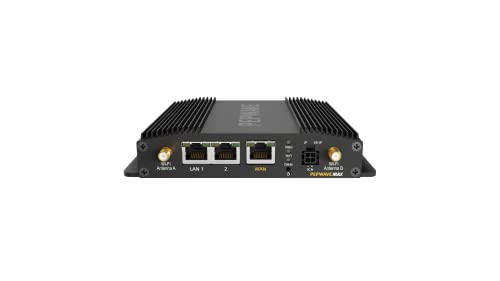
Peplink MAX BR1 Pro 5G | All-In-One – Features & Prices in Saudi Arabia :
Peplink MAX BR1 Pro 5G | All-In-One 5G Solution | Wi-Fi 6 | 2×2 MU-MIMO | MAX-BR1-PRO-5GH-T-PRM
Product Dimensions
6 x 5 x 2 inches
Item Weight
1.28 pounds
ASIN
B09K7SRMX4
Item model number
MAX-BR1-PRO-5GH-T-PRM
Date First Available
October 21, 2021
Manufacturer
Peplink
Test video – Peplink MAX BR1 Pro 5G | All-In-One :
Product highlights :
Questions & Answers – Peplink MAX BR1 Pro 5G | All-In-One :
Technical specifications – Peplink MAX BR1 Pro 5G | All-In-One :
Brand
Peplink
Model Name
MAX BR1 Pro 5G
Special Feature
QoS, WPS
Frequency Band Class
Dual-Band
Wireless Communication Standard
802.11ax
Compatible Devices
Switch, Access Point, Computer, Smartphone
Frequency
5 GHz
Recommended Uses For Product
Home, Business
Included Components
1x GPS Antenna, 1x 12V2A Power Supply, 1x BR1 Pro 5G, 4x LTE/5G Antennas, 2x Wi-Fi Dual Band Antenna
Connectivity Technology
5G, Wi-Fi, Ethernet
Purchase advice :
-
Warranty :
Check the duration of the warranty and also the faults and defects it covers. Is it complete or limited? and What is included in the warranty (parts, repairs or both)?
-
Shipping :
Is delivery offered? And how long does it take to get delivered (Delivery time)
-
Proof of purchase :
Does the shop give you an invoice ?
-
After-sales service :
Do they have an after-sales service to have information about the installation or operation (instructions for use). Also in case of problem, it is the seller who takes charge or you must contact the manufacturer or supplier yourself.
_____________________________
Z. R (verified owner) –
One of the best product lines for remote work/RV Nomads (and yes it works with Tmobile) – I’ve been working remotely since 2017. We set out in 2019 as full time RVers and have continually worked to improve our internet setup, from lowly days with a single Verizon Hotspot to a complete line of Pepwave/Peplink Gear.
P. R (verified owner) –
Amazing kit, but depends on use case – I bought this for getting improved cellular reception on my boat (which is mainly at the marina). I have Verizon and have used an 8800l and Inseego 2100 5g previously. Overall the Peplink was clearly better, but it wasn’t by the wild margins like some have seen. Upload speeds seemed to be the most improved, but I still struggled with webcam calls on my work’s vpn. I think with a true antenna setup, the results may have been far better. The Peplink 4×4 antenna costs another $600 though, so hard to justify such a wildly high cost for technology that will be outdated in another 12-18months once the new series of modems with c-band aggregation come out. The setup interface of the Peplink is on a level I have never seen before, in terms of well designed, ungodly fast, and every setting you can imagine. For me, I just popped in my SIM card and it auto recognized it as Verizon, no setup required. I just changed the WiFi ssid and password and was up and running.
Z. M (verified owner) –
Awesome! – I live in the mountains and was getting 1 or 2 bars @ 300-500 Mbps on my Verizon inseego M2000 mobile hotspot. I connected the exterior antenna to my The Peplink MAX BR1 Pro 5G and now I’m getting 4 bars @ 1.2 Gbps. The unit is pretty easy to set up for someone who is familiar with networks. Once you plug in your hotspot sim card to the router it will give you a basic configuration. Be patient on initial startup, it takes a few to connect everything. Once you have all green lights on the device, sign in and there is a lot of settings to help you set up your security.
Z. R (verified owner) –
One of the best product lines for remote work/RV Nomads (and yes it works with Tmobile) – I’ve been working remotely since 2017. We set out in 2019 as full time RVers and have continually worked to improve our internet setup, from lowly days with a single Verizon Hotspot to a complete line of Pepwave/Peplink Gear.
P. A (verified owner) –
Works very well but has a steep price – Dislikes: Price is extremely high
J. C (verified owner) –
There are T-Mobile Problems! – The other gent was correct that the T-Mobile 100 GB data plan for $50 a month does not work with this. I spent hours with T-Mobile “tech” support trying to get my SIM card to work with this data plan but it would not connect. So finally I read the other gent’s comment to the “T-Mobil tech support” that T-Mobile will work with their 50 GB per month plan for $50 a month, tech person then changed my plan to that and it connected immediately! On YouTube I saw that an outfit called FMCA has a T-Mobile deal for $50 for unlimited data on their web site so I signed up with that and hope that the deal (SIM card) works. You have to join FMCA for $50 a year. Also there is a caveat that since T-Mobile combined with Sprint that in high use areas they may limit you to 50 GB per month in that area!? The software with this device is buggy and will frequently hang up unless you use a mouse and not a touch pad. Also there are two SIM card slots that apparently can belong to two different cell providers and you can select one or the other or both but there is absolutely no explanation how this works that I could find. The so called “user manual” on the Pepwave web site is exactly two pages long for this device – showing only what the blinking lights tell you. The WAN connection directly from my home modem never was able to connect and I could not determine why. Seems like a serious bug? It only said it was “connecting” but never did – probably a configuration error on my part? I agree with another gent that Pepwave should have provided a 12 volt cigarette lighter power plug with this device – they sell for about $25 or so from third parties. If you have an RV and don’t have shore power you shouldn’t have to turn on your battery powered inverter to power this thing when battery power alone will do and save the extra energy drain when using an inverter. Another serious bug is that there is no “scroll control” on the edge of the software pages and therefore if you are just using a touch pad you have almost no way to scroll down a page! That requires a mouse with scroll button! The older Pepwave so called “Duo” has a lot more control over multiple SIM cards (four max as I recall) as well as signing up for the WiFi in a campground. Pardon my ignorance perhaps but I couldn’t find any way to utilize a local WiFi signal in a campground and retransmit it over the WiFi on this device which of course includes 4 and 5 GHz. Even overpriced Winegard has this feature!! By the way I couldn’t get the T-Mobile 100 GB per month data plan for $50 to work with the Winegard Gateway either! Be advised that certain of the higher end Winegard Ranger offerings don’t mention that they won’t accept a third party SIM card and will only allow you to use the pricey Winegard data plans. Buyer beware! One other issue is that you need to do a firmware upgrade. There is an obscure “firmware” selection buried in the admin software which you should click on. It will then check for upgrades and ask you to confirm. The upgrade is from 4.6 something to 4.8 as I recall. Trouble is the upgrade was started and then hung up at 709% completion so I feared I just bricked the device. So I went ahead and ignored the hangup and when I logged in it showed the upgrade was apparently complete and the device did work normally. Watch all the YouTube videos by doing a search on this and other Peplink offerings before you buy this and think about buying the older Duo style units which are much cheaper and offer many more control options with their software. The YouTube folks say that planned firmware upgrades will give this device more options in future.
P. R (verified owner) –
Amazing kit, but depends on use case – I bought this for getting improved cellular reception on my boat (which is mainly at the marina). I have Verizon and have used an 8800l and Inseego 2100 5g previously. Overall the Peplink was clearly better, but it wasn’t by the wild margins like some have seen. Upload speeds seemed to be the most improved, but I still struggled with webcam calls on my work’s vpn. I think with a true antenna setup, the results may have been far better. The Peplink 4×4 antenna costs another $600 though, so hard to justify such a wildly high cost for technology that will be outdated in another 12-18months once the new series of modems with c-band aggregation come out. The setup interface of the Peplink is on a level I have never seen before, in terms of well designed, ungodly fast, and every setting you can imagine. For me, I just popped in my SIM card and it auto recognized it as Verizon, no setup required. I just changed the WiFi ssid and password and was up and running.
J. C (verified owner) –
There are T-Mobile Problems! – The other gent was correct that the T-Mobile 100 GB data plan for $50 a month does not work with this. I spent hours with T-Mobile “tech” support trying to get my SIM card to work with this data plan but it would not connect. So finally I read the other gent’s comment to the “T-Mobil tech support” that T-Mobile will work with their 50 GB per month plan for $50 a month, tech person then changed my plan to that and it connected immediately! On YouTube I saw that an outfit called FMCA has a T-Mobile deal for $50 for unlimited data on their web site so I signed up with that and hope that the deal (SIM card) works. You have to join FMCA for $50 a year. Also there is a caveat that since T-Mobile combined with Sprint that in high use areas they may limit you to 50 GB per month in that area!? The software with this device is buggy and will frequently hang up unless you use a mouse and not a touch pad. Also there are two SIM card slots that apparently can belong to two different cell providers and you can select one or the other or both but there is absolutely no explanation how this works that I could find. The so called “user manual” on the Pepwave web site is exactly two pages long for this device – showing only what the blinking lights tell you. The WAN connection directly from my home modem never was able to connect and I could not determine why. Seems like a serious bug? It only said it was “connecting” but never did – probably a configuration error on my part? I agree with another gent that Pepwave should have provided a 12 volt cigarette lighter power plug with this device – they sell for about $25 or so from third parties. If you have an RV and don’t have shore power you shouldn’t have to turn on your battery powered inverter to power this thing when battery power alone will do and save the extra energy drain when using an inverter. Another serious bug is that there is no “scroll control” on the edge of the software pages and therefore if you are just using a touch pad you have almost no way to scroll down a page! That requires a mouse with scroll button! The older Pepwave so called “Duo” has a lot more control over multiple SIM cards (four max as I recall) as well as signing up for the WiFi in a campground. Pardon my ignorance perhaps but I couldn’t find any way to utilize a local WiFi signal in a campground and retransmit it over the WiFi on this device which of course includes 4 and 5 GHz. Even overpriced Winegard has this feature!! By the way I couldn’t get the T-Mobile 100 GB per month data plan for $50 to work with the Winegard Gateway either! Be advised that certain of the higher end Winegard Ranger offerings don’t mention that they won’t accept a third party SIM card and will only allow you to use the pricey Winegard data plans. Buyer beware! One other issue is that you need to do a firmware upgrade. There is an obscure “firmware” selection buried in the admin software which you should click on. It will then check for upgrades and ask you to confirm. The upgrade is from 4.6 something to 4.8 as I recall. Trouble is the upgrade was started and then hung up at 709% completion so I feared I just bricked the device. So I went ahead and ignored the hangup and when I logged in it showed the upgrade was apparently complete and the device did work normally. Watch all the YouTube videos by doing a search on this and other Peplink offerings before you buy this and think about buying the older Duo style units which are much cheaper and offer many more control options with their software. The YouTube folks say that planned firmware upgrades will give this device more options in future.
P. A (verified owner) –
Works very well but has a steep price – Dislikes: Price is extremely high
Z. M (verified owner) –
Awesome! – I live in the mountains and was getting 1 or 2 bars @ 300-500 Mbps on my Verizon inseego M2000 mobile hotspot. I connected the exterior antenna to my The Peplink MAX BR1 Pro 5G and now I’m getting 4 bars @ 1.2 Gbps. The unit is pretty easy to set up for someone who is familiar with networks. Once you plug in your hotspot sim card to the router it will give you a basic configuration. Be patient on initial startup, it takes a few to connect everything. Once you have all green lights on the device, sign in and there is a lot of settings to help you set up your security.