NOV8Tech USB C Hub 9-in-1 Docking Station – Features & Prices in Saudi Arabia :
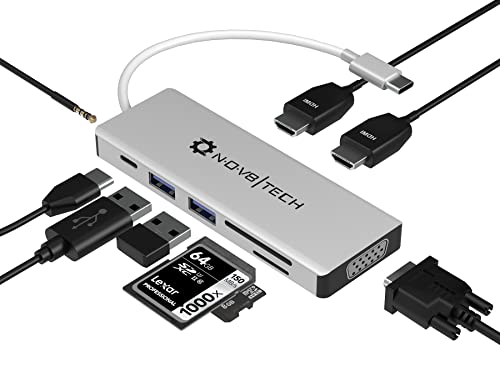
NOV8Tech USB C Hub 9-in-1 Docking Station Silver USB C to Dual HDMI Adapter, VGA, 100W PD, SD/Micro SD, 2 USB Ports for MacBook Air Pro M1 M2, Dell/XPS/MateBook/HP/Acer/Lenovo/Asus (Thunderbolt 3)
Package Dimensions
6.02 x 2.72 x 0.94 inches
Item Weight
0.634 ounces
ASIN
B0B32VMJYY
Date First Available
February 14, 2022
Manufacturer
NOV8Tech
Country of Origin
China
Test video – NOV8Tech USB C Hub 9-in-1 Docking Station :
Product highlights :
All-in-one Multiport USB C Docking Station: NOV8Tech 9 in 1 2-in-1 USB-C Hub adapter and Laptop docking station for MacBook Air 2021-2018 & MacBook Pro 2021-2016 including MacBook M1, Dell XPS 13-15, Huawei MateBook/MateBook X Pro, HP EliteBook / Spectre 13, Surface Pro X/Book 2/Go/Pro 7, Lenovo, Samsung Tab, iPad Pro 2018-2021, Samsung S20-S8, Note 8/9/Note 10/10+, and other Type C laptops that support Power delivery and Display (DP) Alt mode.
4K HDMI Streaming & Multiple Display Adapter: Start streaming the highest resolution videos and shows via its 4K HDMI & VGA ports. It features one (1) USB C 100 W PD3, two (2) 4K HDMI, one (1) USB 3.0 A & one (1) USB 2.0, one (1) TB3 (Thunderbolt 3), one (1) 2-in-1 Audio/Mic, and one (1) SD Card Reader & one (1) TF/MicroSD card Reader Ports so you can plug to any device and enjoy USB-C hub. Kindly note this USB-C can support up to 3840×2160 4K@30Hz or 1920×1080@60Hz with VGA.
Triple Display 2 HDMI Docking Station: In Windows 10 triple display functionality, the monitor connected to HDMI 1 shares the same display as VGA. macOS does not support Multi-Stream Mode Transport (MST) mode. You can mirror/extend your screen to any external device and enjoy crisp, clear, and vibrant imagery. Mirror mode in both macOS and Windows mirrors your laptop screen to three different monitors/displays. For the Mac OS system, displays are mirror mode only.
Super-Speed Charging & Seamless Data Transmission: USB-C Dock has USB-C Power Delivery Port for charging laptops & devices and powering connected devices at max 100W. 9-in-1 multiport USB-C Docking Station allows you to seamlessly transfer your data whether it be photos, videos, music, and other files through its memory card and thumb drive slots. USB 3.0 port allows data transfer at the speed of 5 Gbps that is 10X faster than USB 2.0. Transfer data and charge your devices at the same time.
COMPACT & CONVENIENT: Strong premium aluminum enclosure & high-strength cable provides additional durability. The USB-C Hub slim & compact design allows for convenient storage for on-the-go use or when traveling. The sleek, slim, and stylish profile complements your laptop and takes up limited space on your desk. Buying the 9-in-1 USB-C Docking Station will also get you: A Welcome and Setup Guide as well as a 12-month Warranty. We stand behind our products so if anything does not seem right.
Questions & Answers – NOV8Tech USB C Hub 9-in-1 Docking Station :
➕ What is the price of NOV8Tech USB C Hub 9-in-1 Docking Station in Saudi Arabia ?
The price of NOV8Tech USB C Hub 9-in-1 Docking Station in-store is 140 SAR VAT.
➕ When NOV8Tech USB C Hub 9-in-1 Docking Station was released ?
The release date was February 14, 2022.
➕ What is the price of NOV8Tech USB C Hub 9-in-1 Docking Station cheap used ?
The price of NOV8Tech USB C Hub 9-in-1 Docking Station used is 100 SAR VAT.
➕ What are the main characteristics of NOV8Tech USB C Hub 9-in-1 Docking Station ?
Special specifications :
All-in-one Multiport USB C Docking Station: NOV8Tech 9 in 1 2-in-1 USB-C Hub adapter and Laptop docking station for MacBook Air 2021-2018 & MacBook Pro 2021-2016 including MacBook M1, Dell XPS 13-15, Huawei MateBook/MateBook X Pro, HP EliteBook / Spectre 13, Surface Pro X/Book 2/Go/Pro 7, Lenovo, Samsung Tab, iPad Pro 2018-2021, Samsung S20-S8, Note 8/9/Note 10/10+, and other Type C laptops that support Power delivery and Display (DP) Alt mode.
➕ Is it interesting to buy this product ?
The best people who can answer you are customers who have already bought and tested this product (See Customer Reviews). This product is rated 4.2 / 5 on Amazon.
➕ Where to buy NOV8Tech USB C Hub 9-in-1 Docking Station in Saudi Arabia ?
Technical specifications – NOV8Tech USB C Hub 9-in-1 Docking Station :
Brand
nov8tech
Color
Silver
Hardware Interface
USB Type C, HDMI
Compatible Devices
MacBook Air, iPad Pro, MacBook Pro
Total USB Ports
2
Number of Ports
9
Total HDMI Ports
2
Wattage
100 watts
Purchase advice :
Warranty :
Check the duration of the warranty and also the faults and defects it covers. Is it complete or limited? and What is included in the warranty (parts, repairs or both)?
Shipping :
Is delivery offered? And how long does it take to get delivered (Delivery time)
Proof of purchase :
Does the shop give you an invoice ?
After-sales service :
Do they have an after-sales service to have information about the installation or operation (instructions for use). Also in case of problem, it is the seller who takes charge or you must contact the manufacturer or supplier yourself.
_____________________________
16 reviews for NOV8Tech USB C Hub 9-in-1 Docking Station
Rated 4 out of 5
C. L (verified owner)–
Works as expected – Works as expected
Rated 5 out of 5
H. Z (verified owner)–
Exactly what we needed – This was perfect for what we needed. I have USB outlets in the kitchen, and there is never enough of them there so now we can plug in multiple items. Also my daughters newer computer only comes with one USB outlet so this enables them to plug in multiple items. And lastly, the length is just long enough that my wife will not complain about a “mess” on the counter top,
Rated 3 out of 5
G. G (verified owner)–
Not for Dell – I use a Dell Latitude 3520. The unit does not provide enough power to the laptop. Initially, this was not an issue. It simply charged slowly. One week after the return window ended, everything went kablooey. First, the usb port gave me errors. I move the usb to check each port. After a week, it stopped recognizing the device plugged into it altogether. Next, the power issue became huge. I was not able to start the laptop when plugged into the docking station. The laptop shows as fully charged when I plug it directly into the original power cord. When I plug in the dock station it says that the battery is almost dead. I don’t understand that. I am not a tech person. My IT department suggested discarding this docking station altogether. That worked.
Rated 5 out of 5
G. R (verified owner)–
I had tried similar devices in the past that didn’t work, but this one Does Work Very Well. – I needed a 3.0 USB Hub extended from my Dell laptop to allow for additional USB device connections for DVD Recorder/Player, Remote Keyboard and other USB devices. This unit handles them all with perfection. I especially like the USB socket at the end of the Hub to handle the short cord from my DVD device that sits on my desk at just the right place to reach that end USB socket with ease. Only a few companies offer this feature as most only have all of the USB sockets along the long side. Great quality product that you can’t go wrong buying it.
Rated 5 out of 5
H. Z (verified owner)–
Exactly what we needed – This was perfect for what we needed. I have USB outlets in the kitchen, and there is never enough of them there so now we can plug in multiple items. Also my daughters newer computer only comes with one USB outlet so this enables them to plug in multiple items. And lastly, the length is just long enough that my wife will not complain about a “mess” on the counter top,
Rated 5 out of 5
G. R (verified owner)–
I had tried similar devices in the past that didn’t work, but this one Does Work Very Well. – I needed a 3.0 USB Hub extended from my Dell laptop to allow for additional USB device connections for DVD Recorder/Player, Remote Keyboard and other USB devices. This unit handles them all with perfection. I especially like the USB socket at the end of the Hub to handle the short cord from my DVD device that sits on my desk at just the right place to reach that end USB socket with ease. Only a few companies offer this feature as most only have all of the USB sockets along the long side. Great quality product that you can’t go wrong buying it.
Rated 5 out of 5
E. D (verified owner)–
Even though the picture says USB-A, it is USB-C – I was looking for a USB-A and ordered this from the picture but the actual item is a USB-C. Thankfully, I do have a USB-C connector on my laptop and this worked just fine. Better, actually, because my USB-A is still free for my mouse dongle.
Rated 4 out of 5
C. L (verified owner)–
Works as expected – Works as expected
Rated 3 out of 5
G. G (verified owner)–
Not for Dell – I use a Dell Latitude 3520. The unit does not provide enough power to the laptop. Initially, this was not an issue. It simply charged slowly. One week after the return window ended, everything went kablooey. First, the usb port gave me errors. I move the usb to check each port. After a week, it stopped recognizing the device plugged into it altogether. Next, the power issue became huge. I was not able to start the laptop when plugged into the docking station. The laptop shows as fully charged when I plug it directly into the original power cord. When I plug in the dock station it says that the battery is almost dead. I don’t understand that. I am not a tech person. My IT department suggested discarding this docking station altogether. That worked.
Rated 5 out of 5
L. A (verified owner)–
Great little travel hub! – This thing is perfect for content creators, graphic designers, artists and creatives. The card reader lets me load all my footage. Works great on my Mac and loaded up super quick. Also worked great on both my Dell XPS 13” and Latitude laptop with monitors without having to install drivers or anything. I even bring this when I have client meetings to display my presentation on their meeting room TVs. The HDMI ports also transmit sound to their TVs, which was important for me for my video presentations. I like how it’s aluminum and not plastic and super compact. I’ll have to get another one to keep in my backpack so I don’t have to keep unplugging it from my office!
Rated 4 out of 5
Z. J (verified owner)–
13-in-1 is a pretty decent unit if your laptop/pc does more than data transfer – I purchased the 13-in-1 hub because I wanted something to connect multiple monitors to my laptop so I could work more efficiently. This was one of a few that had everything I wanted and one of very few at a decent price point. It came in an okay timeframe. It was during the earlier stages of the pandemic so a lot of non-essential things were pushed back in delivery a bit. No biggie. Unfortunately, I did not know that the HDMI ports would not work on my brand new HP Pavilion x360 laptop as the built-in Type-C port is only for data transfer only and will not support audio/video. Since this was the sole purpose for buying this hub, it was a bit of a letdown, but not the hub manufacturer’s fault whatsoever. I also purchased USB to Type-C connectors to bypass the issue, but that did not work either. I figured that a brand new, expensive laptop would have updated hardware. Read everything about a new computer before purchasing one. It did take the unit several attempts to finally connect with my laptop. I tried unplugging it and plugging it back in, restarting my laptop, and finally installing software recommended to my by the hub’s manufacturer. After a couple of weeks, the unit just started to work correctly. No idea what had happened differently to make it finally work. It just did. It was quite frustrating but now it works nearly every time I go to use it. Customer service was very kind and helpful. A little pushy as far as requesting a review, which I did not want to give until I knew for sure that at least some of the unit was working properly. I no longer regret purchasing this hub. I do regret my HP laptop purchase though, as something this expensive should have more bells and whistles. I cannot attest to all of the functions working as they should since I cannot use part of them due to my situation, but the parts that are working are doing well. It is nice and small and convenient. I would say that if you need a hub this is one worth looking at due to features and cost. Just make sure that your laptop or desktop has a Type-C that supports more than just data transfer.
Rated 5 out of 5
L. A (verified owner)–
Great little travel hub! – This thing is perfect for content creators, graphic designers, artists and creatives. The card reader lets me load all my footage. Works great on my Mac and loaded up super quick. Also worked great on both my Dell XPS 13” and Latitude laptop with monitors without having to install drivers or anything. I even bring this when I have client meetings to display my presentation on their meeting room TVs. The HDMI ports also transmit sound to their TVs, which was important for me for my video presentations. I like how it’s aluminum and not plastic and super compact. I’ll have to get another one to keep in my backpack so I don’t have to keep unplugging it from my office!
Rated 5 out of 5
A. M (verified owner)–
Good product – VERY GOOD PRODUCT I LOVE IT. I RECOMMEND
Rated 4 out of 5
Z. J (verified owner)–
13-in-1 is a pretty decent unit if your laptop/pc does more than data transfer – I purchased the 13-in-1 hub because I wanted something to connect multiple monitors to my laptop so I could work more efficiently. This was one of a few that had everything I wanted and one of very few at a decent price point. It came in an okay timeframe. It was during the earlier stages of the pandemic so a lot of non-essential things were pushed back in delivery a bit. No biggie. Unfortunately, I did not know that the HDMI ports would not work on my brand new HP Pavilion x360 laptop as the built-in Type-C port is only for data transfer only and will not support audio/video. Since this was the sole purpose for buying this hub, it was a bit of a letdown, but not the hub manufacturer’s fault whatsoever. I also purchased USB to Type-C connectors to bypass the issue, but that did not work either. I figured that a brand new, expensive laptop would have updated hardware. Read everything about a new computer before purchasing one. It did take the unit several attempts to finally connect with my laptop. I tried unplugging it and plugging it back in, restarting my laptop, and finally installing software recommended to my by the hub’s manufacturer. After a couple of weeks, the unit just started to work correctly. No idea what had happened differently to make it finally work. It just did. It was quite frustrating but now it works nearly every time I go to use it. Customer service was very kind and helpful. A little pushy as far as requesting a review, which I did not want to give until I knew for sure that at least some of the unit was working properly. I no longer regret purchasing this hub. I do regret my HP laptop purchase though, as something this expensive should have more bells and whistles. I cannot attest to all of the functions working as they should since I cannot use part of them due to my situation, but the parts that are working are doing well. It is nice and small and convenient. I would say that if you need a hub this is one worth looking at due to features and cost. Just make sure that your laptop or desktop has a Type-C that supports more than just data transfer.
Rated 5 out of 5
A. M (verified owner)–
Good product – VERY GOOD PRODUCT I LOVE IT. I RECOMMEND
Rated 5 out of 5
E. D (verified owner)–
Even though the picture says USB-A, it is USB-C – I was looking for a USB-A and ordered this from the picture but the actual item is a USB-C. Thankfully, I do have a USB-C connector on my laptop and this worked just fine. Better, actually, because my USB-A is still free for my mouse dongle.

C. L (verified owner) –
Works as expected – Works as expected
H. Z (verified owner) –
Exactly what we needed – This was perfect for what we needed. I have USB outlets in the kitchen, and there is never enough of them there so now we can plug in multiple items. Also my daughters newer computer only comes with one USB outlet so this enables them to plug in multiple items. And lastly, the length is just long enough that my wife will not complain about a “mess” on the counter top,
G. G (verified owner) –
Not for Dell – I use a Dell Latitude 3520. The unit does not provide enough power to the laptop. Initially, this was not an issue. It simply charged slowly. One week after the return window ended, everything went kablooey. First, the usb port gave me errors. I move the usb to check each port. After a week, it stopped recognizing the device plugged into it altogether. Next, the power issue became huge. I was not able to start the laptop when plugged into the docking station. The laptop shows as fully charged when I plug it directly into the original power cord. When I plug in the dock station it says that the battery is almost dead. I don’t understand that. I am not a tech person. My IT department suggested discarding this docking station altogether. That worked.
G. R (verified owner) –
I had tried similar devices in the past that didn’t work, but this one Does Work Very Well. – I needed a 3.0 USB Hub extended from my Dell laptop to allow for additional USB device connections for DVD Recorder/Player, Remote Keyboard and other USB devices. This unit handles them all with perfection. I especially like the USB socket at the end of the Hub to handle the short cord from my DVD device that sits on my desk at just the right place to reach that end USB socket with ease. Only a few companies offer this feature as most only have all of the USB sockets along the long side. Great quality product that you can’t go wrong buying it.
H. Z (verified owner) –
Exactly what we needed – This was perfect for what we needed. I have USB outlets in the kitchen, and there is never enough of them there so now we can plug in multiple items. Also my daughters newer computer only comes with one USB outlet so this enables them to plug in multiple items. And lastly, the length is just long enough that my wife will not complain about a “mess” on the counter top,
G. R (verified owner) –
I had tried similar devices in the past that didn’t work, but this one Does Work Very Well. – I needed a 3.0 USB Hub extended from my Dell laptop to allow for additional USB device connections for DVD Recorder/Player, Remote Keyboard and other USB devices. This unit handles them all with perfection. I especially like the USB socket at the end of the Hub to handle the short cord from my DVD device that sits on my desk at just the right place to reach that end USB socket with ease. Only a few companies offer this feature as most only have all of the USB sockets along the long side. Great quality product that you can’t go wrong buying it.
E. D (verified owner) –
Even though the picture says USB-A, it is USB-C – I was looking for a USB-A and ordered this from the picture but the actual item is a USB-C. Thankfully, I do have a USB-C connector on my laptop and this worked just fine. Better, actually, because my USB-A is still free for my mouse dongle.
C. L (verified owner) –
Works as expected – Works as expected
G. G (verified owner) –
Not for Dell – I use a Dell Latitude 3520. The unit does not provide enough power to the laptop. Initially, this was not an issue. It simply charged slowly. One week after the return window ended, everything went kablooey. First, the usb port gave me errors. I move the usb to check each port. After a week, it stopped recognizing the device plugged into it altogether. Next, the power issue became huge. I was not able to start the laptop when plugged into the docking station. The laptop shows as fully charged when I plug it directly into the original power cord. When I plug in the dock station it says that the battery is almost dead. I don’t understand that. I am not a tech person. My IT department suggested discarding this docking station altogether. That worked.
L. A (verified owner) –
Great little travel hub! – This thing is perfect for content creators, graphic designers, artists and creatives. The card reader lets me load all my footage. Works great on my Mac and loaded up super quick. Also worked great on both my Dell XPS 13” and Latitude laptop with monitors without having to install drivers or anything. I even bring this when I have client meetings to display my presentation on their meeting room TVs. The HDMI ports also transmit sound to their TVs, which was important for me for my video presentations. I like how it’s aluminum and not plastic and super compact. I’ll have to get another one to keep in my backpack so I don’t have to keep unplugging it from my office!
Z. J (verified owner) –
13-in-1 is a pretty decent unit if your laptop/pc does more than data transfer – I purchased the 13-in-1 hub because I wanted something to connect multiple monitors to my laptop so I could work more efficiently. This was one of a few that had everything I wanted and one of very few at a decent price point. It came in an okay timeframe. It was during the earlier stages of the pandemic so a lot of non-essential things were pushed back in delivery a bit. No biggie. Unfortunately, I did not know that the HDMI ports would not work on my brand new HP Pavilion x360 laptop as the built-in Type-C port is only for data transfer only and will not support audio/video. Since this was the sole purpose for buying this hub, it was a bit of a letdown, but not the hub manufacturer’s fault whatsoever. I also purchased USB to Type-C connectors to bypass the issue, but that did not work either. I figured that a brand new, expensive laptop would have updated hardware. Read everything about a new computer before purchasing one. It did take the unit several attempts to finally connect with my laptop. I tried unplugging it and plugging it back in, restarting my laptop, and finally installing software recommended to my by the hub’s manufacturer. After a couple of weeks, the unit just started to work correctly. No idea what had happened differently to make it finally work. It just did. It was quite frustrating but now it works nearly every time I go to use it. Customer service was very kind and helpful. A little pushy as far as requesting a review, which I did not want to give until I knew for sure that at least some of the unit was working properly. I no longer regret purchasing this hub. I do regret my HP laptop purchase though, as something this expensive should have more bells and whistles. I cannot attest to all of the functions working as they should since I cannot use part of them due to my situation, but the parts that are working are doing well. It is nice and small and convenient. I would say that if you need a hub this is one worth looking at due to features and cost. Just make sure that your laptop or desktop has a Type-C that supports more than just data transfer.
L. A (verified owner) –
Great little travel hub! – This thing is perfect for content creators, graphic designers, artists and creatives. The card reader lets me load all my footage. Works great on my Mac and loaded up super quick. Also worked great on both my Dell XPS 13” and Latitude laptop with monitors without having to install drivers or anything. I even bring this when I have client meetings to display my presentation on their meeting room TVs. The HDMI ports also transmit sound to their TVs, which was important for me for my video presentations. I like how it’s aluminum and not plastic and super compact. I’ll have to get another one to keep in my backpack so I don’t have to keep unplugging it from my office!
A. M (verified owner) –
Good product – VERY GOOD PRODUCT I LOVE IT. I RECOMMEND
Z. J (verified owner) –
13-in-1 is a pretty decent unit if your laptop/pc does more than data transfer – I purchased the 13-in-1 hub because I wanted something to connect multiple monitors to my laptop so I could work more efficiently. This was one of a few that had everything I wanted and one of very few at a decent price point. It came in an okay timeframe. It was during the earlier stages of the pandemic so a lot of non-essential things were pushed back in delivery a bit. No biggie. Unfortunately, I did not know that the HDMI ports would not work on my brand new HP Pavilion x360 laptop as the built-in Type-C port is only for data transfer only and will not support audio/video. Since this was the sole purpose for buying this hub, it was a bit of a letdown, but not the hub manufacturer’s fault whatsoever. I also purchased USB to Type-C connectors to bypass the issue, but that did not work either. I figured that a brand new, expensive laptop would have updated hardware. Read everything about a new computer before purchasing one. It did take the unit several attempts to finally connect with my laptop. I tried unplugging it and plugging it back in, restarting my laptop, and finally installing software recommended to my by the hub’s manufacturer. After a couple of weeks, the unit just started to work correctly. No idea what had happened differently to make it finally work. It just did. It was quite frustrating but now it works nearly every time I go to use it. Customer service was very kind and helpful. A little pushy as far as requesting a review, which I did not want to give until I knew for sure that at least some of the unit was working properly. I no longer regret purchasing this hub. I do regret my HP laptop purchase though, as something this expensive should have more bells and whistles. I cannot attest to all of the functions working as they should since I cannot use part of them due to my situation, but the parts that are working are doing well. It is nice and small and convenient. I would say that if you need a hub this is one worth looking at due to features and cost. Just make sure that your laptop or desktop has a Type-C that supports more than just data transfer.
A. M (verified owner) –
Good product – VERY GOOD PRODUCT I LOVE IT. I RECOMMEND
E. D (verified owner) –
Even though the picture says USB-A, it is USB-C – I was looking for a USB-A and ordered this from the picture but the actual item is a USB-C. Thankfully, I do have a USB-C connector on my laptop and this worked just fine. Better, actually, because my USB-A is still free for my mouse dongle.