
Description
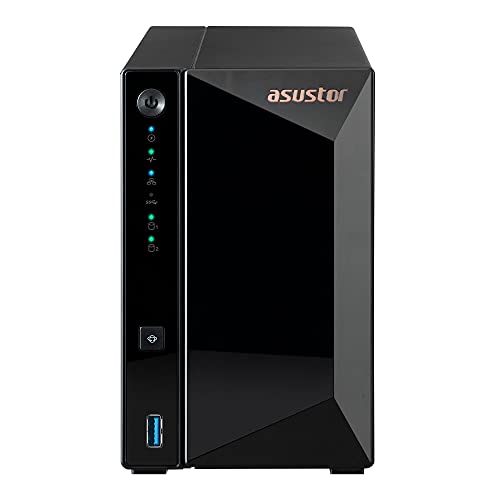
Asustor Drivestor 2 Pro AS3302T – 2 – Features & Prices in Saudi Arabia :
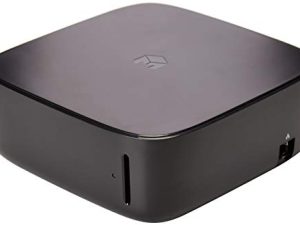
Asustor Drivestor 2 Pro AS3302T – 2 Bay NAS, 1.4GHz Quad Core, 2.5GbE Port, 2GB RAM DDR4, Network Attached Storage (Diskless)
RAM
2 GB
Item model number
80-AS3302T00-MB-0
Item Weight
3.52 pounds
Product Dimensions
9.06 x 4.49 x 6.69 inches
Item Dimensions LxWxH
9.06 x 4.49 x 6.69 inches
Color
Drivestor Pro
Processor Count
4
Computer Memory Type
DDR4 SDRAM
Flash Memory Size
8
Batteries
1 CR123A batteries required.
Manufacturer
Asustor
Language
English, English, English, English, English
ASIN
B08ZD7R72P
Is Discontinued By Manufacturer
No
Date First Available
March 30, 2021
Test video – Asustor Drivestor 2 Pro AS3302T – 2 :
Product highlights :
Questions & Answers – Asustor Drivestor 2 Pro AS3302T – 2 :
Technical specifications – Asustor Drivestor 2 Pro AS3302T – 2 :
Brand
Asustor
Color
Drivestor Pro
Item Dimensions LxWxH
9.06 x 4.49 x 6.69 inches
Size
2 Bay
Item Weight
1.6 Kilograms
Purchase advice :
-
Warranty :
Check the duration of the warranty and also the faults and defects it covers. Is it complete or limited? and What is included in the warranty (parts, repairs or both)?
-
Shipping :
Is delivery offered? And how long does it take to get delivered (Delivery time)
-
Proof of purchase :
Does the shop give you an invoice ?
-
After-sales service :
Do they have an after-sales service to have information about the installation or operation (instructions for use). Also in case of problem, it is the seller who takes charge or you must contact the manufacturer or supplier yourself.
_____________________________
J. R (verified owner) –
Good technical product, review still underway – I do cybersecurity, and I’m not a fan of “canned servers”. That being said, unlike many of my colleagues I can’t afford fancy things so sometimes we must look for diamonds in the rough, and take a risk that there is just rough
E. I (verified owner) –
A Good Home/Home Office NAS… But it Could be Better – This is going to be a long one so if you’re just looking for the TL;DR, here it is: I can recommend the AS1102T for home/home office use as long as you don’t need to restrict individual service access (e.g. FTP, SSH) to specific users and/or groups. It has some issues mind you, as well as some quirks that seem like the OS team just can’t be bothered to address but at this price point, you could do a lot worse (looking at you Synology).
J. R (verified owner) –
Good technical product, review still underway – I do cybersecurity, and I’m not a fan of “canned servers”. That being said, unlike many of my colleagues I can’t afford fancy things so sometimes we must look for diamonds in the rough, and take a risk that there is just rough
H. R (verified owner) –
– I had a few issues in getting this device, which already gave me a negative view of the item.
P. G (verified owner) –
– Bought this to replace a 7 year old Buffalo NAS. Easy to set up and has been working quietly without any further need for us to change any settings.
P. G (verified owner) –
– Bought this to replace a 7 year old Buffalo NAS. Easy to set up and has been working quietly without any further need for us to change any settings.
K. F (verified owner) –
– Disk installation is pretty easy despite the flimsy plastic enclosure however, one of the screw holes on the disk cage was drilled in the wrong place and retaining screw would not fit into the disk. Early in the setup process you are asked to create an account for ASUSTOR with a user id and password; amongst other things this will give access to support and allow a trouble ticket to be raised. Watch this space! The rest of the setup was straightforward and I had the NAS working within half a day. I opted to install ClamAV, the ASUSTOR anti-virus app. This proved to be very slow and took an hour to virus scan 300 files on a NAS device having around 32k files. By contrast Norton AV scanned the whole NAS in just over an hour. I tried to uninstall ClamAV but no uninstall tools are provided. I tried to raise a trouble ticket but every-time I tried to login to ASUSTOR I got an ‘invalid password’ message. I later discovered that several other people had the same ClamAV and login failure and that the only way to login to ASUSTOR was by signing in via Google. Despite this, people reported that nothing had been done to fix either problem. I was using a password manager whilst trying to log in to ASUSTOR and in the general confusion I managed to put the wrong password into the NAS drive and after the second warning I was locked out. Hands up – finger trouble on my part. The lockout message instructed me to press the reset button on the back of the NAS which would put my password back to its default however, this did not work. The only way to gain access was to do a factory reset which erased all my data. I had to start from scratch again and re-input all my settings and recopy my data. Eventually I got everything back but it took a long time. After the NAS was working OK I attached a USB drive as a backup to the NAS and used the backup software provided by ASUSTOR. After I had done a few tests I discovered that deletions were not always being applied i.e a file deleted on the NAS still appeared on the backup drive. At this point I decided enough was enough and returned the NAS drive to Amazon. I now have a Qnap NAS which is more complicated to setup but the build and software quality are far superior to ASUSTOR.
E. I (verified owner) –
A Good Home/Home Office NAS… But it Could be Better – This is going to be a long one so if you’re just looking for the TL;DR, here it is: I can recommend the AS1102T for home/home office use as long as you don’t need to restrict individual service access (e.g. FTP, SSH) to specific users and/or groups. It has some issues mind you, as well as some quirks that seem like the OS team just can’t be bothered to address but at this price point, you could do a lot worse (looking at you Synology).
K. F (verified owner) –
– Disk installation is pretty easy despite the flimsy plastic enclosure however, one of the screw holes on the disk cage was drilled in the wrong place and retaining screw would not fit into the disk. Early in the setup process you are asked to create an account for ASUSTOR with a user id and password; amongst other things this will give access to support and allow a trouble ticket to be raised. Watch this space! The rest of the setup was straightforward and I had the NAS working within half a day. I opted to install ClamAV, the ASUSTOR anti-virus app. This proved to be very slow and took an hour to virus scan 300 files on a NAS device having around 32k files. By contrast Norton AV scanned the whole NAS in just over an hour. I tried to uninstall ClamAV but no uninstall tools are provided. I tried to raise a trouble ticket but every-time I tried to login to ASUSTOR I got an ‘invalid password’ message. I later discovered that several other people had the same ClamAV and login failure and that the only way to login to ASUSTOR was by signing in via Google. Despite this, people reported that nothing had been done to fix either problem. I was using a password manager whilst trying to log in to ASUSTOR and in the general confusion I managed to put the wrong password into the NAS drive and after the second warning I was locked out. Hands up – finger trouble on my part. The lockout message instructed me to press the reset button on the back of the NAS which would put my password back to its default however, this did not work. The only way to gain access was to do a factory reset which erased all my data. I had to start from scratch again and re-input all my settings and recopy my data. Eventually I got everything back but it took a long time. After the NAS was working OK I attached a USB drive as a backup to the NAS and used the backup software provided by ASUSTOR. After I had done a few tests I discovered that deletions were not always being applied i.e a file deleted on the NAS still appeared on the backup drive. At this point I decided enough was enough and returned the NAS drive to Amazon. I now have a Qnap NAS which is more complicated to setup but the build and software quality are far superior to ASUSTOR.
H. R (verified owner) –
– I had a few issues in getting this device, which already gave me a negative view of the item.